Banner ads have lost their effectiveness on mobile devices. Users scroll past them, browsers block them, and engagement rates continue to drop. Mobile native advertising addresses these failures by adapting promotional content to fit the design, flow, and user experience of each platform. Rather than interrupting the browsing or app experience, native advertising appears within feeds, recommendation streams, and interactive environments where users already spend their attention.
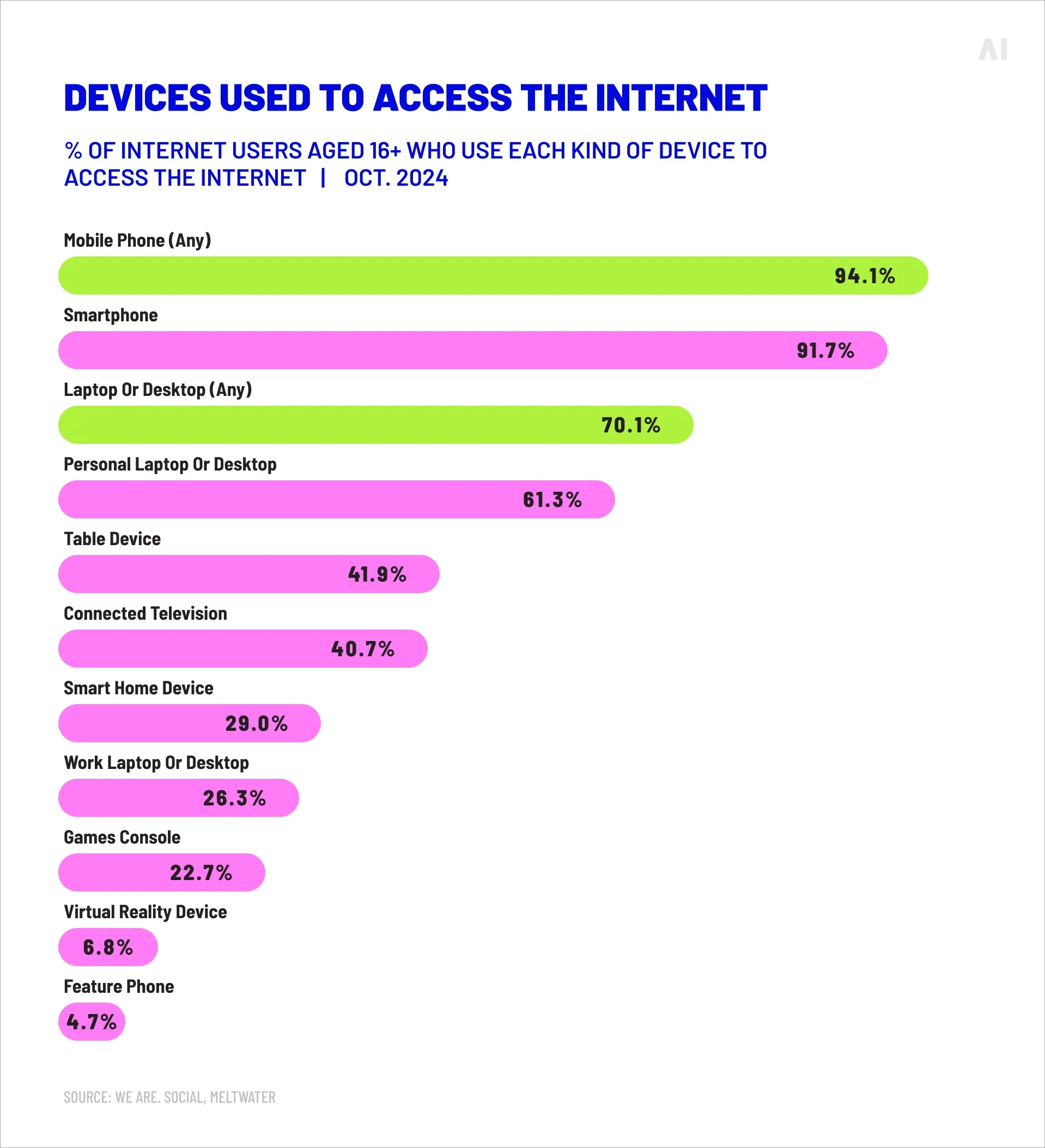
The shift toward mobile-native formats reflects how people actually use smartphones. Users devote roughly 85% of their mobile time to apps, moving quickly between social platforms, games, maps, and content hubs. Traditional display units designed for desktop viewing fail to capture attention in these fast-moving, touch-based environments. Native mobile ads succeed because they mirror the format and context of surrounding content, whether that's a sponsored post in a social feed, a recommended article in a news app, or an interactive element within a mobile game.
Performance data supports this approach. Research shows consumers view native ads 53% more frequently than traditional banners, and exposure to native content can boost purchase intent by approximately 18% compared to standard display advertising. Automation and AI-driven optimization have made it possible to scale these campaigns while maintaining the contextual relevance that drives results. The growing importance of transparent supply chains and brand-safe inventory has further pushed marketers toward premium native placements that deliver both performance and credibility.
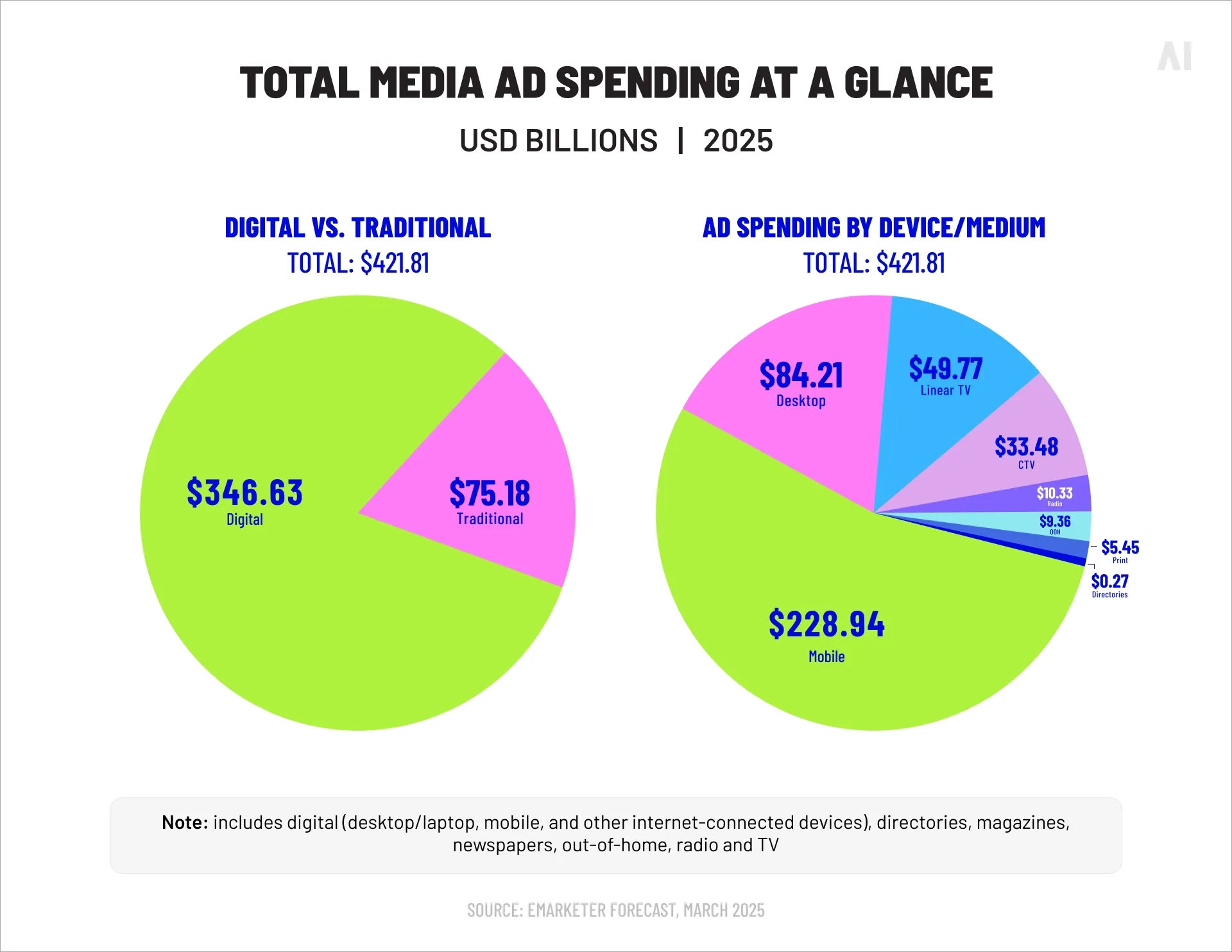
As mobile advertising spending continues to concentrate in app environments and mobile-first channels, understanding how to execute native campaigns effectively has become essential. The following sections break down the specific formats that perform best, the benefits they deliver, and the practices that separate high-performing campaigns from mediocre ones.
💡 For a broader view of mobile advertising trends and technology, see our article on The future of mobile advertising.
What is mobile native advertising?
Mobile native advertising refers to paid promotional content designed to match the visual style, functionality, and user experience of its mobile environment. These ads appear within apps or mobile websites in formats that mirror organic content.
A sponsored post in an Instagram feed, a recommended article widget on a news site, or a branded pin on a navigation map all qualify as native mobile ads because they adapt to their surroundings rather than standing apart as distinct advertising units.
{{26-Mobile-Native-Advertising-SEO-1="/tables"}}
The defining characteristic of native mobile advertising is this contextual fit. Where banner ads announce themselves as promotional interruptions, native ads blend into the content flow. They use the same aspect ratios, fonts, and interaction patterns as the posts, articles, or interface elements around them. On mobile devices, where screen space is limited and user attention spans are measured in seconds, this integration matters. Users scroll, swipe, and tap through content quickly. Ads that disrupt this flow get ignored or blocked. Ads that participate in it earn engagement.
Performance differences reflect this user behavior. Native formats work with mobile interaction patterns rather than against them:
- When someone scrolls through a social feed, a native ad appears as another post in that feed, inviting the same quick evaluation and potential interaction as organic content.
- When someone searches for directions, a native in-map ad presents itself as a relevant business suggestion within the search results.
⚡ The format matches the user's current task and mindset, which explains why native ads can achieve up to 8.8 times higher click-through rates than conventional display ads.
This approach extends across mobile web and app environments, though the execution differs between them:
- Mobile web native ads typically appear as in-feed units within content sites or recommendation widgets at the end of articles.
- App-based native advertising includes these formats plus additional options like rewarded video, playable ads, and platform-specific story formats.
💡 To understand how programmatic technology powers the buying and optimization of these placements, see our article Programmatic mobile advertising explained.
Effective mobile-native ad formats
Mobile native advertising encompasses several distinct formats, each designed for specific user contexts and campaign objectives. The most effective formats balance scale and performance, working across both mobile web and app environments while maintaining the contextual integration that defines native advertising. Performance marketers typically focus on formats that deliver measurable engagement and conversion metrics, not just brand impressions.
{{26-Mobile-Native-Advertising-SEO-2="/tables"}}
In-feed ads (Social, Content & Commerce)
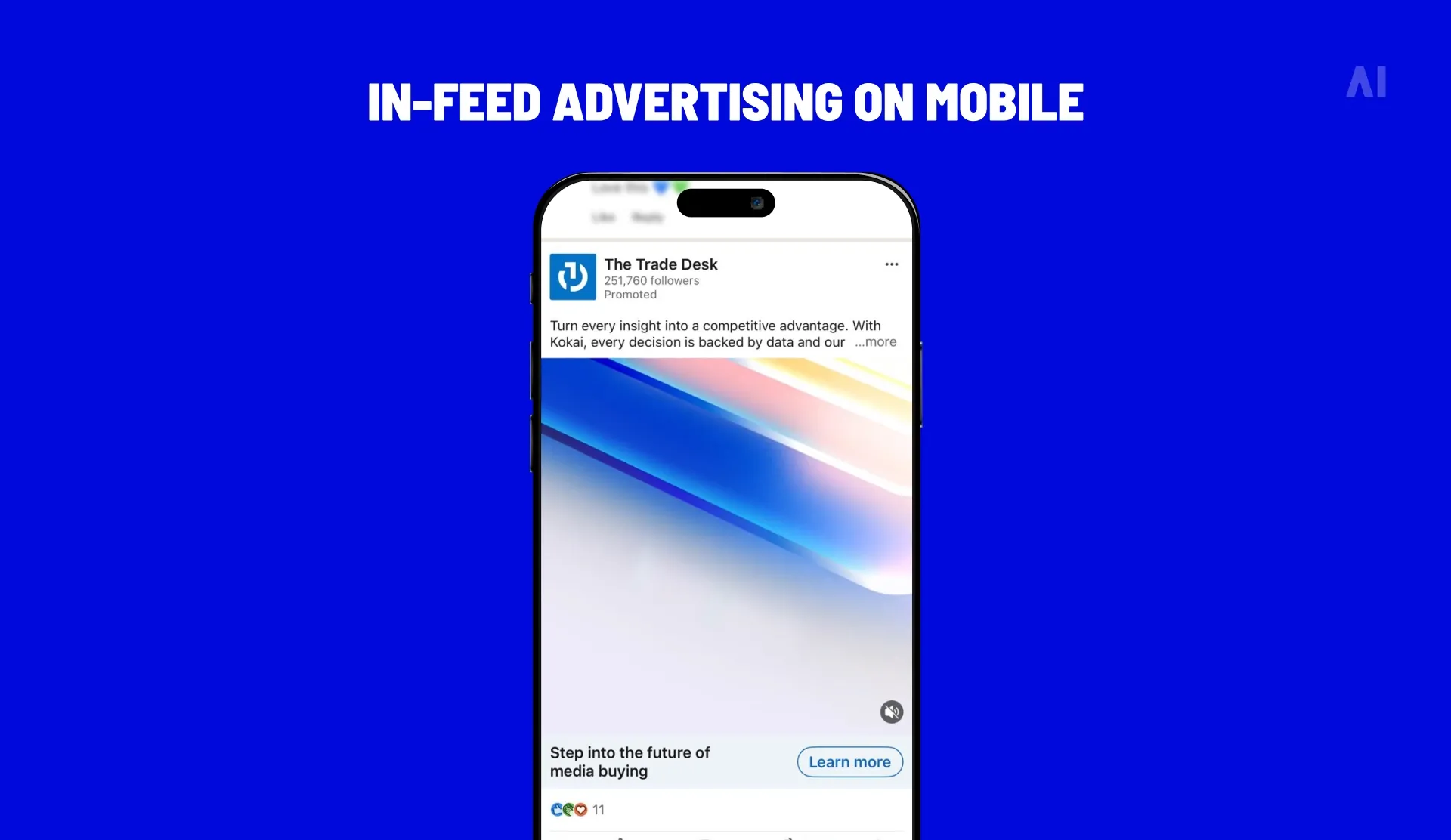
In-feed ads appear directly within scrolling content streams on social platforms, news apps, and commerce sites. These units match the surrounding posts, articles, or product listings in visual style and layout.
- On Facebook or Instagram, a sponsored post uses the same dimensions, font choices, and interaction elements as organic content from friends or followed accounts.
- On a retail app, a promoted product appears within search results or category pages using the same card design as regular inventory.
This format has become the largest segment of native advertising because it aligns with core mobile behavior. Users spend most of their mobile time scrolling through feeds, and in-feed ads take advantage of this consumption pattern. The ads don't require users to leave their current context or adapt to a different interaction model. They simply present another piece of content within an established flow.
Engagement rates for in-feed native ads consistently outperform traditional mobile display. The format allows for rich creative elements including images, video, carousel galleries, and interactive components while maintaining visual consistency with the feed.
Marketers can test different creative approaches, headlines, and calls-to-action within the same placement structure.
The standardization of in-feed formats across major platforms also means creative assets can often be adapted and reused with minimal modification.
⚡ In-feed ads match how people actually consume content on mobile—swiping, scrolling, diving into articles or videos. When executed properly, they don't register as advertising at all.
Commerce applications have pushed in-feed native advertising into product discovery and purchase intent. Sponsored product listings in retail apps or marketplace search results function as native ads by appearing within existing shopping interfaces. These placements capture users who are already browsing with purchase intent, making them particularly effective for conversion-focused campaigns.
In-map ads
In-map advertising integrates promotional content into location-based apps like Google Maps and Waze. These native placements appear as branded pins, promoted search results, or sponsored locations within the map interface. When someone searches for "coffee near me" or navigates through an area, relevant businesses can appear as native suggestions with logos, ratings, and one-tap directions.
The effectiveness of in-map ads comes from proximity and context. Users consulting map apps typically have immediate local intent. They're looking for a place to eat, shop, or get fuel right now.
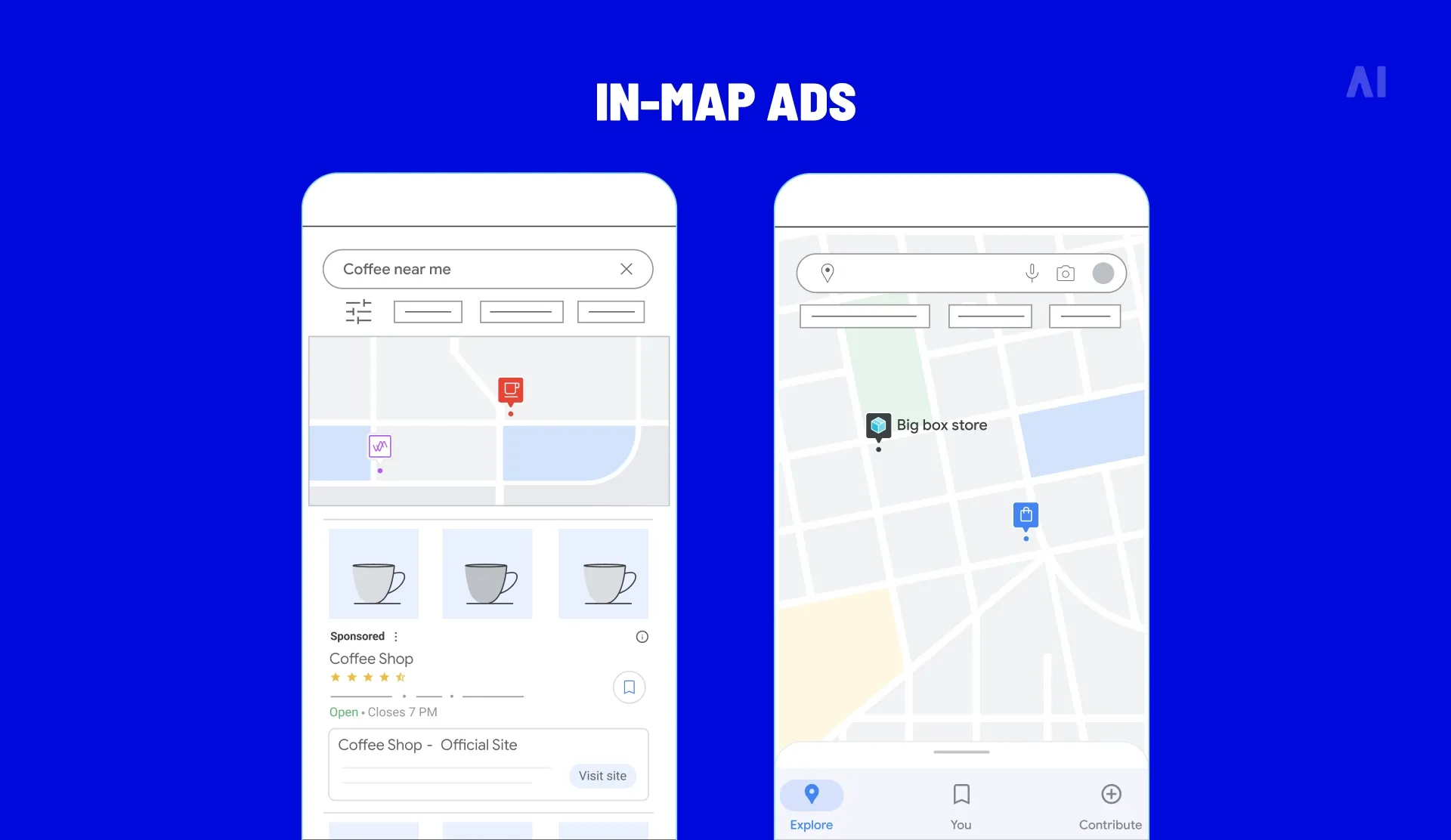
Branded pins display a sponsor's logo on the map when users are nearby, connecting the ad to both geographic location and current need. The integration feels native because the ad provides the same information and functionality as organic map results.
For businesses with physical locations, in-map native advertising delivers direct ROI through foot traffic and store visits.
The format includes practical features like store hours, contact information, and navigation buttons that reduce friction between ad exposure and in-person visit.
Local restaurants, retail chains, gas stations, and service providers find particular value in these placements because they reach consumers at the moment of decision.
Measurement for in-map ads extends beyond digital metrics to include store visit attribution and location-based conversion tracking. This allows marketers to connect map ad impressions and interactions to actual customer visits.
💡 For more on how location targeting works in digital advertising, see our article Geotargeting 2026: What is it? How does it work?
In-game native ads
In-game advertising places native content within mobile gaming environments without disrupting gameplay. These placements range from environmental integration (billboards in a racing game, posters in a virtual city) to rewarded video ads that offer players in-game currency, extra lives, or unlocked content in exchange for viewing.
Rewarded ads command particularly strong engagement because they create a value exchange. Players choose to watch the ad to gain a gameplay advantage.
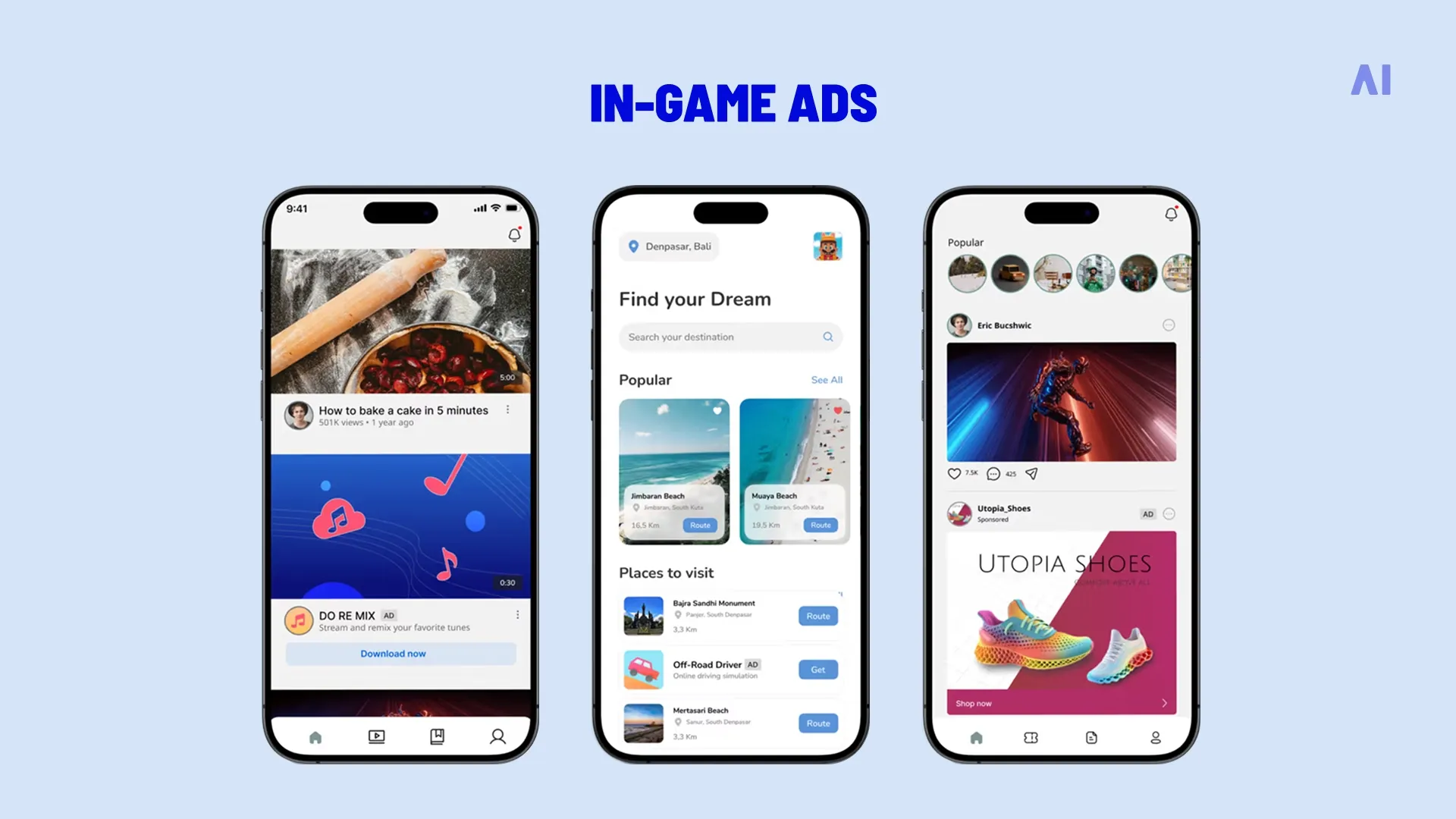
⚡ This opt-in model produces results: 72% of mobile gamers report willingly engaging with rewarded ads, and 64% prefer rewarded ads over conventional sponsored posts.
The native quality comes from integration into the game's reward system rather than visual mimicry of game content.
Playable ads represent another high-performing in-game format. These interactive demos let users try a sample version of a game before downloading. Playable ads generate approximately 9.4% average engagement in gaming apps, far exceeding standard mobile ad benchmarks. The native element here is interactivity—playable ads use the same touch-based mechanics as the host game, making them feel like a natural extension of the gaming experience.
Mobile gaming audiences spend extended sessions within apps, creating multiple opportunities for ad exposure. In-game native formats leverage this sustained attention while respecting the user experience. Ads that interrupt gameplay or force interaction generate negative responses.
Native in-game advertising succeeds by offering value (rewards, previews, relevant information) within the game's existing structure.
Video & story-native ads
Full-screen vertical video and story formats have become essential mobile-native placements. Instagram Stories, Snapchat, TikTok, and other platforms built their interfaces around immersive, full-screen content that users swipe through quickly. Native ads in these environments adopt the same vertical aspect ratio, short duration, and swipe-based interaction model as organic stories.
Performance data shows why story formats work.
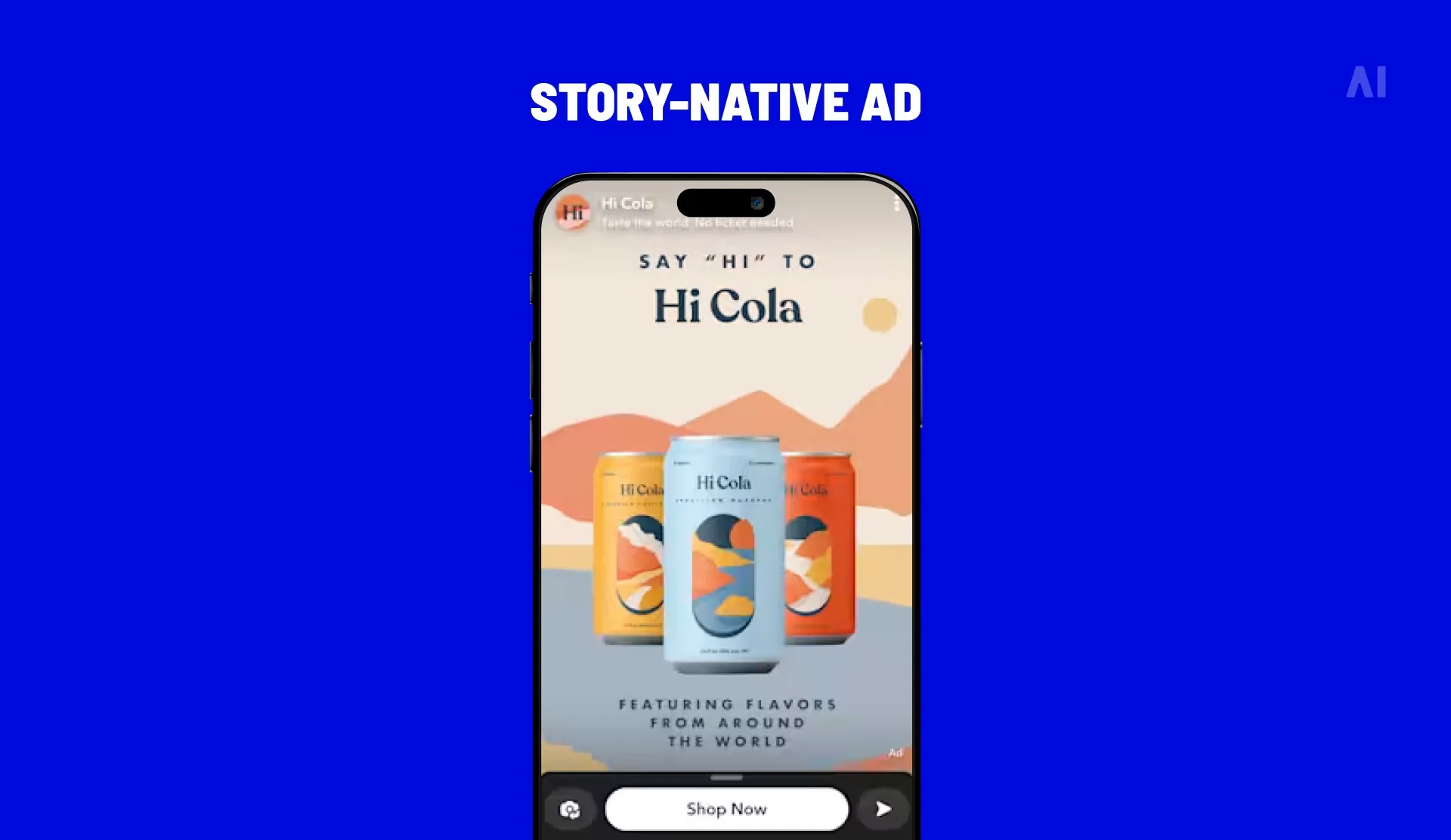
⚡ Instagram Story ads generate 78% more clicks and 44% greater reach than traditional feed ads. Many Instagram users report visiting a website or buying a product after seeing it in a Story.
The full-screen format eliminates competing elements and focuses attention entirely on the content. Users engage with stories in a dedicated viewing mode, moving through content rapidly but giving each piece a moment of undivided attention.
Story-native video ads typically run 15 seconds or less, matching the consumption pattern users expect. The format supports various creative approaches including product showcases, demonstrations, testimonials, and quick narratives. Interactive elements like polls, swipe-up links, and direct response buttons integrate into the story format without breaking the viewing experience.
Some sources indicate that story video ads deliver over six times higher interaction than static images, making them effective for both awareness and direct response campaigns. The native quality comes from matching user expectations for the format—vertical, brief, visually driven, and designed for quick consumption.
💡 For deeper exploration of video in native advertising, see our article on native video advertising.
Interactive & AR native ads
Interactive and augmented reality ads create immersive mobile experiences that go beyond passive viewing. These formats include polls, quizzes, shoppable elements, and AR lenses or filters that overlay digital content onto camera views.
Nearly 23% of mobile video campaigns now incorporate interactive elements like polls or AR features, reflecting growing adoption of these engagement-focused formats.
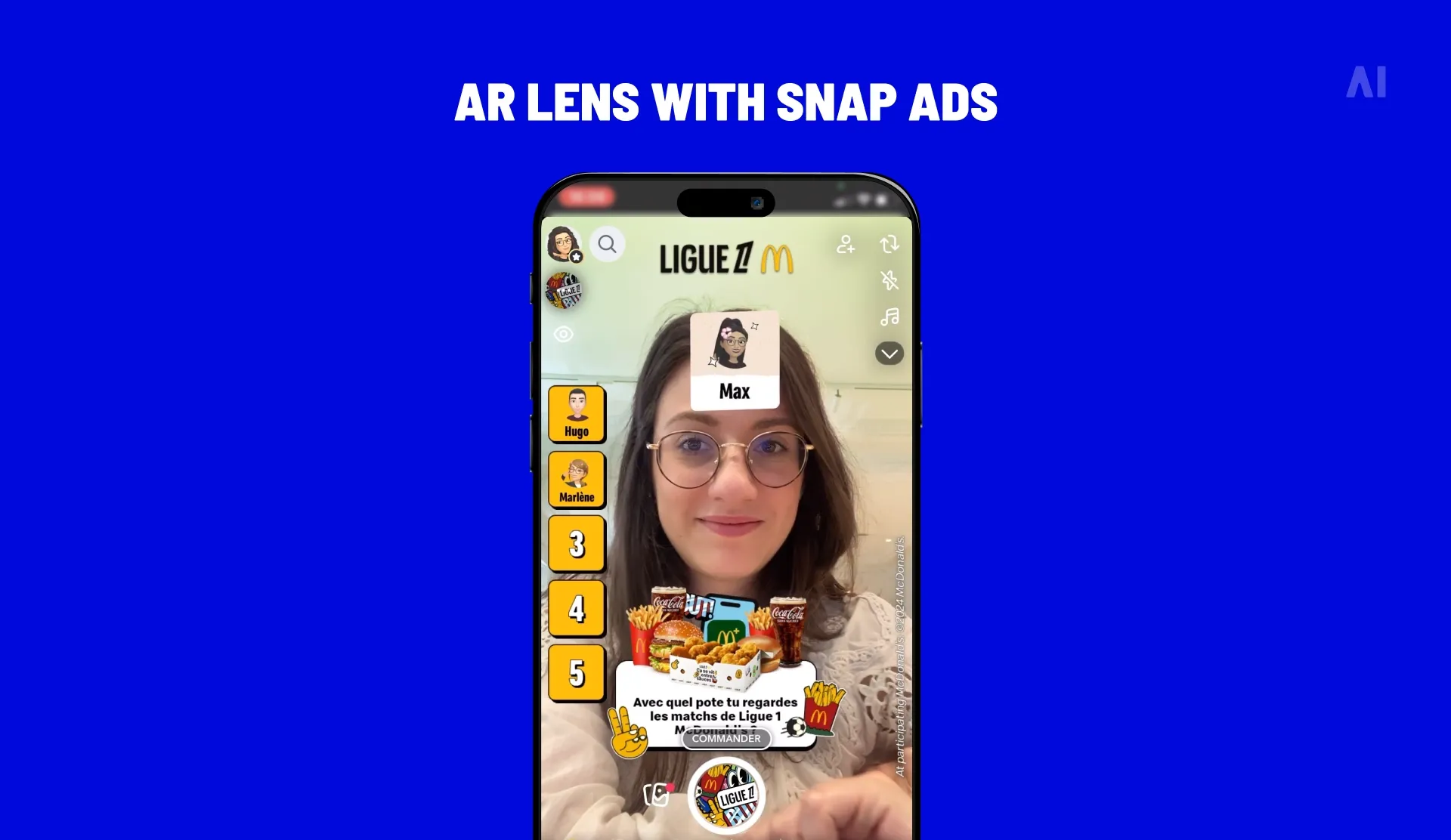
AR advertising in particular delivers strong immersion and recall. Snapchat's AR lenses score approximately 1.2 times higher immersion than AR on other platforms, and the format produces exceptional ROI. Analysis shows AR campaigns achieve roughly 460% return on ad spend, compared to 200-300% for traditional digital advertising. For retail applications, AR shopping experiences like virtual try-ons can triple conversion rates.
The native quality of interactive and AR ads comes from leveraging device capabilities users already understand. Smartphone cameras, touch screens, and motion sensors enable these experiences without requiring special equipment or technical knowledge. When someone uses a furniture brand's AR app to visualize a sofa in their living room, they're using familiar interactions (pointing a camera, pinching to zoom) to engage with promotional content.
Interactive elements add participation to advertising. Rather than simply viewing an ad, users complete a poll, answer quiz questions, or manipulate AR objects. This active engagement increases time spent with brand content and improves recall.
The format works particularly well for product categories where visualization matters—cosmetics, furniture, apparel, and home improvement.
Custom native formats
Beyond standardized formats, publishers and platforms develop bespoke native placements tailored to their specific user experiences. Major retailers build sponsored product carousels that match their app design. Content platforms create recommendation modules that integrate brand messaging into editorial environments. These custom units are fully tailored to the app's design and user flow, making them indistinguishable from organic features.
Custom native formats work best when they solve specific user needs or enhance existing functionality:
- A recipe app might offer sponsored ingredient suggestions that help users shop for meals.
- A fitness app could feature branded workout plans within its training section.
These placements feel native because they provide utility within the app's core purpose rather than simply displaying promotional messages.
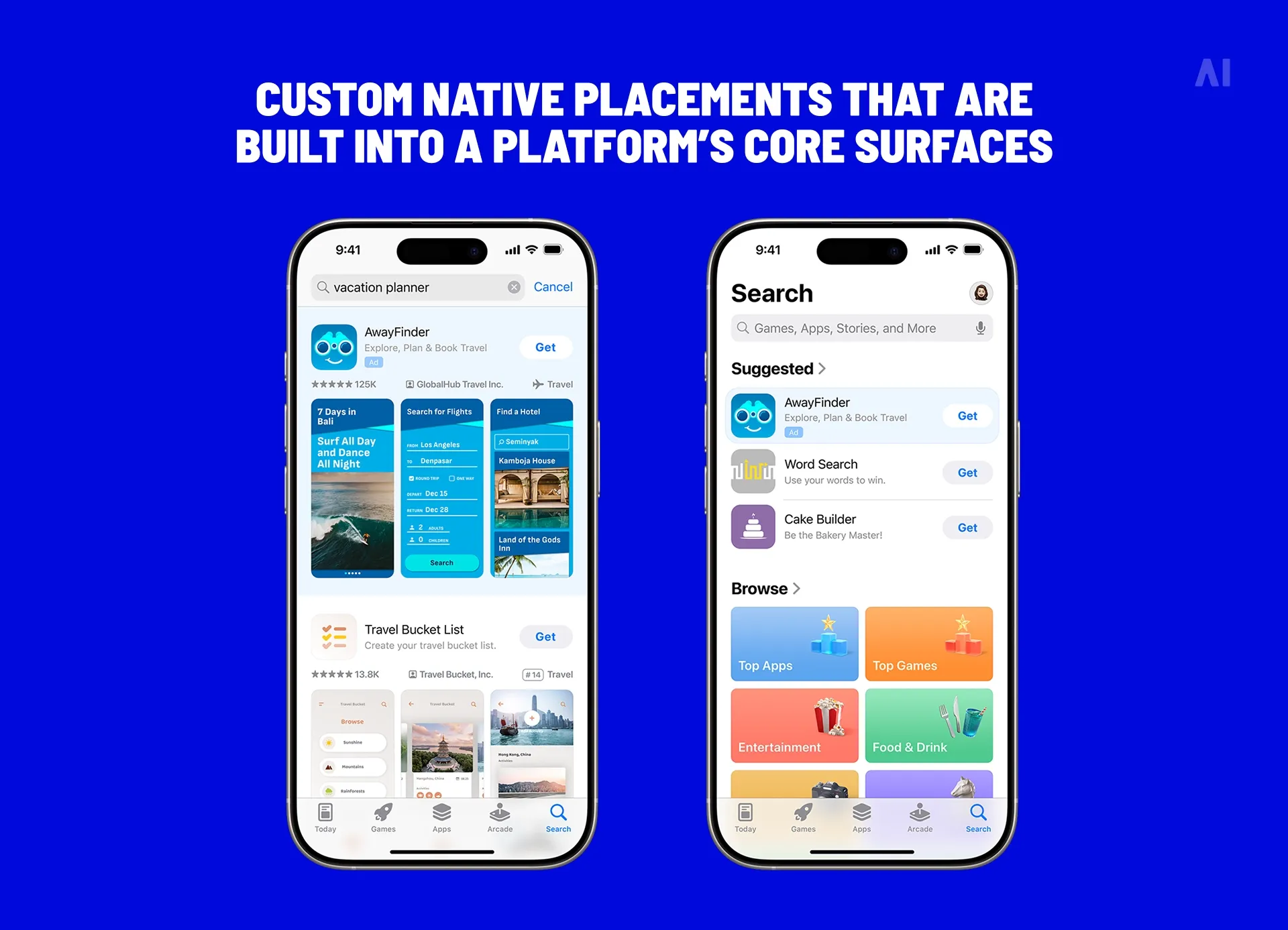
Commerce platforms have particularly embraced custom native advertising. Sponsored product collections, featured brand shops, and promoted categories all function as native ad units by appearing within existing shopping interfaces. Users browsing for products encounter these promotions as natural extensions of their search and discovery process.
The challenge with custom formats is scalability. Unlike standardized placements that work across multiple properties, custom native units often require unique creative development and specific integration work. However, brands with consistent product catalogs and first-party data can build reusable templates that make custom formats practical at scale.
Key benefits of mobile native ads
Native performs when it earns attention without breaking the mobile experience. The benefits below are measurable, but they’re not automatic—execution matters.
{{26-Mobile-Native-Advertising-SEO-3="/tables"}}
Higher engagement and CTR
Mobile native ads tend to generate stronger engagement because they don’t force a hard context switch (the way classic banners often do).
One of the most-cited benchmarks comes from an IPG Media Lab × Sharethrough eye-tracking + survey study, which found that people looked at native ads 53% more frequently than display, with 18% higher lift in purchase intent, and 32% saying the native ad is something they’d share (vs 19% for display).
👉 Even though that study is older, the pattern still gets referenced in current industry commentary. For example, an IAB UK member article in May 2025 repeats the “~53% more visual attention” point as a shorthand for why native tends to outperform banners in attention-heavy mobile environments.
CTR alone can be a trap, so it’s worth pairing it with post-click quality signals that tell you whether the traffic is actually useful, such as:
- bounce rate or engaged sessions,
- landing page view rate,
- downstream conversion rate, and
- scroll depth or time on page (especially for content-led native placements where attention matters as much as the click).
Stronger purchase intent and conversions
Conversion impact usually comes from two native advantages:
- Intent alignment: People are already browsing something related (content context, category context, location context). When the ad “belongs” in that moment, users process it faster and with less skepticism.
- Lower friction: The unit is presented in a familiar structure (feed card, map pin, in-game placement), so users don’t have to decode a new UI pattern before they decide to click.
On the measurable side, the same IPG Media Lab × Sharethrough work reported 18% lift in purchase intent versus banners.
👉 And on the “modern proof” side, Microsoft Advertising’s October 2025 Agency Roundup highlights an Audience Ads case study for Aeromexico that cites a +23% lift in conversions and +32% YoY revenue increase, attributing the gains to expanding beyond search and using native formats with audience targeting.
Reduced ad fatigue
Ad fatigue hits faster on mobile because the screen is small, sessions are frequent, and repetitive creative becomes obvious almost immediately.
Native can reduce fatigue when you treat it like content instead of just another inventory source, because it gives you room to:
- rotate multiple hooks (problem, benefit, proof, offer),
- vary the visual structure (image style, crop, motion, headline length), and
- refresh angles without needing to change the core offer every time.
⚡ One caution: native isn’t a license to run higher frequency; it’s an opportunity to build better sequences.
Ad-blocker resilience
Ad blockers remain a meaningful factor, especially on the open web. A MediaPost write-up of a YouGov study reports that 44% of Americans “have ad blockers running all the time no matter what the website is.”
Native’s resilience is mostly structural:
- Many native placements in apps are served inside the app environment (not identical to classic browser display calls).
- Some native units are integrated into publisher content modules that can be harder to remove without breaking page layouts.
This does not mean native is immune. It means you should plan with reality:
- Mobile web can be more exposed to blocking and tracking constraints.
- In-app native often has more stable delivery, but comes with different privacy and measurement rules (consent flows, platform APIs, limited third-party identifiers).
⚡ If you treat native like banners, you get banner results, just in nicer clothing.
How to create high-impact mobile native ads
Winning with mobile native advertising is mostly craft and process. You’re aligning creative, placement, and measurement so the ad feels natural and produces outcomes you can defend in a reporting deck.
A useful mental model from the IAB is that native can be evaluated by how it handles design, location, and ad behavior (how the unit behaves in the environment), with strong emphasis on clear disclosure. Those three levers show up in every high-performing mobile native program.
Match creatives to organic content
Start with a simple question: what does “normal” look like here?
On mobile, “normal” isn’t a vibe—it’s a set of patterns your audience has already learned:
- how fast content moves
- where captions usually sit
- what a product demo typically looks like
- what kinds of headlines feel believable in that feed
- how much text is readable without squinting
When your ad follows those patterns, users don’t have to decode a new format before they decide whether it’s relevant. That’s the real advantage.
Then, translate “normal” into creative rules:
- Pacing: A fast scrolling feed wants fast structure (hook, proof, CTA quickly). A publisher tile or in-article unit can support a calmer, more explanatory headline and image.
- Visual framing: Mobile rewards clarity. Tight shots. Big readable type. One focal point. If people have to zoom or rewatch to understand it, it’s too busy.
- Copy style: Match the platform’s voice without doing an impression of it. If the environment is punchy, don’t write like a whitepaper. If it’s editorial, don’t write like a meme.
- CTA placement: Mobile needs early clarity. Don’t hide the action at the end of a long caption. Users decide quickly whether they’re continuing or scrolling.
A practical workflow that tends to work across placements:
- Collect examples from the exact placement you’re buying. Screenshot 20–30 organic posts or tiles (not ads).
- Identify repeating patterns. Look for 3–5 consistencies: text length, layout, camera distance, motion style, tone, use of subtitles, common transitions.
- Build native-first variants. Create ads that use those patterns, then add brand distinctiveness (logo placement, product cues, brand colors, consistent tagline).
- Do a “thumb test.” Scroll past your own ad in context. If it looks out of place, it will underperform.
📍 One important guardrail: native does not mean unclear. The IAB’s playbook stresses that native formats still require clear disclosure principles, not hidden labeling.
💡 Related reading: Dynamic content personalization: how brands create smarter customer experiences in 2026
Test, learn, and optimize continuously
Performance can swing a lot based on small creative choices because native is tightly connected to user behavior (scrolling, tapping, watching).
To avoid random testing, run it like a system.
- Test one variable at a time: If you change the hook and the CTA and the visual style, you learn nothing. Instead:
- Hook vs. hook
- Thumbnail/frame vs. thumbnail/frame
- Offer framing vs. offer framing
- CTA wording vs. CTA wording
- Length (6–10s vs. 15–20s)
- Use a learning agenda: Write a one-line hypothesis before you launch:
- “We believe creator-style demos will outperform polished product shots in Reels placements because organic content is creator-led in that environment.”
- “We believe benefit-led headlines will outperform brand-led headlines in publisher in-feed because the user intent is information-first.”
Now your results become reusable strategy, not just performance trivia.
- Rotate before fatigue shows up: In native, fatigue often shows up as:
- CTR flattening while impressions keep rising
- completion rate dropping on video
- higher CPC/CPM for the same audience
- rising frequency with falling conversion rate
Refresh angles before you refresh offers. You can keep the same offer and rotate the story: problem-first, proof-first, comparison-first, FAQ-first.
- Measure with a stack, not a single metric: CTR is a signal of interest. It is not a verdict.
Pair metrics so you can see quality:
- CTR → Are people curious?
- Engagement rate / watch time → Are they actually consuming it?
- Landing page view rate → Are clicks turning into real page loads?
- CVR → Does the traffic convert?
- CPA/ROAS → Does it make financial sense?
- Incremental lift (when possible) → Did native create net-new outcomes?
If you can run holdouts or geo tests, do it. Native can look great in-platform while mostly shifting demand you would have captured anyway.
Choose formats and placements strategically
Different native placements do different jobs. If you pick a format that doesn’t match the user’s moment, the creative has to work too hard.
A practical mapping:
- Upper funnel (attention + awareness): in-feed social video, story-native, publisher in-feed
- Mid funnel (consideration): interactive units, editorial native, video in content environments
- Lower funnel (action): commerce feed native, map-native, retargeting-native sequences
Then pressure-test that mapping with the user’s context. Mobile is full of distinct moments:
- Scrolling moment (feeds): fast decisions, snackable value
- Seeking moment (maps/search-like): location, convenience, urgency
- Playing moment (games): value exchange, reward logic
- Browsing moment (publisher content): relevance, credibility, usefulness
- Shopping moment (commerce surfaces): product clarity, pricing, trust cues
When placement matches the moment, creative doesn’t need to “convince” as much. It just needs to be clear.
Activate quality native supply
Native can be bought through:
- walled gardens (social platforms, retail media)
- publisher direct
- programmatic native exchanges/SSPs
Quality rises when you can answer two questions confidently:
- Where did my ads actually run?
- Was the inventory authentic and brand-safe?
If you’re buying programmatically, this is where supply-chain transparency standards matter. The IAB Tech Lab’s transparency tooling includes ads.txt/app-ads.txt, sellers.json, and the SupplyChain object, which are designed to help buyers validate authorised sellers and see the intermediaries involved in selling an impression.
What that means in plain English:
- ads.txt/app-ads.txt: helps you confirm who is authorised to sell a publisher’s web or app inventory.
- sellers.json and SupplyChain object: help identify intermediaries and relationships so you can avoid murky paths.
You don’t need to become an ad-tech engineer. But you do want partners who can show you this transparency and act on it.
💡 Check AI Digital supply solution: Smart Supply
Maintain transparency and trust
Native works only if the user doesn’t feel tricked. The FTC is explicit that misleadingly formatted ads can be deceptive even if the underlying claims are true. In native advertising, the source should be clear so consumers can make informed decisions about whether to engage and how much weight to give the content.
Non-negotiables
- Clear “Sponsored” / “Ad” labeling near the headline or primary visual
- No misleading thumbnails or “bait-and-switch” copy
- Landing pages that match the promise (same offer, same framing, no surprise friction)
- Disclosures that survive mobile rendering (tiny labels don’t count)
Trust is also a performance lever. When users feel misled, they bounce, they don’t convert, and your retargeting pool fills with people who are already annoyed.
📍 A simple rule that prevents most native mistakes: If the user would reasonably think it’s editorial, user-generated, or platform content, make the paid relationship obvious up front.
Mobile native ads: web vs apps
“Mobile” isn’t one environment. Mobile web and mobile apps behave differently, and native advertising needs to adapt accordingly.
Here’s the simplest summary:
- Apps tend to be deeper, higher-frequency sessions with native UI patterns and stable placements (users come back to the same environments repeatedly).
- Mobile web tends to be more transient and task-driven (search → click → answer → leave), and it’s more sensitive to page speed, blockers, and browser privacy limits.
A helpful context point from DataReportal (using data.ai): mobile users spend less than 6% of total smartphone time using browsers and search engine apps, which underlines how dominant native apps are in overall smartphone time.
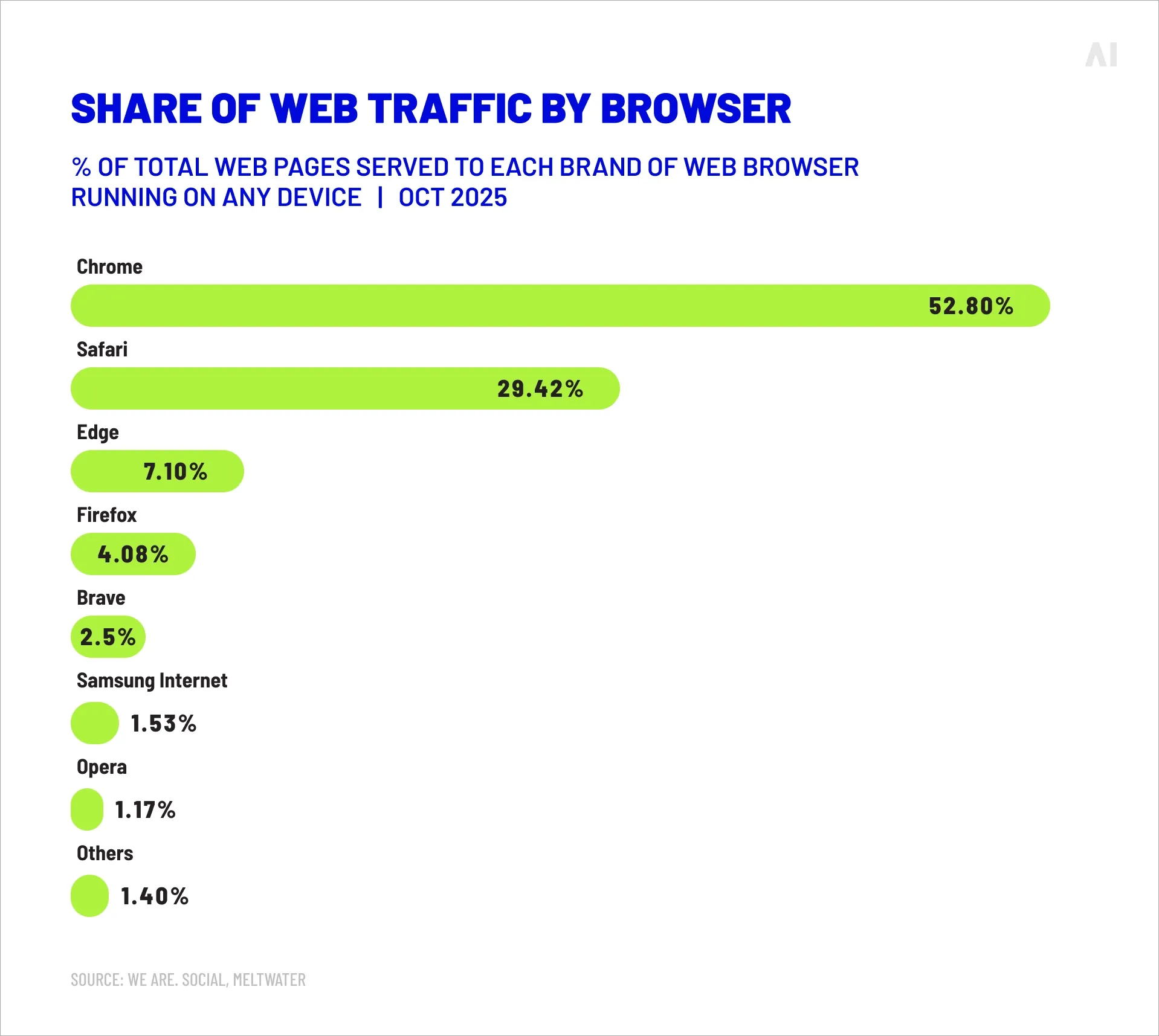
Why the environments behave differently
Before you compare CTR, conversions, or ROI, it helps to understand what you’re actually buying in each environment. Mobile apps and mobile web aren’t just different screens—they’re different session types with different friction points. Apps are built for repeat behavior inside a controlled interface. Mobile web is built for quick access across many sites, often through search or social, with more variability in speed and tracking. Once you see those structural differences, the performance patterns (and the best practices) make a lot more sense.
Apps create “owned” sessions: Once someone installs an app, they usually:
- return often (habit)
- stay logged in (lower checkout/login friction)
- accept native interaction patterns (swipe, tap, deep link)
- move through predictable screens (home feed → product → cart → purchase)
That matters for native ads because your ad can land the user on a specific in-app destination (deep link) with fewer steps.
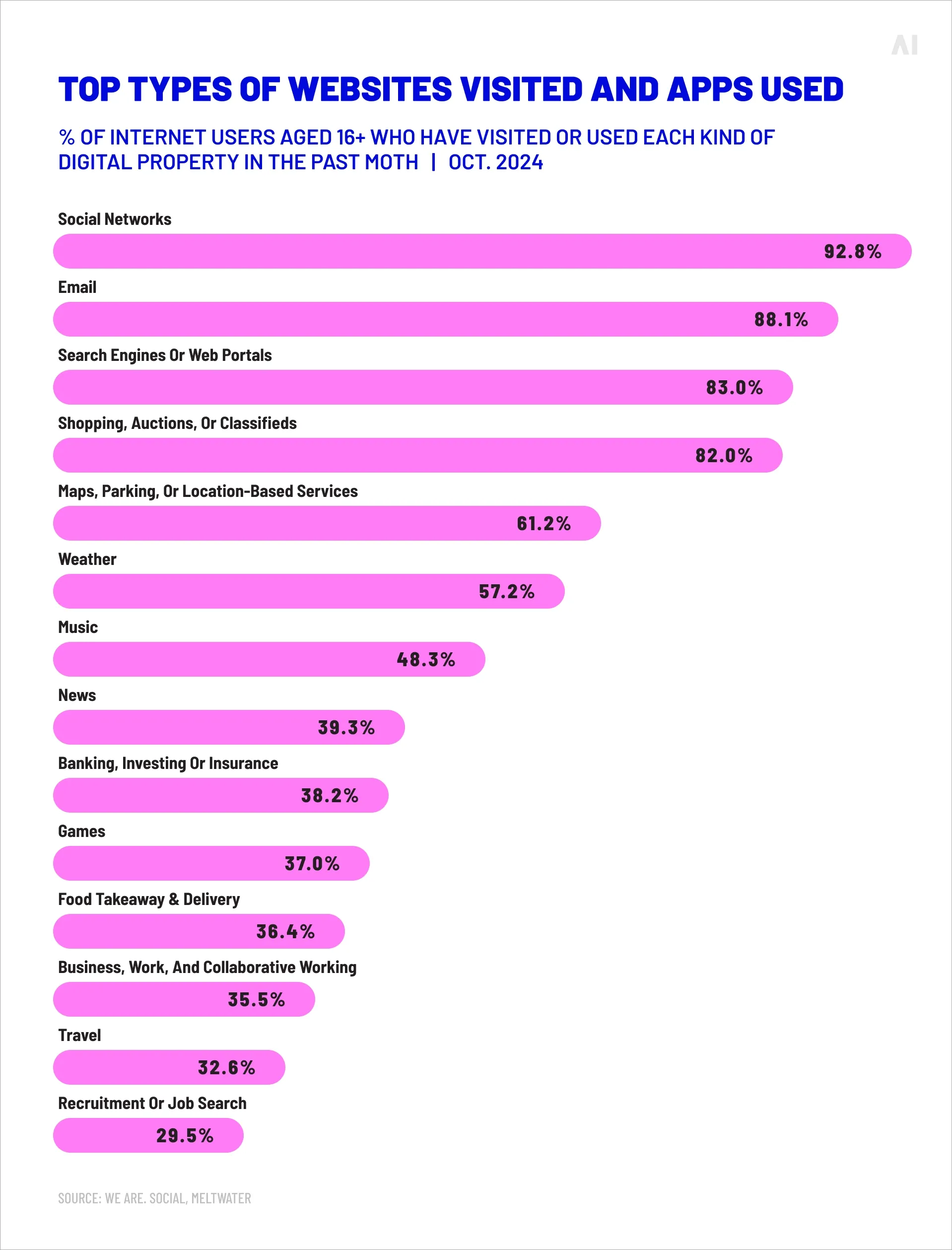
Mobile web creates “intent bursts”: A lot of mobile web activity is driven by:
- search
- social clicks
- quick comparisons
- “I need this now” tasks
That makes web native powerful for contextual intent (publisher + content alignment), but it also means:
- a slow landing page can kill the session quickly
- browser-level blockers and privacy settings can reduce delivery and measurement
- you often have less continuity (fewer repeat sessions tied to the same identity)
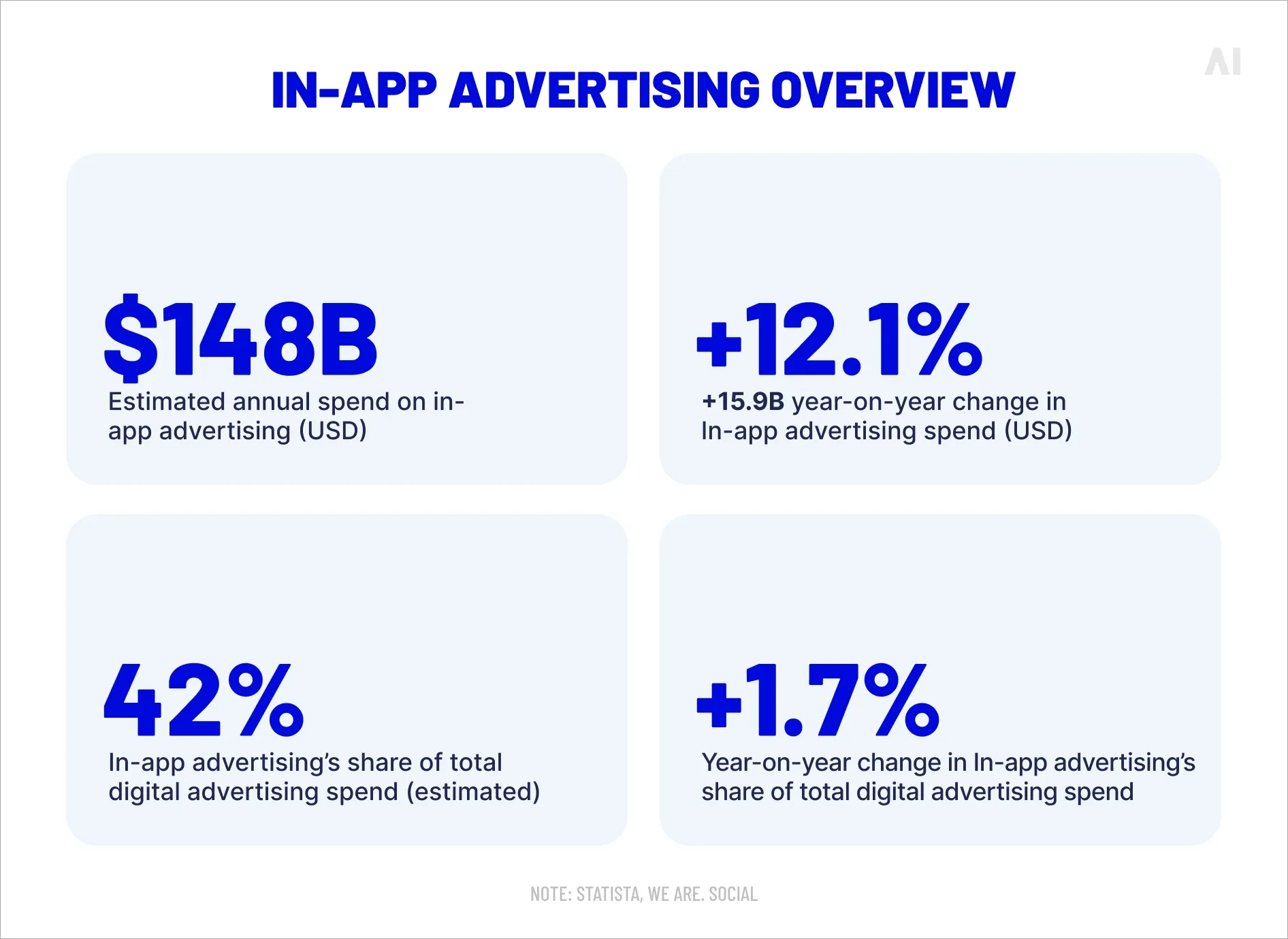
Practical differences that impact CTR, conversions, and ROI
It’s useful to break the comparison into the specific factors that usually drive performance. These differences influence how often people click, how likely they are to convert after clicking, and how cleanly you can measure results—which ultimately shows up in campaign ROI.
{{26-Mobile-Native-Advertising-SEO-4="/tables"}}
Why CTR and CVR benchmarks aren’t interchangeable: Even if the creative is the same, the “distance to value” is different:
- In apps, users often land inside a familiar interface, sometimes already authenticated, with fewer steps to complete a meaningful action.
- On mobile web, every extra second of load time and every extra step (cookie banners, popups, heavy scripts, long forms) increases abandonment risk.
So if your app CTR looks “higher,” it may be partly because the environment is smoother. If your mobile web CVR looks “lower,” it may be partly because the landing path has more friction.
The hidden driver: blockers and browser controls
Ad blockers are still a meaningful factor on the web. A YouGov Profiles report states “more than 2 in 5 Americans have an ad blocker on their web browser or cell phone.”
This matters for web vs apps because:
- browser-based ad blocking can reduce both reach and measurement on mobile web
- in-app inventory isn’t immune to privacy limits, but it’s generally less exposed to classic browser ad-blocking behavior
How this changes your execution
If you’re running native in apps, then—
Prioritize:
- Deep links (destination matters more than the ad): Send users to the exact screen that matches the promise (product page, category, offer page). “App home” is the fastest way to waste a good click.
- A native landing experience: Whenever possible, keep the user in the app experience rather than bouncing them out to a browser. That usually improves follow-through.
- App-native measurement planning: App measurement has specific privacy guardrails.
- On iOS, App Tracking Transparency governs tracking permissions. For campaign measurement that’s designed to preserve privacy, Apple provides SKAdNetwork.
On Android, Privacy Sandbox work includes an Attribution Reporting approach intended to support measurement without relying on cross-party identifiers, with developer guidance updated in late 2025.
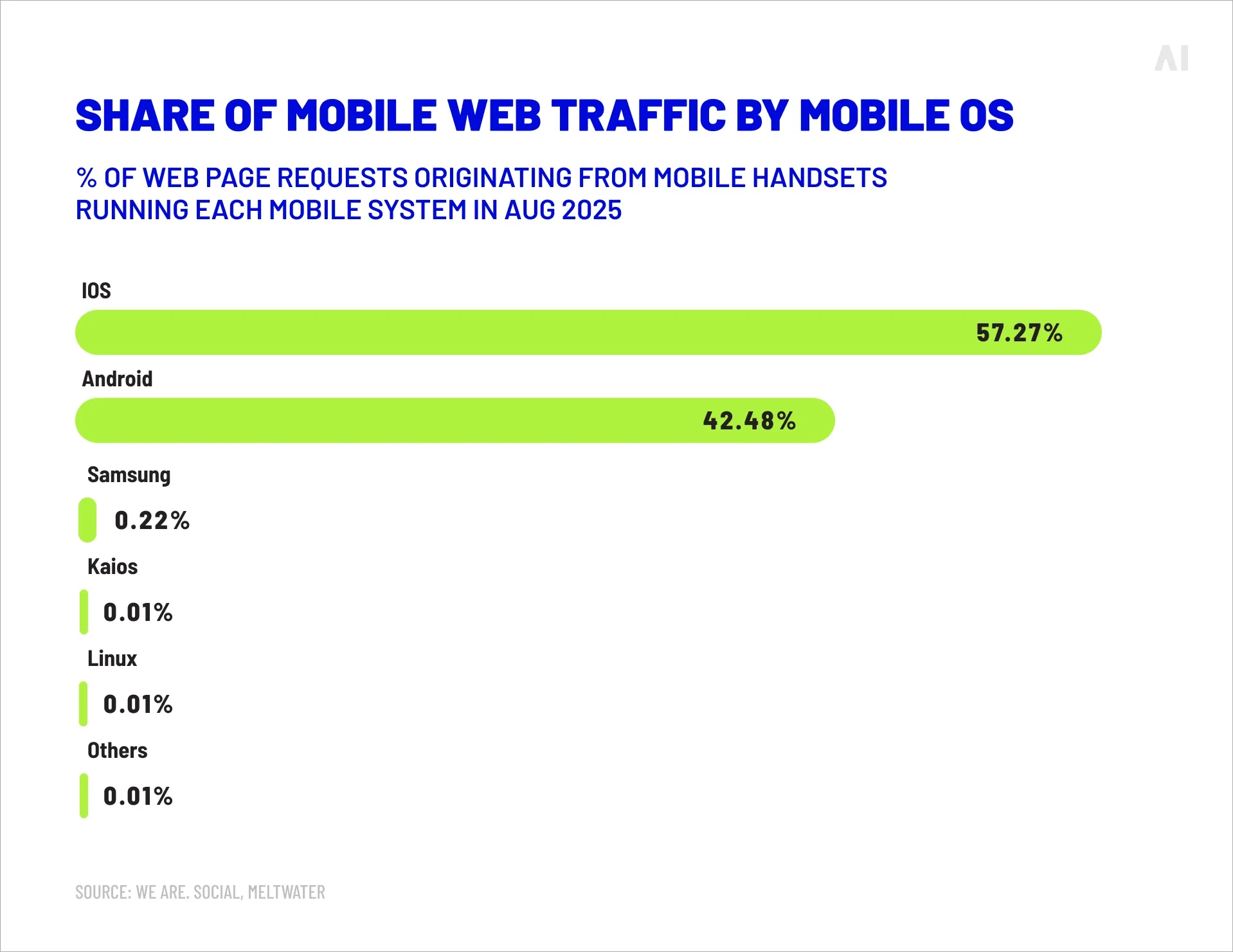
Common mistakes:
- Using “desktop-style” creative: small text, slow pacing, cluttered layouts.
- Driving users to generic screens with too many steps between click and value.
- Treating app measurement like web measurement (then being surprised by aggregated or delayed reporting).
If you’re running native on mobile web, then—
Prioritize:
- Page speed and layout stability: On web, your landing page is part of the ad experience. If the first screen is slow, jumpy, or buried under popups, you’ll lose the click you paid for.
- Message continuity (promise → first screen): The ad should match the first screen of the page, not just the overall site. If the ad says “Pricing in 60 seconds,” the page can’t open with a brand manifesto.
- Context targeting and editorial alignment: Mobile web is where publisher context can shine. Native placements that match the article/topic often produce higher-quality sessions than broad, untargeted reach.
Common mistakes:
- Buying “native” web inventory that’s actually low-quality clickbait modules.
- Optimizing only to CTR (which can reward curiosity clicks that don’t convert).
- Overloading pages with tags and scripts until performance collapses.
A simple planning approach
If you want a clean way to split budgets:
- Use in-app native for scalable engagement and repeat exposure (especially stories, in-feed video, interactive units).
- Use mobile web native for contextual intent and mid-funnel depth (especially publisher environments and content-led discovery).
- Measure both with a shared KPI stack (CTR + engaged sessions + CVR + CPA/ROAS), but don’t assume the same CTR or CVR benchmarks apply across environments.
Scaling mobile native advertising with AI Digital
Scaling mobile native ads is rarely about finding one “perfect” placement. It’s about building a repeatable system that can run across mobile web and apps, keep quality high, and improve performance week over week without turning reporting into guesswork.
AI Digital approaches that problem through its Open Garden framework: a DSP-agnostic model designed to give advertisers more control, more transparency, and more flexibility than a single-platform strategy.
Here’s what that looks like in practice for mobile native advertising.
1) Plan native formats around outcomes, not inventory
Mobile native can support very different goals (awareness, consideration, conversion), and the “right” format depends on the user moment: scrolling, browsing, shopping, or navigating.
AI Digital’s managed service teams build performance-driven plans around business KPIs (not just media KPIs), then choose native placements and creative approaches that map to those KPIs across channels.
📍 Why this matters: if you start with inventory (“let’s buy native”), you usually end up with mismatched formats, mixed traffic quality, and reporting that’s hard to explain. If you start with outcomes (“we need qualified leads at X CPA” or “we need product views at Y cost”), format decisions become much cleaner.
2) Keep supply quality high with Smart Supply
Native performance often breaks down at the supply layer. Even strong creative can underperform if it’s running in low-quality placements, through inefficient paths, or on traffic that doesn’t have real attention behind it.
AI Digital’s Smart Supply is built to solve that by curating and optimising supply paths and inventory so buyers can focus on performance rather than cleaning up the buy after the fact. It’s a tool, not a media vendor, and it’s DSP-agnostic, designed to work across inventory types.
Smart Supply’s approach is especially relevant to mobile native because it focuses on:
- Outcome-based curation: curation decisions are tied to your KPIs, not generic “best lists.”
- Supply path efficiency: reducing unnecessary intermediaries (“bid hops”) that can inflate costs and muddy transparency.
- Quality controls: filtering out low-performing publishers and applying invalid traffic protection to help preserve working media.
- Bias reduction: avoiding platform incentives that can push spend toward owned-and-operated inventory regardless of performance.
3) Execute across DSPs without being locked into one “truth”
Mobile native often spans multiple buying environments: open web native, in-app native, native video, commerce-like placements, and publisher-native units. If you’re locked into one DSP or one walled garden, you can end up with:
- uneven performance benchmarks
- limited transparency into where spend went
- reporting that’s difficult to unify
AI Digital’s model is explicitly DSP-agnostic and positioned to connect advertisers across multiple DSPs, helping teams choose the best fit for each goal rather than defaulting to one stack.
4) Optimise with AI-assisted workflows, with humans still accountable
As mobile native scales, optimisation becomes a volume problem:
- more creatives
- more placements
- more audience segments
- more supply variables
AI Digital’s platform, Elevate, is an AI-driven intelligence layer designed to aggregate performance across platforms and support smarter planning and optimisation, while still being human-enhanced (meaning people remain responsible for decisions and oversight).
From a mobile native standpoint, the value is in tightening the loop between:
- what’s running (placements, formats, supply paths, creatives)
- what’s working (performance against your KPI definition)
- what changes next (budget shifts, bid adjustments, creative rotation)
In other words, you’re not just buying more native. You’re building a system that can learn faster.
5) Make transparency part of performance, not a reporting add-on
One of the most practical points in the Open Garden framing is that transparency is not treated as a nice-to-have. It’s positioned as core to how media gets selected and optimised, including visibility into placements and the logic behind supply decisions.
That matters for mobile native because “native” can sometimes hide low-quality delivery if you’re not strict about:
- where ads ran
- what the user experience looked like
- whether the supply path was efficient
- whether results were driven by real engagement or cheap clicks
Conclusion: Unlocking the full potential of native advertising on mobile
Mobile native advertising is not a trick. It’s a design discipline: respect the mobile experience, earn attention, and make the next step obvious. On a small screen, users move fast. They scroll, tap, compare, and bounce the moment something feels intrusive or confusing. Native works when the ad fits that behavior—visually, structurally, and contextually—so the user can understand it in a glance and decide whether it’s relevant.
The formats that tend to perform best—in-feed, story-native video, map-native, commerce-native, and interactive native—share a few practical traits:
- They match the environment’s “rules.” A feed ad behaves like a post. A map ad behaves like a location result. A commerce ad behaves like a product tile. Users don’t need to learn a new interface to engage.
- They’re built for mobile attention. Clear focal point, readable text, fast pacing when needed, and one primary action. Mobile doesn’t reward clutter.
- They reduce friction after the click. The destination mirrors the promise (same product, same offer, same message), and the path to value is short.
- They still disclose clearly. “Sponsored” or “Ad” labeling isn’t optional—it’s part of trust. When disclosure is obvious, people can choose to engage without feeling misled later.
If you treat mobile native ads like “better banners,” you’ll usually optimise for surface metrics—cheap clicks, high CTR, broad reach—without improving what happens next. That’s when native becomes a prettier wrapper around the same old problems: low-quality traffic, weak conversion rates, and unclear ROI.
If you treat mobile native advertising like content with performance accountability, the channel behaves differently. You build creative systems that can rotate hooks and angles, you match formats to real user moments (scrolling, browsing, shopping, navigating), and you measure success with quality signals—not just clicks. Done that way, native becomes a repeatable growth lever: better engagement, stronger downstream performance, and a scalable process you can optimise over time.
.webp)