Creative Workflow Management: How to Automate and Scale Ad Production


Creative workflow management is becoming more important because production capacity is expanding faster than many teams’ ability to coordinate it. IAB’s 2026 research into digital video advertising found that nearly two in three buyers now use generative AI for video creative, up from approximately half in 2025. Those buyers expect generative AI to contribute to one-third of their video ad assets in 2026, compared with one-quarter in 2025.
This acceleration changes the operational challenge. When teams can produce more variations in less time, complexity moves into briefing, prioritization, version control, review, localization, approval, delivery, and measurement. A faster production engine connected to an unclear workflow does not eliminate the bottleneck—it creates a larger queue of work to manage.
A structured creative workflow establishes how each request moves from intake and planning through production, approval, delivery, and performance-led iteration. This article explains that cycle, identifies where automation can remove repetitive work, and presents a maturity framework for scaling creative operations. It also applies the framework to always-on, multi-market, and cross-channel campaigns and explains how teams can measure cycle time, review efficiency, rework, delivery reliability, and production capacity.
TL;DR: Key Takeaways
- Structure creates speed. A repeatable workflow reduces avoidable coordination, protects quality, and gives teams a clear view of work in progress.
- Ownership must be explicit. Every request needs one accountable owner, defined reviewers, and a final approver.
- Automation works best on predictable repetition. Routing, task creation, resizing, reminders, status updates, and delivery are stronger candidates than creative direction or brand judgment.
- Standardize before automating. Technology will reproduce ambiguity if briefs, approval rules, naming conventions, and handoffs remain unstable.
- Feedback must close the loop. Campaign learnings should shape the next brief, variation, and production priority.
- Measure flow, not output alone. Cycle time, revision rounds, first-pass approval, rework, and on-time delivery reveal whether production is genuinely becoming more efficient.
What Is Creative Workflow Management?
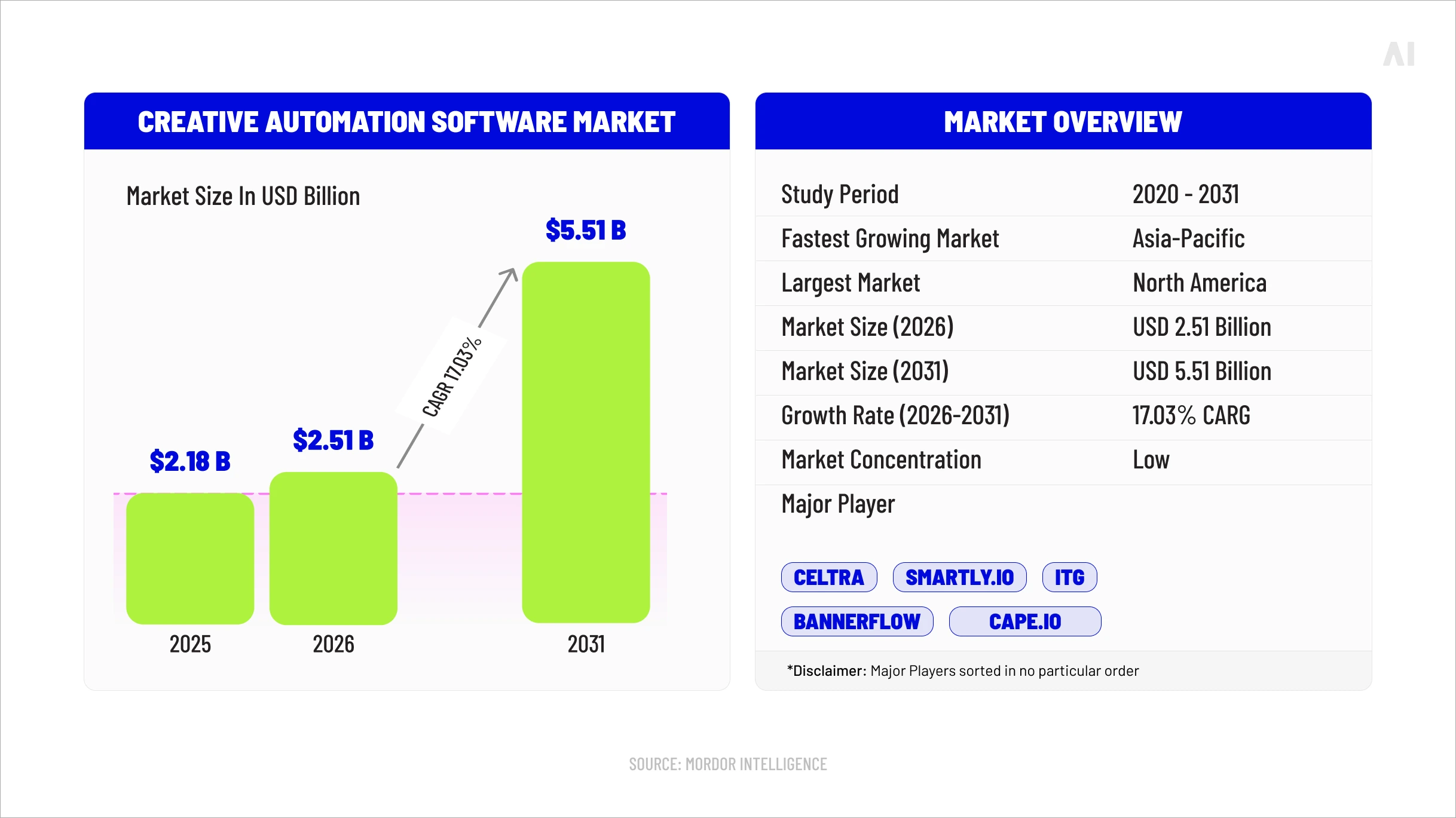
Creative workflow management is the structured coordination of the people, information, assets, decisions, and systems required to move advertising work from request to measurable iteration. It defines what must happen, in what order, who owns each stage, what is required before work can advance, and how progress and approval are recorded.
In practice, a request becomes a usable brief; the brief becomes prioritized work; designers, writers, editors, and production specialists create approved master assets and variations; reviewers provide consolidated feedback; final files pass quality control; and campaign teams receive correctly named, specification-ready assets. Performance findings then return to the workflow as inputs for the next brief or iteration.
Workflow management is not the same as creative automation. The workflow is the operating design; automation is a capability used within that design. A team can manage a workflow without automation, and it can automate isolated tasks without having a coherent workflow. The latter often produces faster activity without faster delivery.
Understanding what creative automation is and how it works helps teams identify where technology can resize assets, create variations, route work, or accelerate quality checks. It does not decide who has authority, which feedback takes priority, or what “approved” means. Those remain workflow and governance decisions.
Why Creative Workflows Break as Ad Production Scales
Creative workflows rarely fail because teams lack talent. They fail because rising volume multiplies unresolved decisions. One concept adapted for five channels, three formats, and four markets already creates 60 potential outputs—and each output may carry different specifications, copy, owners, deadlines, and approval requirements.
.webp)
At low volume, teams can compensate through messages, meetings, and individual memory. At scale, those workarounds become operating risk. Fragmented briefs force creators to chase missing inputs. Unclear ownership leaves requests waiting between teams. Undefined reviewers produce conflicting comments, while unlimited revision rounds turn preference changes into recurring rework. When files are copied across folders or renamed inconsistently, teams may duplicate production or deliver an outdated version to the media.
The resulting bottleneck is not confined to design capacity. Decision-making, review, and handoffs can become slower than asset creation itself.
This is central to understanding why scaling ad production creates a creative bottleneck: production capacity may increase while the organization’s capacity to prioritize and approve work does not.
⚡️Scale does not create workflow weaknesses; it makes existing weaknesses impossible to ignore.
The impact appears in longer cycle times, missed launch dates, avoidable rework, inconsistent brand execution, and fewer opportunities to test genuinely different ideas. The solution begins by making work visible: one intake path, one accountable owner, controlled approval stages, a reliable version history, and a feedback loop that turns campaign results into the next production decision.
The Creative Production Workflow: From Brief to Iteration
A repeatable creative production workflow moves advertising work from request to approved asset and then back into the next production decision. Each stage should resolve a defined question and produce a usable input for the next. If uncertainty is passed forward, the team pays for it later through clarification, revision, or rework.
Performance evidence closes the cycle. It may lead the team to revise a brief, build a new variation, change a template, or reconsider which work deserves priority.
⚡️A scalable workflow does not end at launch; it improves when launch results change the next production decision.
Intake and Creative Briefing
Standardized intake turns a request into production-ready information. Without it, teams begin while objectives, specifications, or responsibilities are still changing—and revisions become the mechanism for completing the brief.
Every request should establish:
- campaign objective, intended audience, and desired action;
- message, offer, and mandatory brand elements;
- channels, placements, and technical specifications;
- deliverables, formats, languages, and markets;
- legal, accessibility, and localization requirements;
- deadlines, dependencies, source assets, and success criteria.
Standardization does not make every campaign identical. It establishes the minimum information needed to assess scope, estimate effort, identify missing inputs, and decide whether work is ready to enter production.
Planning, Prioritization, and Ownership
A valid request is not automatically the next request the team should produce. Planning turns approved briefs into a realistic production sequence based on business priority, launch date, effort, dependencies, available capacity, and opportunities to reuse approved components.
Each project needs one accountable owner who keeps it moving across the workflow. Tasks may belong to designers, writers, editors, localization partners, or media specialists, but accountability should not disappear between them. Teams should also name reviewers and the final approver before production begins; otherwise, late-arriving decision-makers can reopen choices already resolved.
This stage should produce a scheduled brief with named owners, milestones, dependencies, review windows, and a defined approval path.
Creative Production and Versioning
Production should begin with an approved creative system, not a collection of disconnected final files. Teams develop a master concept or core asset and define which elements must remain fixed and which can change across placements, audiences, channels, products, languages, and markets.
Reusable templates, modular components, naming conventions, and one source of truth keep adaptations controlled. Every version should remain connected to its master, intended placement, market, review status, and latest approved change.
When teams use AI ad creative to automate production and scale proven ideas, those controls become more important. Faster resizing and variation can multiply mistakes as easily as approved content. Success is not the largest possible asset count as it is a traceable family of usable assets that remains faithful to the campaign idea.
Review, Feedback, and Approval
A creative approval workflow should make feedback easier to interpret and decisions easier to close. Comments should remain attached to the relevant asset and version in one review environment rather than being divided across meetings, email, chat, and private documents.
Teams must define who reviews each stage and what that person is responsible for evaluating.
Creative, brand, legal, localization, accessibility, product, and media specialists may all have roles, but one owner should consolidate conflicting comments before feedback returns to production.
Controlled revision rounds create a clear boundary between refinement and changed scope. New stakeholders, objectives, or requirements should be recorded as changes rather than quietly added to an active revision. The stage ends when the correct version has the required approvals and the decision is documented.
Quality Control and Delivery
Approval confirms stakeholder acceptance; quality control confirms that an asset is ready to run. Final checks should cover brand elements, copy, claims, legal language, localization, dimensions, duration, file size, aspect ratio, safe zones, captions, audio, URLs, naming, and platform specifications.
Where possible, someone other than the creator should conduct this review using a format-specific checklist. Approved files should then be delivered with clear names, version identifiers, destinations, and trafficking or usage instructions.
Delivery is complete only when the receiving team knows which assets are approved, where each should run, and whether anything remains outstanding. A folder link is not a complete handoff if the recipient must reconstruct those details independently.
Performance Feedback and Iteration
Launch changes the type of work; it does not end the workflow. Teams should connect campaign results to identifiable creative versions, messages, formats, placements, audiences, and markets so that evidence can inform what they produce next.
That does not mean chasing every short-term fluctuation or assuming one metric explains performance. Media cost, audience quality, frequency, offer strength, placement, and campaign stage can all influence outcomes. Creative teams need interpreted findings from media and measurement partners, not a spreadsheet of unexplained winners and losers.
A useful feedback loop changes at least one of three things:
- The next brief, by refining the audience problem, message, offer, or hypothesis;
- The next variation, by identifying elements that deserve further testing;
- The production system, by improving templates, specifications, tagging, or workflow rules.
This principle supports performance creative that turns campaign evidence into better advertising. When learning returns in a structured form, the creative workflow becomes a cycle of informed iteration rather than a series of disconnected launches.
Where to Automate the Creative Workflow
Creative workflow automation creates the most value when it removes predictable coordination and production work without removing accountability. Suitable tasks are frequent, rules-based, auditable, and consistent. Creative direction, interpretation of ambiguous feedback, brand judgment, exceptions, and high-risk approvals should remain human-led.
Automate how work moves, transforms, and reports its status; retain human control over why the work exists, what it should communicate, and whether it is ready to represent the brand.
Intake, Routing, and Task Creation
A standardized request can trigger workflow actions as soon as required information is submitted. Campaign type, channel, format, market, deadline, and deliverable fields can determine which team receives the request, which template applies, which tasks are created, and when reviewers are notified.
Rules can also calculate lead times, identify dependencies, and flag incomplete submissions before production begins. Exceptions should move into a visible queue for human assessment rather than being forced through an unsuitable workflow. Automation should make a complete brief move faster—not make an incomplete brief appear ready.
Asset Versioning and Adaptation
Once a master asset and its flexible elements are approved, automation can handle repetitive resizing, cropping, duration changes, format conversion, copy population, language substitution, and variant creation. Templates and locked brand components can protect logos, colours, typography, disclaimers, safe zones, and other non-negotiable requirements.
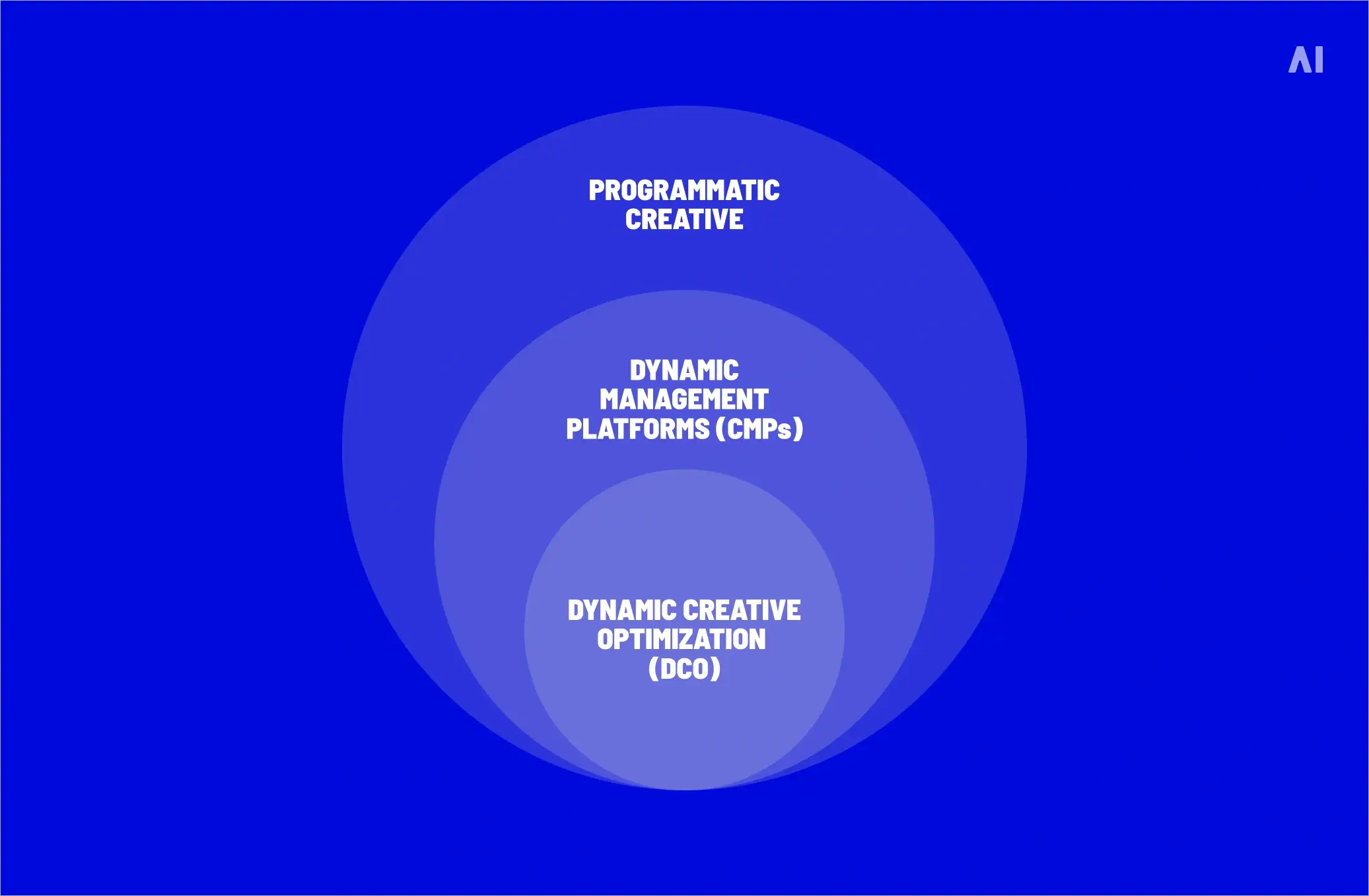
Automated output still needs traceable naming, links to its source asset, and quality checks for context, readability, translation, and technical compliance. Versioning may also provide the approved components needed for dynamic creative optimization across audiences and campaign contexts. The distinction matters: production automation creates or adapts assets, while DCO uses data and decisioning to determine which approved combination to serve.
Reviews and Approvals
Automation can route assets to the correct reviewers in sequence, issue reminders, update project status, and escalate overdue decisions. Centralized proofing keeps comments attached to the correct version and allows the team to see which approvals are complete, outstanding, or rejected.
However, routing approval is not the same as granting it. Brand, legal, creative, localization, and accessibility specialists remain responsible for evaluating the work within their remit. Automation manages the traffic around the decision; the authorized reviewer remains accountable for the decision itself.
Asset Delivery and Handoffs
When an asset reaches an approved status, workflow rules can package the correct files, apply naming conventions, attach metadata, and route them to media, localization, campaign, or publishing teams. Automated checks can confirm whether required formats, specifications, captions, disclaimers, and destination information are present before release.
A reliable handoff should also record what was delivered, when, by whom, and to which destination. This creates an audit trail and prevents teams from relying on private messages or memory. Human intervention remains necessary when requirements conflict, assets fail validation, or a late campaign change affects previously approved work.
A Framework for Scaling Creative Workflow Management
A creative workflow management framework helps teams improve work before adding tools or production capacity. Maturity replaces invisible decisions with shared rules and then automates tasks that are stable enough to repeat.
⚡️ Automation is a maturity stage, not a starting point. If intake, ownership, templates, or approval rules change from project to project, automating them reproduces inconsistency faster. Teams should first define each task’s trigger, owner, rules, expected output, and exception path.
Maturity can vary within one organization: paid social may be automated while high-risk campaigns remain standardized and closely managed. The objective is the right level of structure and control—not automation everywhere.
Creative Workflow Management Examples
These creative workflow management examples use the same lens: intake → ownership → production and versioning → approval → delivery → feedback. What changes is the volume of assets, decision-makers, specifications, and dependencies.
Always-On Paid Social Production
Always-on social requires a short, repeatable creative operations workflow that can refresh assets frequently without rebuilding the process for every campaign cycle.
- Intake: A recurring brief records the campaign objective, audience, offer, platform, required aspect ratios, refresh cadence, and testing priorities.
- Ownership: One production owner manages the calendar, while named creative and media leads control brand approval and activation readiness.
- Production and versioning: Approved templates convert core concepts into platform-ready sizes, copy lengths, motion treatments, and audience variations.
- Approval: Review windows are short and scheduled. Stakeholders evaluate new concepts separately from routine adaptations of approved creative.
- Delivery: Files follow consistent naming and tagging rules and are delivered with their intended platform, audience, flight dates, and status.
- Feedback: Media teams return structured findings on messages, formats, fatigue, and audience response to inform the next refresh brief.
Templates create speed, but teams still need new concepts; otherwise, efficient production can become creative repetition.
Multi-Market Product Launch
A multi-market launch adds languages, cultural context, market-specific offers, legal requirements, regional decision-makers, and synchronized deadlines. The workflow therefore needs one controlled master system with managed local variation.
- Intake: The global brief defines the campaign idea and mandatory elements; regional supplements capture language, offer, product, legal, and cultural requirements.
- Ownership: A global owner protects the master system, while regional owners validate local inputs, deadlines, and market readiness.
- Production and versioning: Teams create approved master assets and adapt only designated components, keeping every local version connected to its source.
- Approval: Global creative and brand teams approve the system; legal, product, and regional reviewers approve market-specific adaptations within defined boundaries.
- Delivery: Each market receives a manifest showing approved files, language, version, placement, usage dates, and unresolved exceptions.
- Feedback: Regional results and production issues are consolidated to improve the shared master, localization rules, and future launch planning.
One master system preserves common decisions, allows controlled local relevance, and prevents markets from duplicating the same production work.
Cross-Channel Campaign Production
Cross-channel production begins with one campaign idea but must translate it into different viewing environments, specifications, durations, and interaction patterns. The workflow should coordinate those expressions as one connected body of work.
- Intake: A channel matrix defines display, social, video, CTV, audio, landing-page, and other requirements before production begins.
- Ownership: One campaign owner coordinates the shared concept, while channel specialists own specification, accessibility, and placement readiness.
- Production and versioning: Teams build from shared messaging, visual components, footage, audio, and brand rules, then create channel-specific executions and cutdowns.
- Approval: Core concept approval happens once; channel reviewers then evaluate only the elements and requirements specific to their environments.
- Delivery: Assets are grouped by channel but remain connected through campaign identifiers, naming standards, metadata, and a shared delivery record.
- Feedback: Results are interpreted by channel and creative variable, then translated into decisions about which shared or channel-specific elements to revise.
⚡️This prevents every output from becoming a separate project. The concept stays shared, while production rules reflect each channel’s requirements.
How to Measure Creative Workflow Efficiency
Measure creative workflow efficiency by how reliably work moves—not simply by how many assets are produced. The scorecard should cover speed, review quality, delivery, errors, and sustainable capacity.
Asset output provides context, but more files do not automatically indicate a healthier workflow. Simple adaptations and complex video assets are not equivalent units. Teams should compare similar work and examine trends.
Keep workflow metrics separate from campaign-performance KPIs. CTR, CPA, ROAS, and conversion rate evaluate what happened after creative entered the market; they do not reveal whether briefing, review, versioning, or delivery operated efficiently. Performance findings should inform future briefs and variations without being presented as direct proof of workflow efficiency.
Where AI Fits Into Creative Workflow Management
Rule-based automation and AI-assisted creative work solve different operational problems. Traditional workflow automation follows explicit instructions: route a completed request, create tasks, calculate deadlines, notify reviewers, update status, or release an approved file. Its value comes from consistency and predictability.
AI is better suited to variable or unstructured work. It can help teams:
- summarize long briefs and identify missing information;
- classify and tag assets for retrieval and reuse;
- adapt approved creative across formats or repurpose existing content;
- flag possible copy, specification, brand, or localization issues;
- synthesize performance findings into inputs for future briefs.
These capabilities should support—not silently replace—creative direction and accountable review. AI-generated summaries can omit nuance, adaptations can introduce errors, and automated checks may miss cultural, legal, or brand risks.
⚡️Use rules where the correct action can be defined in advance; use AI where the task requires interpretation, transformation, or synthesis. In both cases, teams need human oversight when the decision affects strategy, brand meaning, compliance, or final approval.
How AI Digital Helps Scale Creative Production
A well-designed creative workflow can establish the brief, owners, review stages, and delivery requirements, but teams still need enough production capacity to execute that system across growing combinations of channels, formats, audiences, and markets. AI Digital addresses this execution gap through AI-powered creative production with AI Creative Studio, combining technology-enabled speed with experienced human creative direction.
The service is designed to help brands move from an approved idea or source asset to a broader, media-ready family of creative. Its role can include original production, adaptation, versioning, repurposing, and controlled iteration across the digital advertising landscape.
The important distinction is that AI accelerates production, while people remain responsible for creative meaning. Human oversight shapes the concept, story, visual quality, brand discipline, cultural relevance, and suitability of the final output. This combination matters because a technically correct adaptation can still be weak if it loses the original idea or misunderstands the environment in which the ad will appear.
AI Creative Studio can therefore operate as a production layer inside a brand’s existing creative operations workflow. The client’s systems and teams can continue to manage requests, priorities, permissions, approval authority, asset storage, legal sign-off, and campaign release.
AI Digital contributes creative expertise and execution capacity at the production and iteration stages, then returns assets to the wider workflow for the client’s required reviews and handoffs.
This positioning avoids a common scaling mistake: assuming that one platform or partner must replace the entire creative ecosystem. AI Creative Studio is not presented as project-management, DAM, centralized proofing, or end-to-end approval software. Its value is in helping a structured workflow produce more usable creative without forcing the organization to rebuild the workflow around the production partner.
For marketing and creative leaders, that creates a more flexible operating model. Internal teams can retain ownership of strategy, brand standards, governance, and final decisions while drawing on AI Digital to create, adapt, and iterate the assets required by fragmented media plans. Scale then comes from combining a controlled client workflow with production capacity designed for high-volume digital execution—not from sacrificing human judgment for speed.
Build a Creative Workflow That Scales
Scalable ad production does not come from adding more tools or people to an unstable process. It comes from giving creative work a repeatable route: complete briefs, visible priorities, accountable owners, controlled versions, defined approvals, reliable delivery, and feedback that informs what happens next.
Automation strengthens that system when it removes predictable coordination and production work. It weakens it when unclear rules and unresolved responsibilities are automated before they are standardized. The most effective operating model therefore combines automated speed with human direction, brand judgment, and approval authority.
For many teams, the next step is not rebuilding the entire creative ecosystem. It is identifying where demand exceeds capacity, stabilizing the workflow around that pressure point, and adding the right production support. Brands ready to extend approved ideas across more formats, channels, and markets can discuss a scalable creative production model with AI Digital. The goal is more usable creativity delivered with greater control, consistency, and learning.


.webp)