Banner Ad Design Best Practices: What Makes a High-Performing Display Ad

A banner ad has limited space and only moments to earn attention. In Adobe’s 2026 AI and Digital Trends research, 50% of customers said promotional emails, ads, and social posts have just two to five seconds to capture their interest, while 50% said they are likely to disengage when a personalized interaction feels irrelevant. Banner ad design best practices are therefore more than a visual exercise: the creative must communicate a relevant promise, identify the brand, and make the next action easy to understand.
Banner ads are one standard format within display advertising. Display advertising is the broader category, covering banner placements as well as responsive, animated, HTML5, video, and interactive executions. This article focuses on banner ads and closely related display formats, where limited space and placement requirements shape every design decision.
It examines:
- Message clarity, visual hierarchy, branding, and CTA design
- Imagery, typography, color, banner sizes, and responsive formats
- Animation, landing-page consistency, and structured creative testing
The goal is not to promise that attractive creative will automatically win. It is to show how disciplined design creates better conditions for performance, which must be validated through campaign data.
TL;DR: Key Takeaways
- Lead with one clear message and build an obvious visual hierarchy around it.
- Make the brand and CTA easy to recognize without allowing either to overpower the main value proposition.
- Design for real placements and sizes, adapting copy, imagery, spacing, and layout instead of mechanically resizing one master banner.
- Remove unnecessary clutter and keep the ad promise consistent with the landing-page experience.
- Use campaign data to guide iteration; no single design will perform equally well across every audience, placement, or objective.
What Makes an Effective Banner Ad Design?
An effective banner ad does more than look polished. It communicates a relevant idea quickly, makes the brand recognizable, guides attention toward the intended action, and remains usable in the placement where it appears.
The strongest designs usually combine:
- One clear message rather than several competing claims
- A deliberate visual hierarchy that shows viewers where to look first
- Visible branding without allowing the logo to overpower the offer
- Relevant imagery that supports the message
- A clear CTA aligned with the destination page
- Placement-aware execution across sizes, devices, and formats
- Structured testing to determine what performs in a real campaign
These principles create better conditions for attention and action, but they cannot guarantee clicks, conversions, engagement, or revenue before the creative is tested. In digital display advertising, performance depends on the interaction between creative, audience, placement, offer, media delivery, and measurement.
The Core Elements of Effective Banner Ad Design
Banner design is most useful when every element has a distinct job. The question is not whether a creative looks attractive in isolation, but whether someone can understand it quickly, recognize who is speaking, and identify what to do next.
Build a Clear Visual Hierarchy

Visual hierarchy determines the order in which viewers process the banner. A useful structure often moves from:
The exact arrangement can change by format. A product-led ad may lead with the product, while an awareness campaign may lead with a bold statement or image.
⚡️What matters is intentional priority. If the logo, headline, image, and CTA all compete at the same scale, the viewer has to solve the layout before understanding the offer.
Use size, position, spacing, contrast, and repetition to guide attention. Do not assume that making every element larger will improve comprehension; hierarchy depends on the relationship between elements.
Keep the Message Focused
A banner has limited room, so the copy should express one primary value proposition. That does not mean every ad must use the same number of words. A wide leaderboard can accommodate more supporting context than a compact mobile placement.
Good banner copy usually answers three questions:
- What is being offered?
- Why might it matter to this audience?
- What should the viewer do next?
Remove claims, qualifiers, and secondary offers that compete with the main idea. If the campaign needs several messages, create a controlled set of variants rather than forcing every message into one banner.
Copy should also match the awareness level of the audience. A prospect discovering a category may need a simple benefit, while an existing customer may respond to a product update or time-sensitive offer.
Make the CTA Clear and Relevant
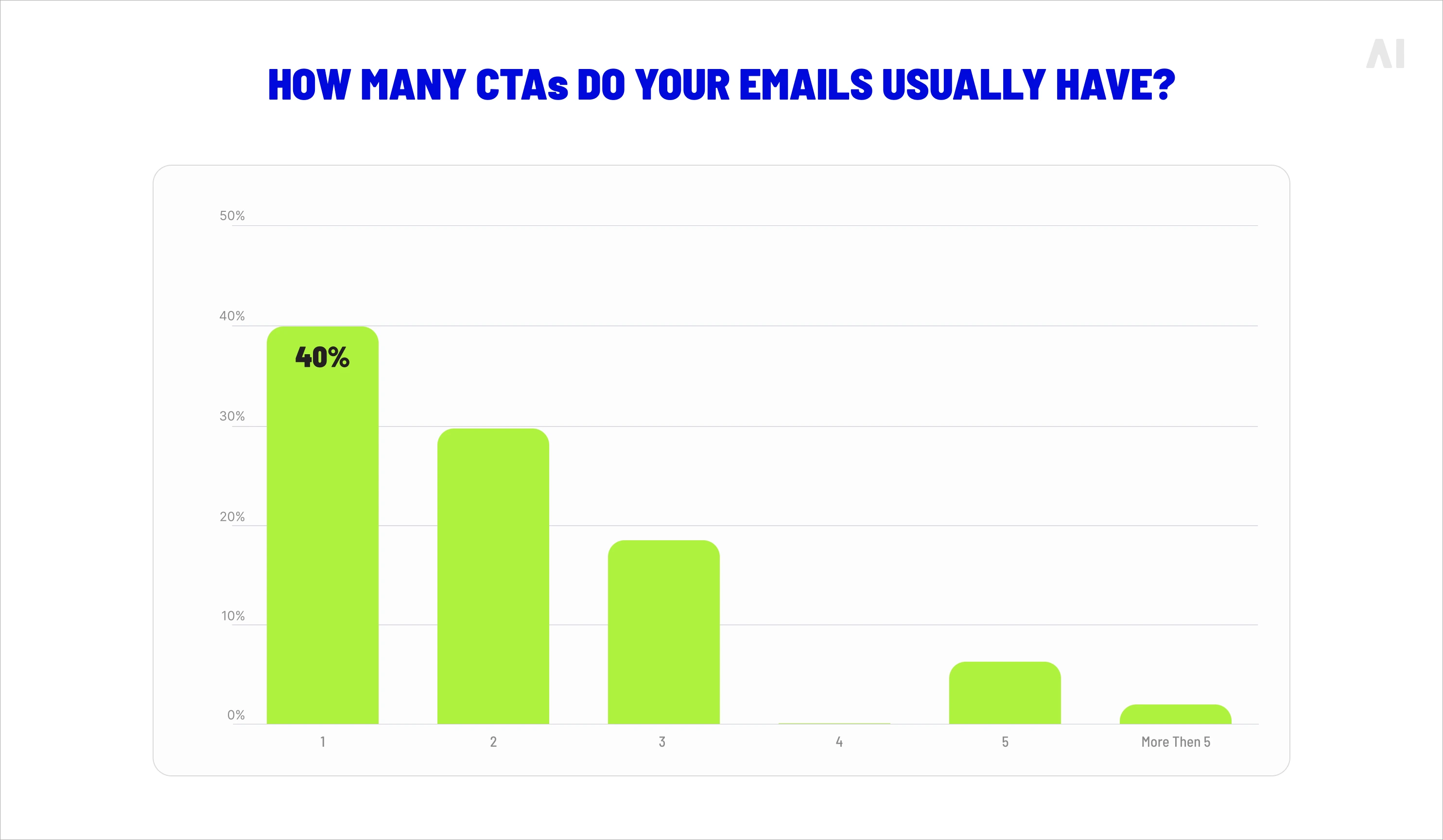
A CTA should communicate the intended next step, not simply occupy a brightly colored space. “Shop now,” “Explore plans,” “Download the guide,” and “See the collection” each set a different expectation.
A clear CTA depends on three factors:
- Visibility: It should be easy to locate at the rendered size.
- Specificity: The wording should describe the action.
- Continuity: The action should match what happens after the click.
Not every banner needs a button-shaped CTA. Some formats use linked text, product cards, or the entire creative as the clickable area. The design requirement is clarity, not a particular visual treatment.
Avoid promising “Learn more” when the landing page immediately asks for a purchase, form submission, or account creation. The CTA and destination should describe the same user journey.
Use Typography for Fast Readability
Typography should be judged at the banner’s actual rendered size, not only on a large design canvas. A typeface that looks elegant in a design file may become difficult to read when reduced to a compact mobile placement.
Prioritize:
- Clear distinction between headline and supporting copy
- Sufficient contrast against the background
- Simple, legible letterforms
- Adequate spacing between lines and elements
- A manageable number of text styles
Avoid narrow text, decorative fonts, long all-caps sentences, and small legal or offer details that disappear at scale. If important information cannot remain readable, simplify the message or move supporting detail to the landing page.
Typography should also remain consistent with the brand. Readability and recognition are not competing goals when the type system is selected carefully.
Choose Imagery That Supports the Message
Imagery should make the proposition easier to understand, not simply make the banner feel fuller. A product image can show what is being sold; a lifestyle image can establish context; a visual metaphor can communicate an abstract benefit.
Before approving an image, check:
- Subject focus: Is the main object or person immediately clear?
- Composition: Is there enough negative space for copy and CTA elements?
- Cropping: Does the subject remain understandable across placements?
- Quality: Does the image remain sharp at the required dimensions?
- Relevance: Does it reinforce the offer rather than introduce a different story?
Avoid stock imagery that feels disconnected from the product or audience. A visually impressive image can still weaken performance if it attracts attention without helping viewers understand the message.
Keep Branding Visible Without Letting It Overpower the Ad
Branding should be recognizable early enough to provide context, but it should not consume the space needed for the value proposition. A large logo cannot compensate for an unclear offer.
Use a consistent combination of:

The right balance depends on the campaign objective. A brand-building campaign may give identity greater prominence, while a direct-response banner may prioritize the offer and CTA.
Brand consistency also matters across variations. When teams produce multiple sizes or messages, viewers should still recognize that the assets belong to the same campaign.
Use Color and Contrast Intentionally
Color can separate content, establish emphasis, and support readability. It should help viewers distinguish the headline, product, CTA, and background—not create visual noise.
Consider:
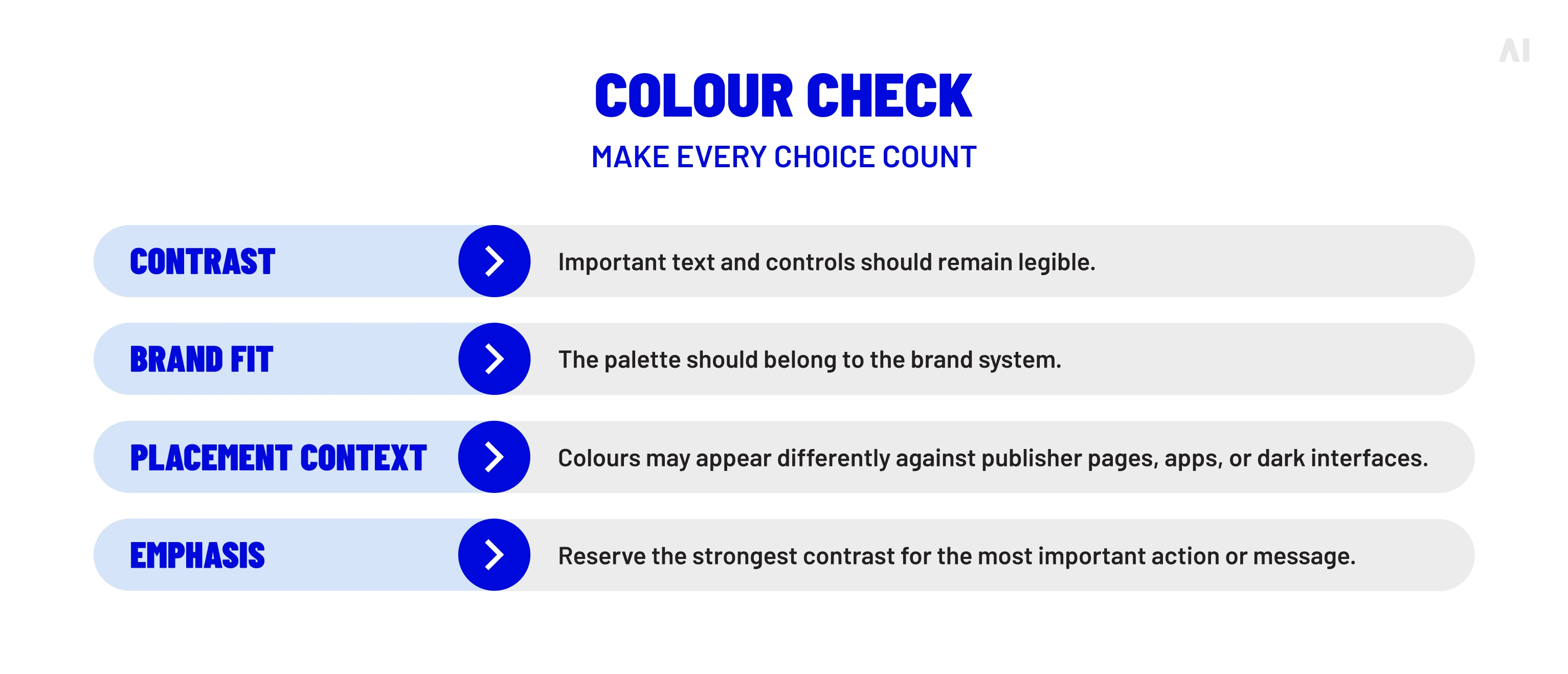
Brighter or more aggressive colors are not automatically more effective. A restrained palette with strong contrast can communicate more efficiently than a saturated design with several competing accents.
Design for the Placement, Not Just the Master Banner
A master creative is a starting point, not a finished solution for every placement. Different dimensions change how much copy can fit, where the subject can sit, how the logo is treated, and whether the CTA remains visible.
Adapt the Layout Across Banner Sizes
Wide, square, vertical, and compact placements create different reading conditions. A layout that works in a 728 × 90 leaderboard may become unreadable when compressed into a 320 × 50 mobile banner.
Common examples include:
- Medium rectangle: 300 × 250
- Leaderboard: 728 × 90
- Half-page unit: 300 × 600
- Mobile banner: 320 × 50
These are useful reference points, not universal requirements. Google’s current display-ad size guidance lists different examples for mobile and desktop inventory, and individual platforms or publishers may apply their own specifications.
When adapting a layout, preserve the hierarchy rather than copying every pixel:
- Shorten or restructure copy.
- Reposition the subject to protect the focal point.
- Adjust logo size and placement.
- Give the CTA enough space to remain identifiable.
- Remove secondary elements when the format cannot support them.
The goal is a coherent campaign system, not identical artwork in every ratio.
Account for Responsive Display Formats
Fixed banners are finished creative files built for specific dimensions. Responsive display ads are asset-based formats: the advertiser supplies separate headlines, descriptions, images, logos, and other assets, and the platform assembles them into different layouts.
Google’s current responsive-display specification illustrates the level of modularity involved:
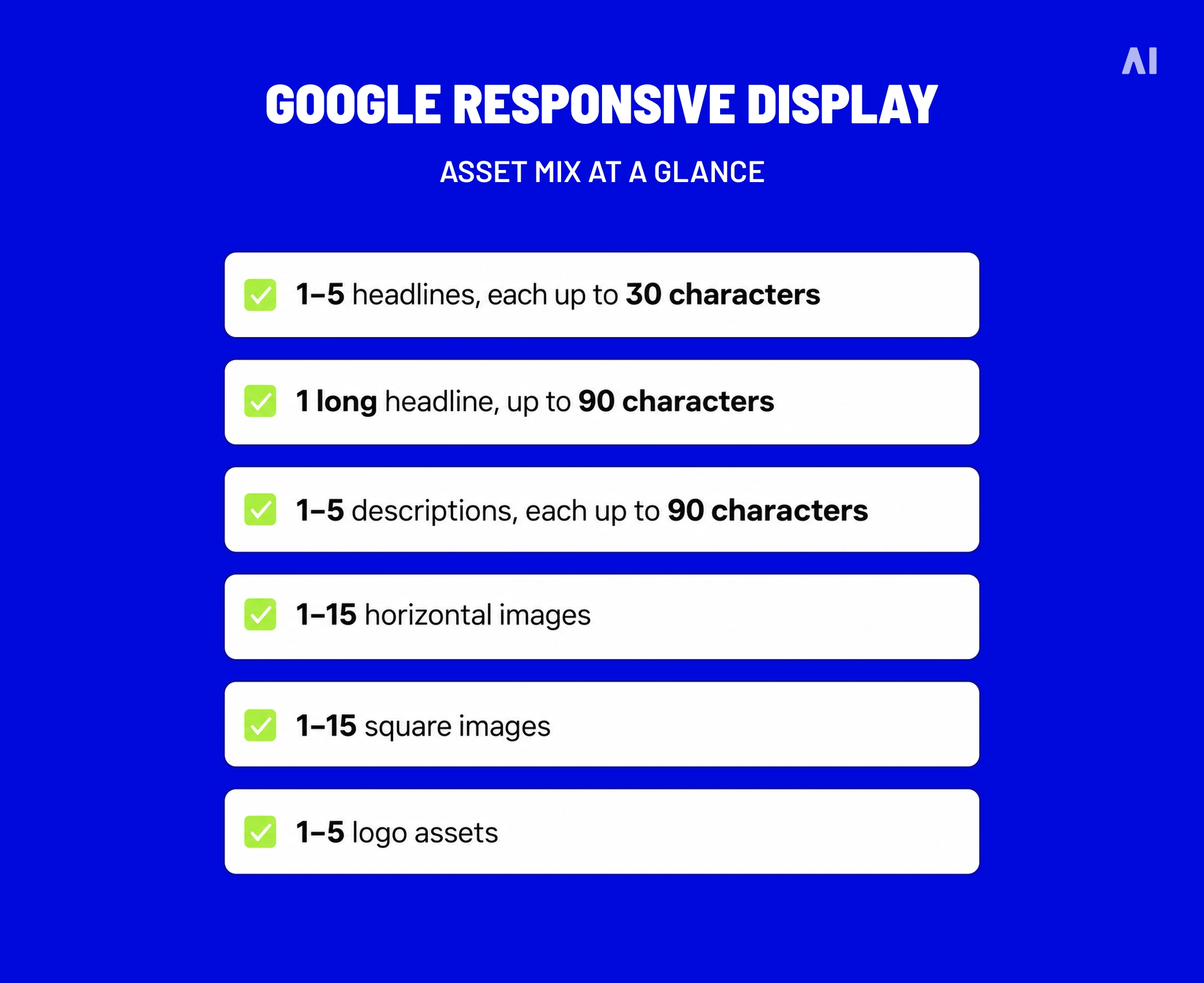
⚡️These limits are Google-specific and should not be treated as universal display standards. They do, however, show why each asset must work independently. A headline should remain meaningful without one particular image, and an image should retain a clear subject when paired with several approved messages.
Responsive creative benefits from variation, but variation still needs control. Establish approved copy, imagery, logo treatments, and brand rules before allowing the platform to combine assets across placements.
Static, Animated, and HTML5 Banner Design
The right format depends on the job the creative needs to perform. A static banner may communicate an offer more efficiently than an interactive unit, while animation or HTML5 may be justified when the message benefits from sequencing, exploration, or richer interaction.
Static Banners
Static banners are effective when the proposition can be understood without movement. They are often appropriate for:
- A single product or offer
- A clear brand message
- A simple promotional CTA
- Placements with limited technical support
Their simplicity can be an advantage. A viewer does not need to wait for a frame to appear or interact with the unit to understand the message.
Animated Banners
Animation can help when the message needs to unfold. One frame might introduce the problem, a second might present the product, and a final frame might deliver the offer and CTA.
Good animation has a clear information order:
- Establish the subject
- Reveal the benefit
- End with the brand and action
Keep the final frame visible long enough to be understood. Fast transitions, constant movement, flashing elements, or several simultaneous animations can make the banner harder to process. Motion should guide attention—not compete with the message.
HTML5 and Interactive Creative
HTML5 banners can support richer experiences, including expandable panels, product carousels, swipe interactions, quizzes, maps, and shoppable elements. They are most useful when interaction adds genuine value to the campaign objective.
The production burden is also higher. Teams may need to manage:
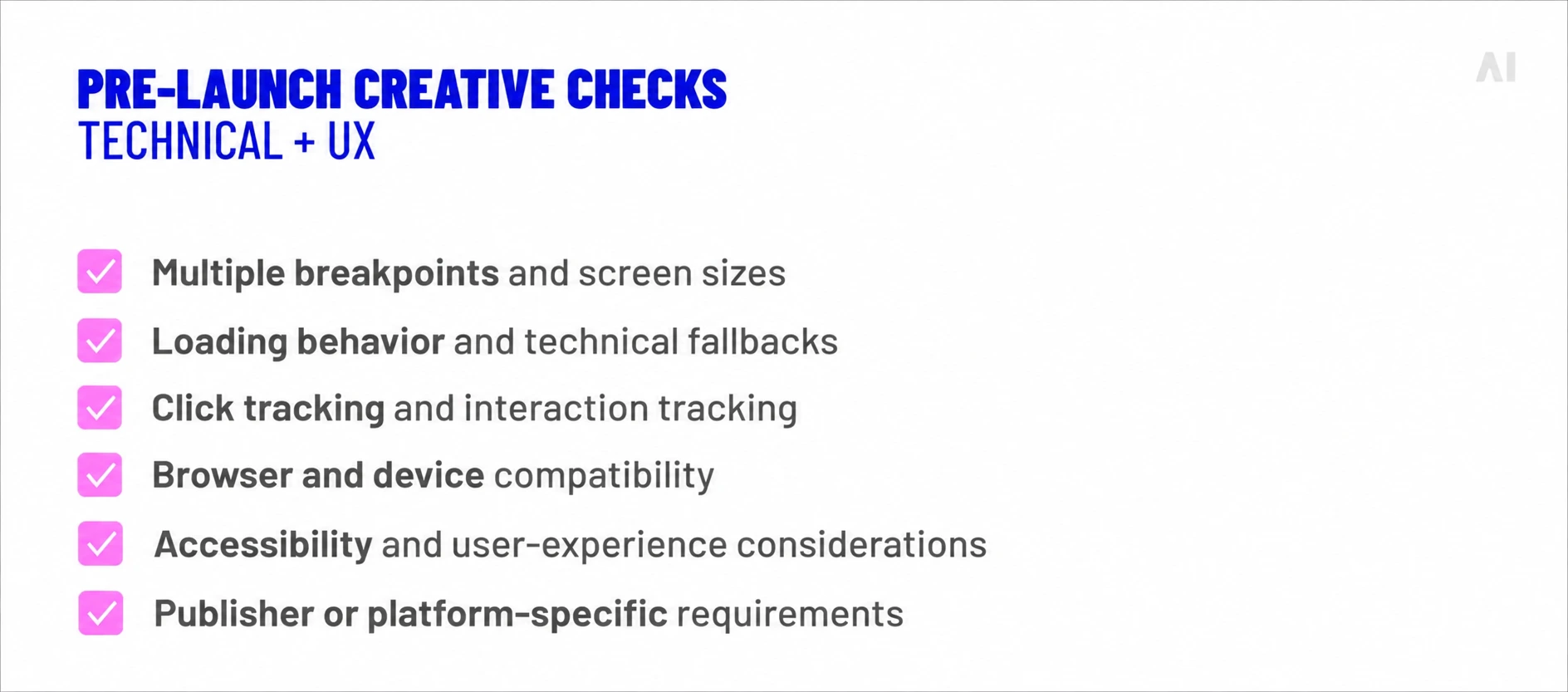
For campaigns that need a larger or more interactive canvas, high-impact display units can extend beyond standard banners while remaining connected to targeting and measurement.
Google’s current responsive-display specification illustrates how modular creative can become.
Advertisers can provide up to five headlines, five descriptions, fifteen horizontal images, fifteen square images, and five logo assets, subject to Google’s format requirements. HTML5 Banner Ads can support richer motion and interaction, but they also require additional production, QA, and placement support.
More assets or more interaction do not automatically make an ad stronger. Choose the format based on the objective, message, placement, production resources, and available inventory.
Match the Banner Ad to the Landing Page
Most banner mistakes are not dramatic technical failures. They are small design decisions that make the message slower to understand, harder to trust, or difficult to act on.
Use this checklist before launch:
- Overcrowded layout: Too many messages, images, logos, or decorative elements compete for attention.
- Weak visual hierarchy: Viewers cannot tell whether to look at the headline, product, brand, or CTA first.
- Unreadable text: Copy becomes too small, dense, or complex at the banner’s actual rendered size.
- Vague CTA: “Click here” does not explain what happens next.
- Low-quality imagery: Blurry, poorly cropped, or irrelevant visuals weaken the offer.
- Inconsistent branding: The banner does not look recognizably connected to the campaign or brand.
- Insufficient contrast: Text, product details, or CTA elements disappear against the background.
- Mechanical resizing: One master layout is compressed into every placement without adapting the hierarchy.
- Distracting animation: Movement continues without adding meaning or makes the final CTA difficult to notice.
- Misleading offer: The banner promises a price, product, or benefit that the destination does not provide.
- Placement blindness: The design ignores the device, page environment, inventory type, or viewing context.
A final review question is useful: Can the intended audience understand the offer, identify the brand, and recognize the next action at the size and speed at which the ad will appear? If the answer is no, adding more visual detail will usually make the problem worse.
How to Test and Improve Banner Ad Creative
Banner design should be evaluated through structured testing, not personal preference or internal votes about which version “looks better.” A polished creative can underperform because of its audience, placement, offer, delivery conditions, or landing page. Testing helps separate those factors from the design itself.
Start by defining:
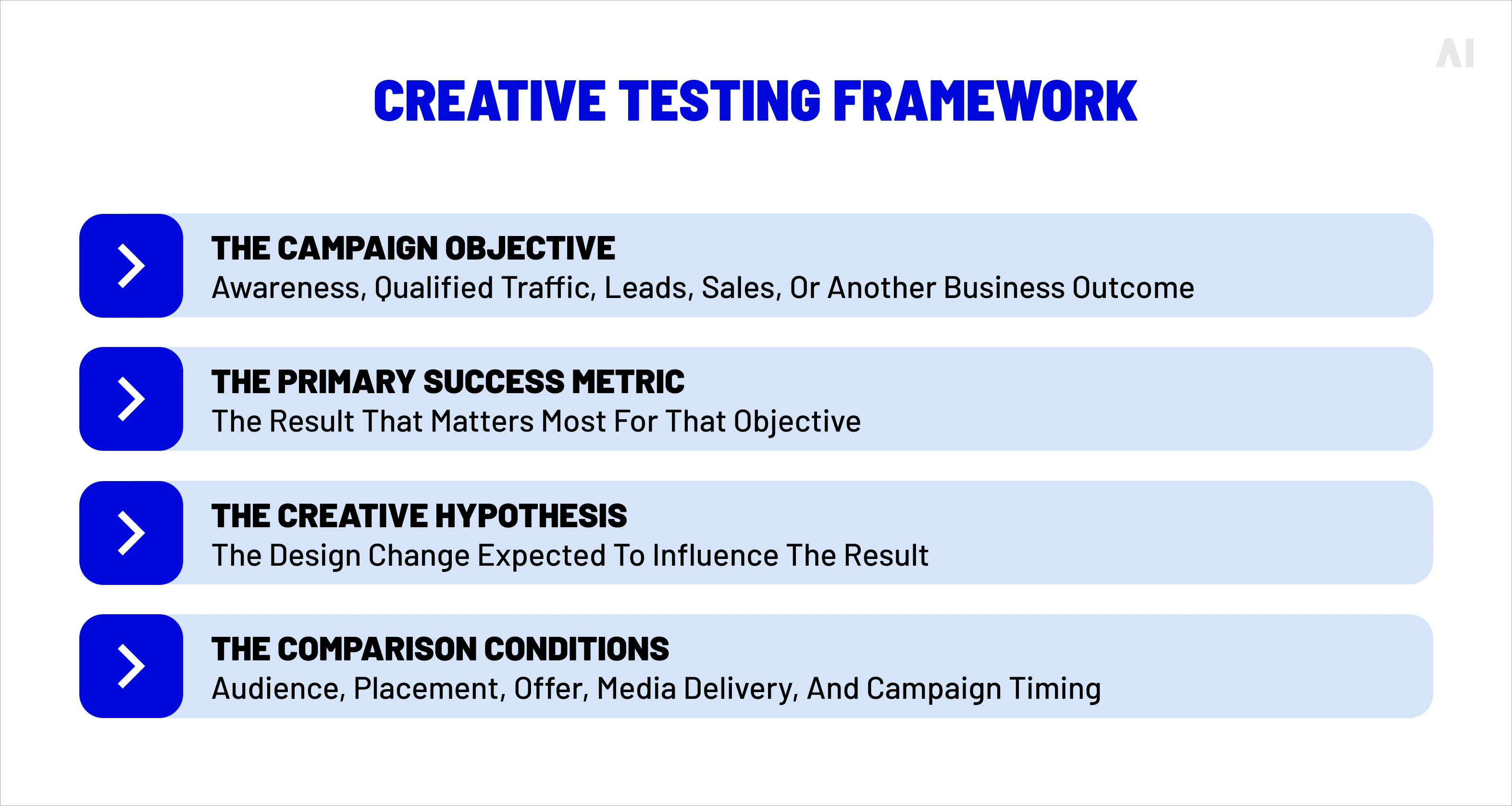
A test should produce a useful decision, not just a winning thumbnail. If the objective is awareness, interaction or brand metrics may be more relevant than clicks. If the objective is ecommerce revenue, post-click quality and purchase value may matter more than engagement alone.
Test One Meaningful Creative Hypothesis at a Time
A useful hypothesis connects one design change to one expected behavior:
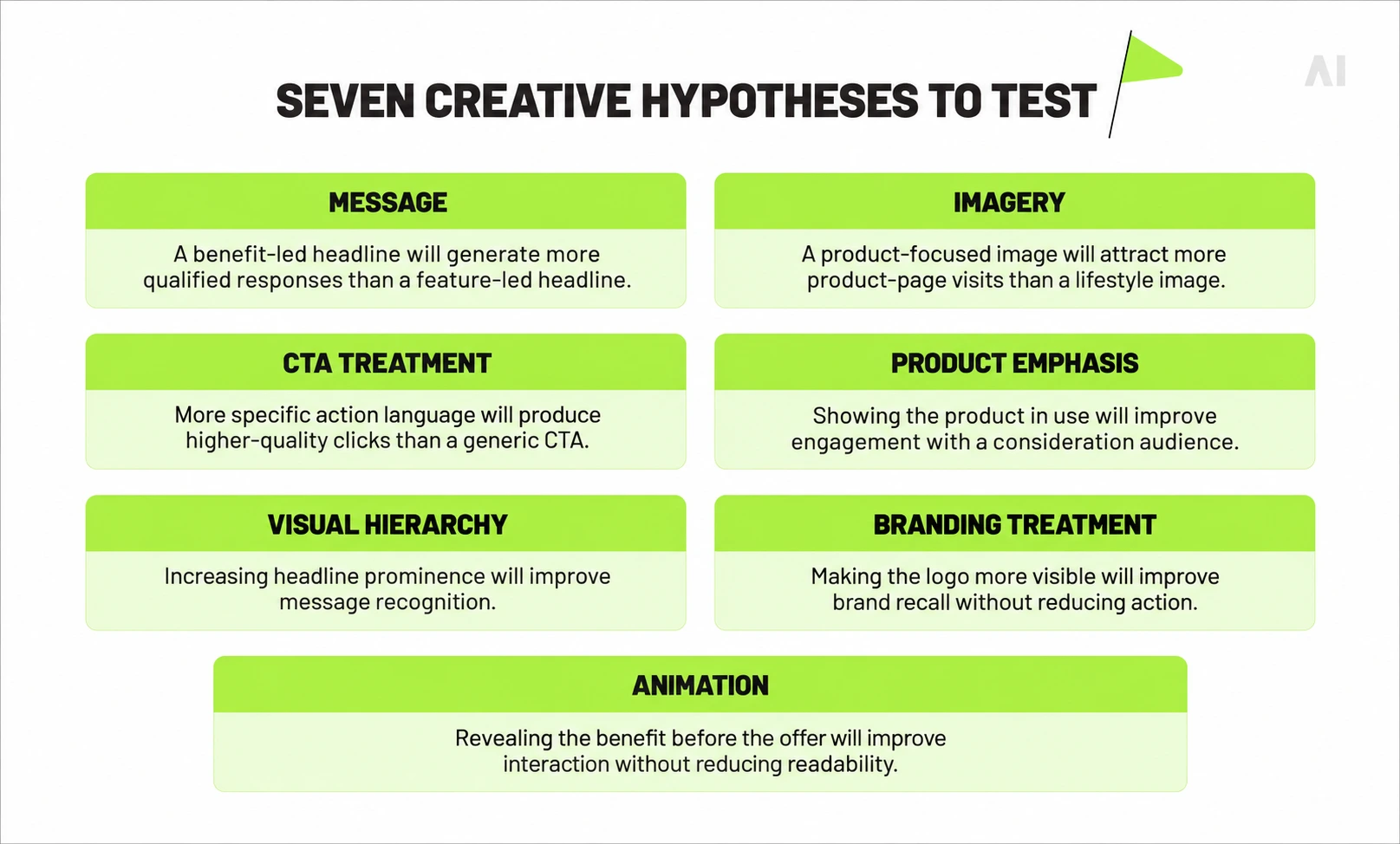
Changing the headline, image, CTA, color, logo, animation, and layout at the same time may produce a performance difference, but it will not explain why the difference occurred.
A controlled test does not require every asset to look nearly identical. It requires the difference between versions to be intentional enough that the result can inform the next decision.
Evaluate More Than Click-Through Rate
CTR is useful when the campaign is designed to generate traffic or an interaction. Google defines click-through rate as clicks divided by impressions, which means it measures response to the served ad—not the quality of the resulting visit or the value of the customer.
Depending on the campaign objective, evaluate a broader set of signals:
- Delivery and visibility: Impressions, reach, frequency, and viewability
- Engagement: Interaction rate, expansion, video completion, or time spent
- Post-click quality: Engaged sessions, product views, form starts, or qualified visits
- Business outcomes: Conversions, qualified actions, purchases, revenue, or customer value
- Brand outcomes: Awareness, recall, consideration, preference, or intent
⚡️Interpret these metrics together. A banner may generate a high CTR through an exaggerated promise but produce weak post-click engagement. Another may receive fewer clicks while generating stronger qualified actions or higher revenue per visitor.
Before attributing the difference to design, check whether the variants had sufficiently comparable:
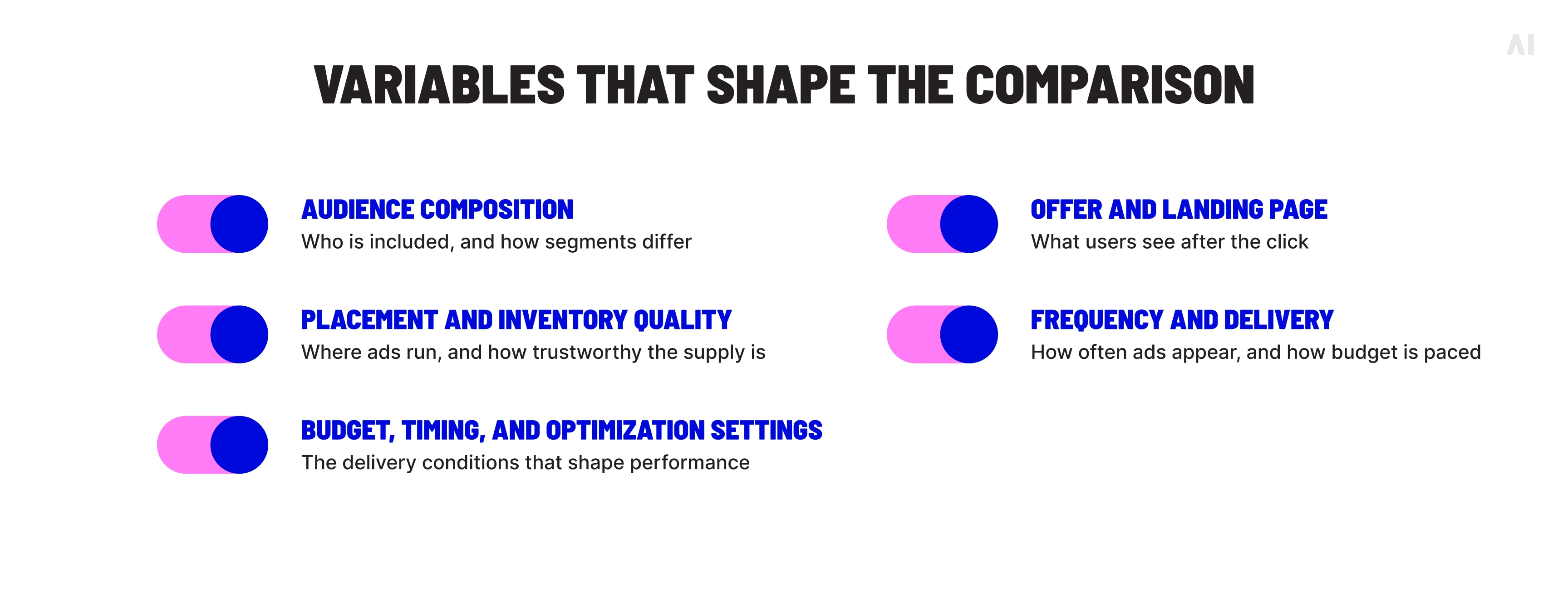
Do not treat one metric, one test, or one winning variation as proof that a particular design element caused the outcome. Avoid universal claims about the required test duration, sample size, or impression threshold. The appropriate design depends on the campaign objective, conversion volume, delivery environment, and level of decision risk.
How to Scale Strong Banner Design Across More Variations
Scale starts with a repeatable creative system, not a growing folder of disconnected files. Once the master concept is clear, modular layouts, reusable templates, controlled variations, and placement-aware resizing can extend the idea across audiences, products, markets, and messages without weakening the original design logic.
The need is growing quickly. Adobe’s 2026 AI and Digital Trends report found that 76% of organizations say generative AI has improved content volume, while 53% still describe their content supply chain as largely linear and resource-intensive. More output only creates value when teams can maintain consistency and quality.
A practical scaling system includes:
- Modular components: Build flexible headline, image, logo, background, offer, and CTA treatments that can be rearranged without redesigning every banner from scratch.
- Controlled variation: Change one meaningful variable—such as message, product emphasis, imagery, or audience cue—so results remain interpretable.
- Placement-aware adaptation: Adjust hierarchy, cropping, copy length, and spacing for wide, square, vertical, and compact placements rather than mechanically shrinking one master file.
- Version control and QA: Track markets, formats, offers, approval status, and expiry dates. Check every export for legibility, brand accuracy, functionality, and destination-page alignment.
This structure is the practical basis for producing hundreds of banner ad variations with AI while keeping strategy, accessibility, and brand judgment in view.
How AI Digital Helps Scale Banner and Display Creative
AI Digital’s AI Creative Studio combines AI-assisted production with experienced creative judgment. The goal is not to replace designers or generate unlimited ads without direction; it is to help teams adapt a strong concept across the fragmented environments in which display campaigns run.
Depending on the brief and media plan, the studio can support:
- Static banners for clear, single-state messages.
- Interactive HTML5 creative and richer media experiences where motion or interaction supports the objective.
- Resizing and format adaptation across aspect ratios, placements, and platform requirements.
- Localization through market-specific assets, copy, and variant tagging.
- Creative variations that test different messages, imagery, products, or calls to action.
- Multi-platform versioning for distribution across programmatic, social, video, CTV, and other environments.
The workflow should still begin with a defined audience, proposition, visual hierarchy, brand system, and campaign hypothesis. AI can accelerate asset production, resizing, tagging, and repurposing; human specialists decide whether the result is strategically appropriate, visually coherent, technically valid, and faithful to the brand.
That distinction matters. More versions do not automatically mean better creative. Each variation still needs placement-specific QA, clear naming and governance, live campaign testing, and performance review. AI Digital describes the model as “AI scale. Human taste.” In practice, that means using automation to expand useful options while keeping creative accountability with people.
Design for Clarity First, Then Let Performance Data Guide Iteration
Strong banner design gives a campaign a clear, usable foundation: the message is understandable, the brand is recognizable, the CTA sets an accurate expectation, and the execution fits its placement. It does not, by itself, prove that the ad will earn attention or drive revenue.
Actual performance emerges from the interaction between creative, audience, placement, offer, media delivery, landing-page experience, and measurement. Treat the first launch as a learning opportunity, then use comparable data to refine the next iteration. A banner with a lower click-through rate may still support stronger qualified actions or revenue, while a visually impressive execution may underperform when the offer or audience is mismatched.
If you are building a scalable display system and want to connect creative production with media realities, speak with AI Digital about your creative and media priorities.