HTML5 banner ads: What they are and how to build them


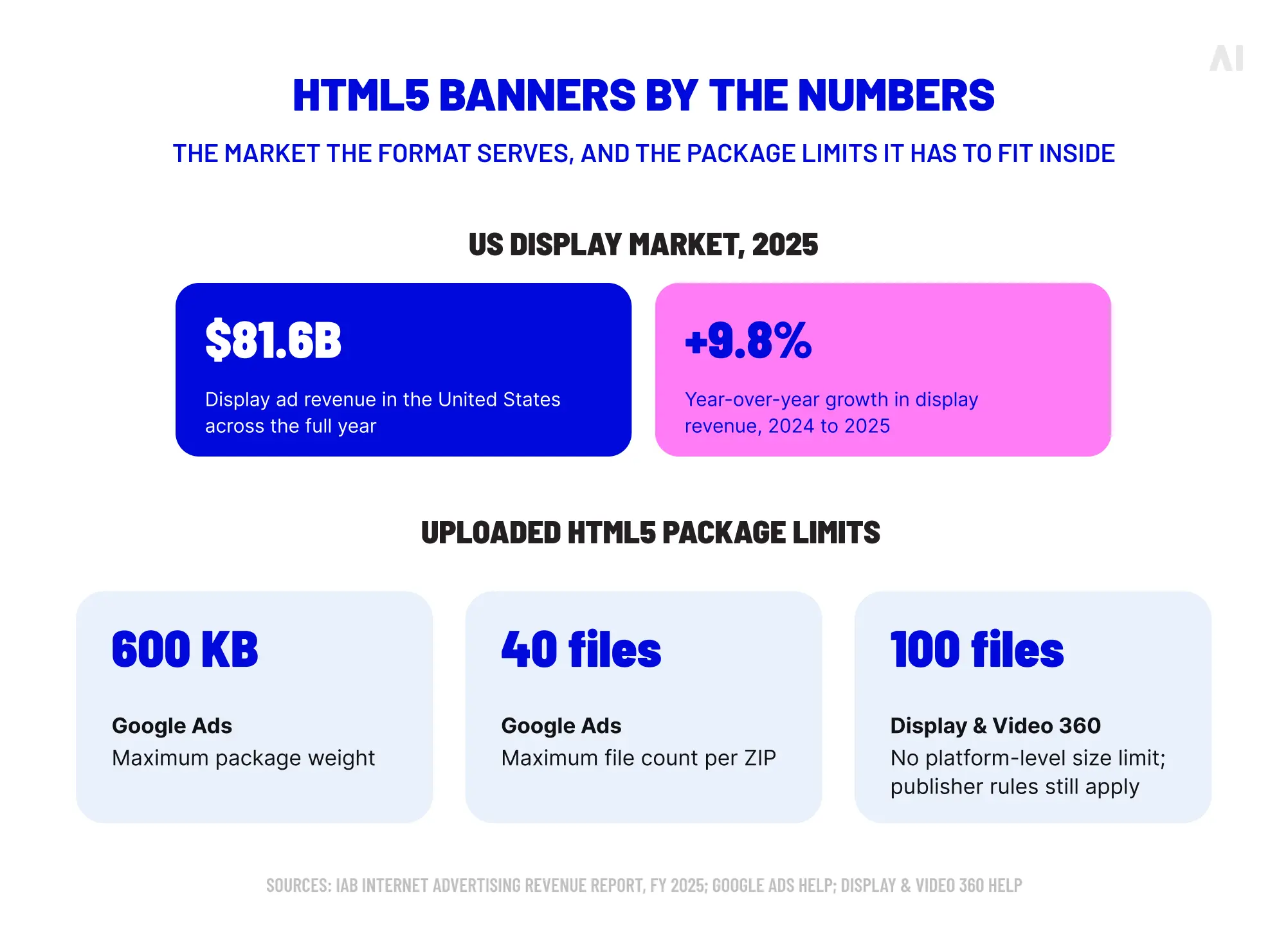
HTML5 banner ads give display teams more creative range than a single image. They can reveal a message in stages, demonstrate a feature or respond to an action such as a tap or swipe. In a US display market that generated $81.6 billion in revenue in 2025, up 9.8% year over year, that flexibility has a substantial field in which to operate.
The format still needs discipline. HTML5 describes the technology used to build the creative. It does not automatically make an ad responsive, dynamic, interactive, lightweight or effective. Those qualities depend on the concept, production choices and environment in which the files are served.
This guide explains what HTML5 banners contain, how they compare with adjacent formats and how to create units that are planned, packaged, tested and ready for trafficking.
TL;DR: Key takeaways
- HTML5 banners use HTML, CSS and JavaScript alongside approved creative assets.
- Their value comes from purposeful sequencing or interaction, rather than technical complexity for its own sake.
- Media and platform requirements should be confirmed before design and development begin.
- Asset paths, click behavior, package integrity and rendering all require technical QA.
- Responsive HTML5 creative is different from an asset-based responsive display ad assembled by a platform.
- Campaign measurement must establish if the creative supports the intended business outcome.
What are HTML5 banner ads?
HTML5 banner ads are display creatives built with standard web technologies. HTML provides the elements and basic structure, CSS controls their appearance and position and JavaScript can manage timelines, states and user interactions. Images, SVGs, fonts and other supporting files may sit alongside that code.
The result behaves more like a compact web page than a single image. IAB Tech Lab's HTML5 guidance uses that same comparison and emphasizes that the files must be packaged to support reliable loading and execution.
An HTML5 banner can be fixed-size or responsive, with anything from a restrained transition to a product explorer. Some contain no interaction beyond the main click-through. Others qualify as rich media through video, expansion, games or multiple trackable interactions.
The label identifies the construction method, not a guaranteed feature set. A GIF can animate without HTML5, while a platform-generated responsive ad can adapt without arriving as a completed HTML5 package. Rich media commonly uses HTML5, although standard HTML5 display does not automatically qualify.
HTML5 vs. static, GIF, responsive and rich media ads
These formats can look similar. The practical difference lies in what the advertiser supplies, what the platform assembles and how much behavior the unit supports.
Google Ads describes responsive display ads as asset-based units generated from advertiser-supplied components. An uploaded HTML5 banner arrives as a finished executable creative. Campaign Manager 360 also distinguishes standard HTML5 display creative from HTML5 rich media, with the latter supporting video, expansion and richer interaction reporting.
A static banner may communicate a direct offer more efficiently, while HTML5 earns its production cost when timing, demonstration or interaction improves the idea.
💡 For more on advanced executions, read AI Digital's guide to rich media ads.
How HTML5 banner ads work
An HTML5 banner normally loads inside a controlled frame supplied by a publisher or advertising platform. The browser reads the main HTML file, finds its supporting assets and executes the approved styling and scripts. The package also needs a serving-compatible method for opening and tracking its destination URL.
HTML, CSS and JavaScript
HTML identifies the elements in the creative: containers, text, images, buttons and other components. CSS determines how those elements look, where they sit and how some transitions or animations behave. JavaScript can control a timeline, respond to a tap, switch between products or register a supported interaction.
Many effective HTML5 banners use modest scripting. If CSS can handle a simple transition cleanly, a large JavaScript library may add weight without useful behavior.
Creative assets and file packaging
Images, SVGs, fonts, CSS and JavaScript files must be optimized and referenced correctly. A missing image or incorrect relative path can leave a blank frame even when the main HTML file opens. External resources may also be restricted, so an asset that works in a designer's browser can still fail after upload.
Many platforms accept a ZIP package, but its contents and limits vary. Some require local assets, permit only approved hosted libraries or handle backup images separately. Clicks must also use the serving environment so the platform can record them and traffickers can update the destination.
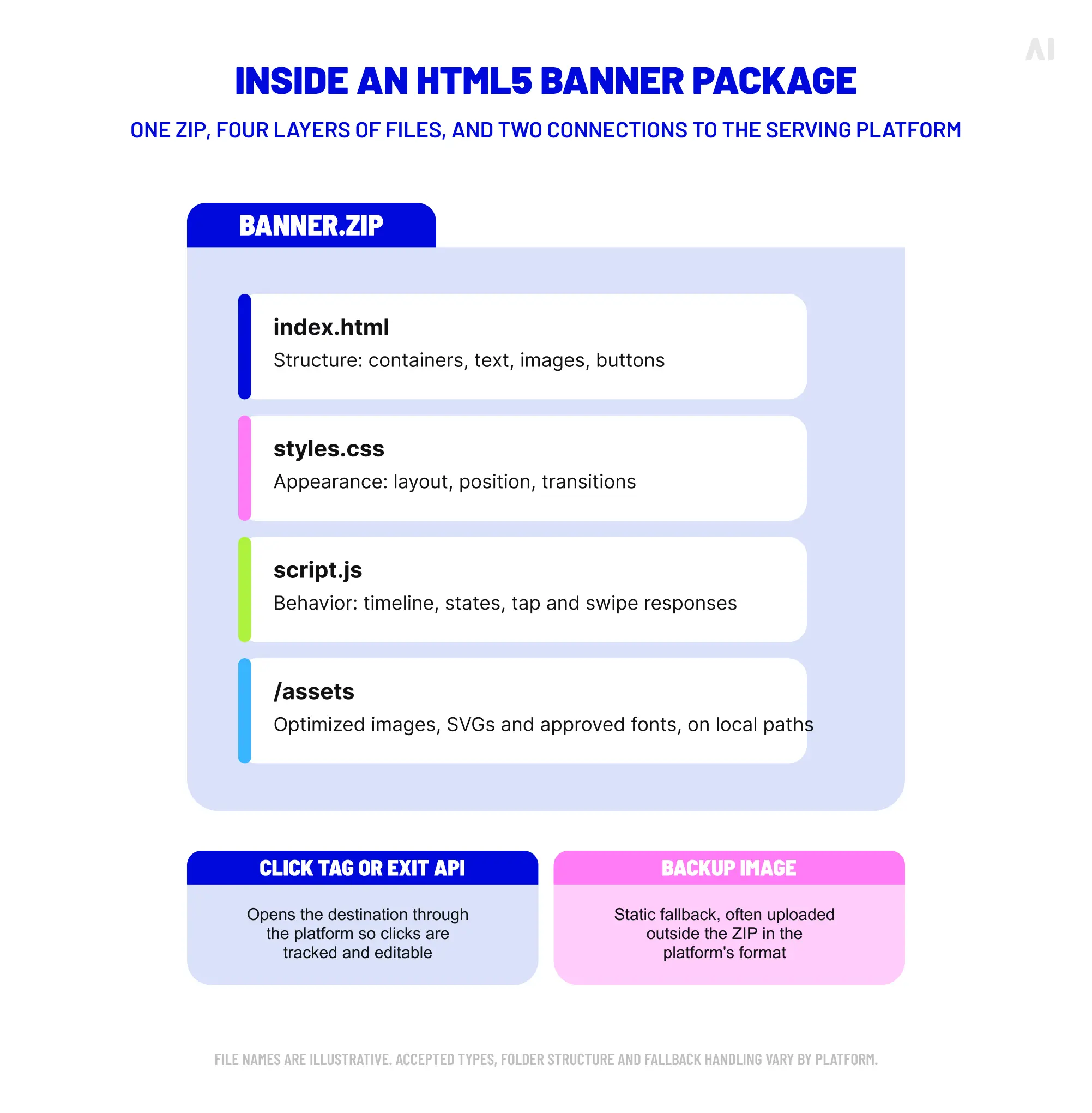
⚡ An HTML5 banner is a small working system. Every visible element, file path and exit has to survive the move from the build environment to the live placement.
When should you use HTML5 banner ads?
HTML5 is useful when the message benefits from time, movement or user control. It can present several ideas without placing them all in one frame, draw attention toward a CTA, demonstrate a product function or let users explore a small set of options.
The additional production is often justified when a campaign needs to:
- reveal information in a deliberate sequence;
- demonstrate a feature or before-and-after state;
- display several products within one placement;
- support a simple, intuitive action such as a swipe or tap;
- create a richer execution for premium inventory;
- adapt one structured concept across several fixed placements.
A static banner may be the better choice for a short message, a tight deadline or inventory with strict creative restrictions. It can also be sufficient when movement adds no explanatory value. Production resources should follow the communication requirement, rather than the assumption that a more elaborate format will be more persuasive.
HTML5 banner ads examples and common use cases
These patterns illustrate what HTML5 can add without turning every banner into a miniature application.
For instance, a software company could introduce a problem, demonstrate the relevant feature and end on a concise CTA. A retailer could let users move through several products without leaving the placement. A travel advertiser could invite a swipe between destinations when the inventory supports it.
AI Digital's high-impact advertising capabilities include expandable, parallax, swipeable, interactive and shoppable formats. These executions require suitable placements and measurement plans. The functional idea should lead, with animation and interaction used to support it.
How to create HTML5 banner ads: Step-by-step
The same production logic applies to manual coding, visual authoring tools and specialist studios.
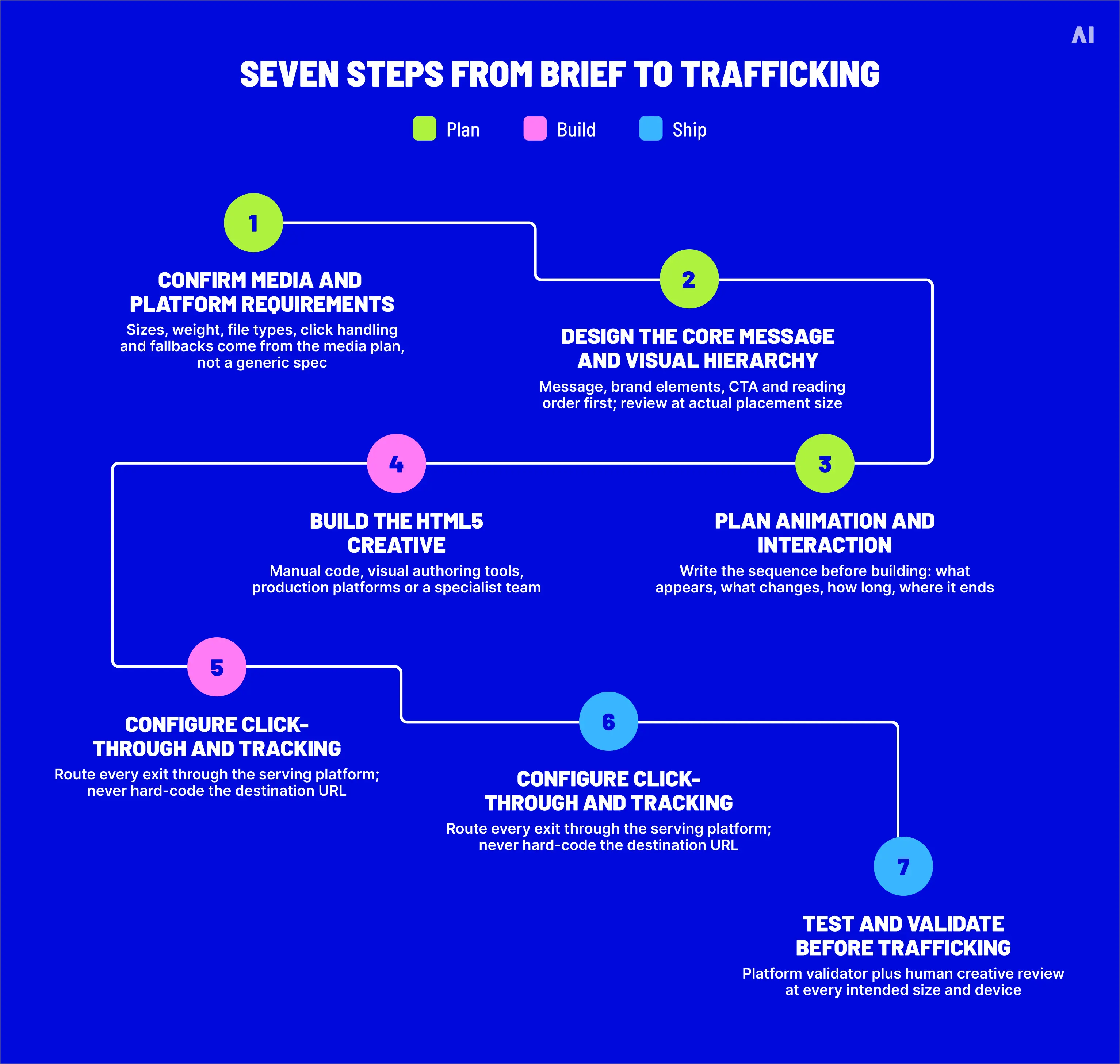
Step 1: Confirm media and platform requirements
Start with the media plan. Identify the publisher, DSP, ad server or platform, then confirm the specifications for the creative type being purchased before approving final layouts or animation.
Check:
- serving dimensions and accepted creative types;
- total file or package weight;
- permitted file types, fonts, libraries and external requests;
- click-through and exit implementation;
- animation, interaction, audio or video restrictions;
- backup-image or fallback requirements;
- validation, review and publisher-specific policies.
Google Ads' uploaded HTML5 requirements, for example, differ from the requirements published for DV360. An agency may need separate packages for creative that looks identical to a viewer.
Step 2: Design the core message and visual hierarchy
Define the message, brand elements, imagery, CTA and reading order before planning motion. The opening frame should provide an immediate point of entry and the final frame should hold long enough for the viewer to understand the offer and act.
Review the banner at its actual size. Copy that looks restrained on a large canvas can become unreadable in a compact unit. Establish contrast, spacing and CTA prominence before adding animation.
Step 3: Plan animation and interaction
Write a sequence before building. Identify what appears first, what changes, how long each state remains visible and where the creative ends. Movement should reveal information, direct attention or demonstrate a feature.
For interactive units, define the action and response in advance. A carousel needs visible controls or an intuitive gesture. A hotspot needs a clear cue, including on touchscreens.
Avoid several elements moving in competition, transitions that pass too quickly to read and long openings that postpone the brand or main message. Repeated motion also needs restraint, particularly when the ad remains in view beside editorial content.
Step 4: Build the HTML5 creative
Teams have four common production routes:
- Manual development: A developer writes the HTML, CSS and JavaScript for detailed control.
- Visual authoring tools: Applications such as Google Web Designer provide an interface and generate HTML5 code.
- Creative production platforms: Templates and reusable components support controlled variations.
- Specialist creative teams: Designers and developers collaborate on custom or multi-platform executions.
Generated and handcrafted code must both conform to the selected ad environment and remain understandable to the trafficking team.
Step 5: Configure click-through and tracking
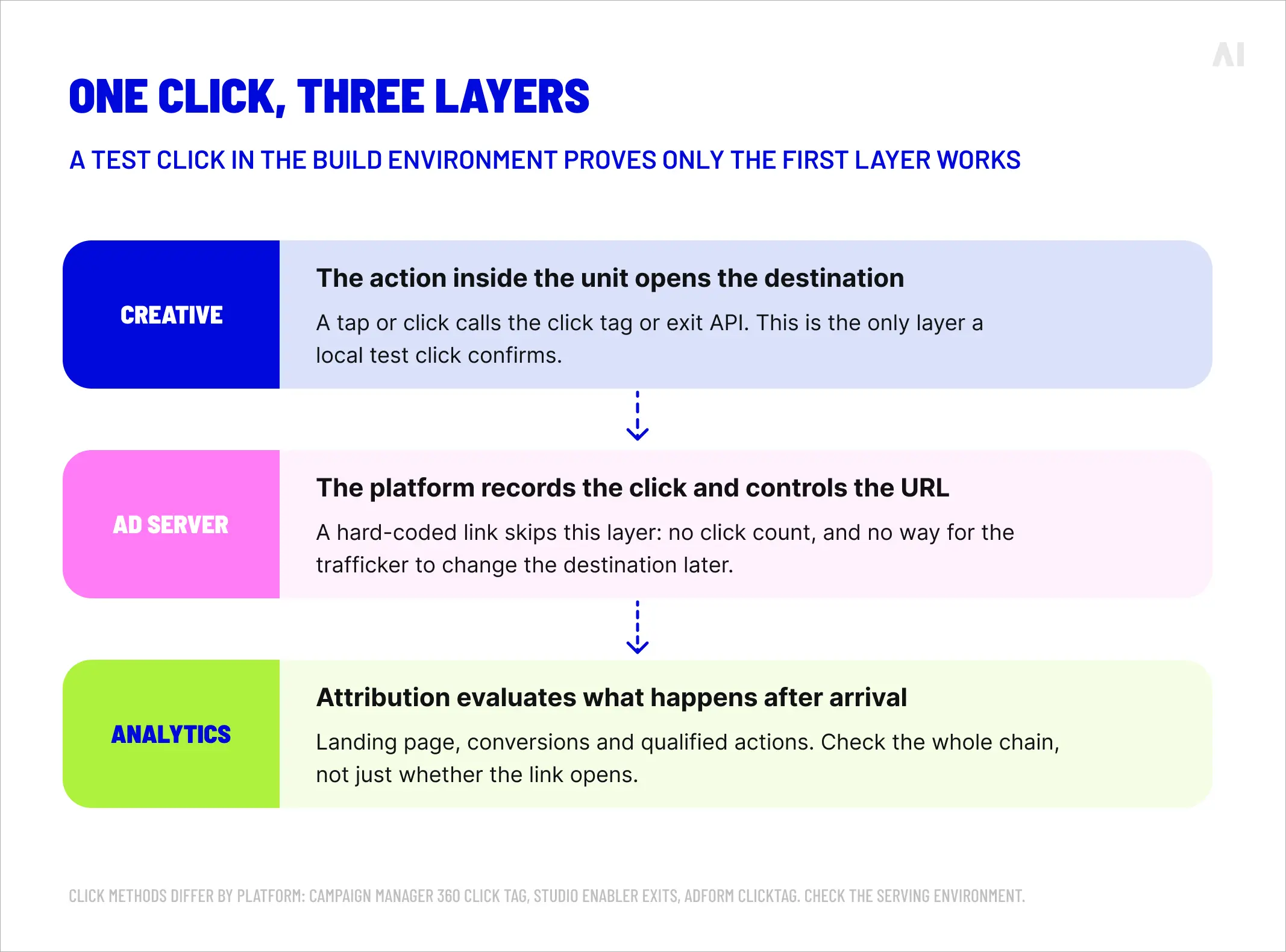
Define the clickable area, destination and any secondary exits through the serving platform. A hard-coded link may work locally while bypassing tracking or preventing later URL changes.
Campaign Manager 360 advises developers to use a readable click-tag variable, while rich media in the same ecosystem uses Studio Enabler exits. Adform has its own DHTML and clickTAG method. One code example cannot serve as a universal solution.
Keep three layers separate during QA:
- the action inside the creative that opens the destination;
- the ad server or platform mechanism that records the click;
- the analytics and attribution that evaluate behavior after arrival.
A test click confirms only the first layer unless the full serving and measurement chain is checked.
Step 6: Optimize and package the creative
Once the banner works, compress raster images, simplify oversized SVGs and remove unused assets. Avoid a large library for one small effect and reduce external calls that could delay the first frame.
Before creating the package:
- verify every asset path;
- confirm that all required files are present;
- remove source files and unused exports;
- check the declared dimensions and metadata;
- use clear, permitted filenames;
- follow the required folder and ZIP structure;
- prepare the fallback asset in the form requested by the platform.
A carefully designed sequence cannot communicate if essential assets arrive late or fail to render.
Step 7: Test and validate before trafficking
Run the package through the platform validator or upload workflow, then conduct a human creative review.
Test:
- dimensions and rendering at every intended size;
- text legibility at the actual placement size;
- animation order, pacing and final frame;
- CTA visibility throughout the relevant sequence;
- hover, tap, swipe and click interactions;
- exit behavior and the final destination URL;
- missing assets, broken paths and console errors;
- overflow caused by resizing or localization;
- required browsers, devices, WebViews or serving previews.
Use the platform preview because local testing does not reproduce every serving condition. A validator can catch unsupported code, but it cannot judge a crowded hierarchy, ambiguous CTA or slow message.
⚡ Passing validation means the files meet a technical gate. It does not establish that the banner communicates well or will produce the desired campaign result.
HTML5 banner specs and platform requirements
There is no single specification for all HTML5 ads. Requirements belong to the serving environment and may be narrowed by a publisher or inventory deal. Check them before production and trafficking, especially when reusing a package elsewhere.
Google Ads currently limits uploaded HTML5 packages to 600 KB and 40 files, while DV360 allows up to 100 files and states that its ZIP upload has no platform-level size limit, subject to publisher requirements. A generic specification can therefore derail production.
The term HTML5 responsive banner ads is often used for completed units built to adapt across specified dimensions. DV360 explains that a responsive HTML5 creative uses CSS rules to resize and restyle its elements, although serving sizes must still be selected. This remains distinct from giving a platform separate assets to assemble.
IAB Tech Lab's New Ad Portfolio distinguishes fixed and flexible specifications and promotes lightweight, user-controlled experiences. Platform and publisher documentation supplies the final limits.
Common HTML5 banner ad mistakes
Most failures begin earlier than the upload screen. A concise preflight review should look for:
- designing the banner before confirming where it will run;
- adding movement without a clear communication purpose;
- oversized images, unused scripts or unnecessary libraries;
- missing assets and incorrect relative paths;
- hard-coded or incorrectly configured click-throughs;
- unreadable copy or a final frame that disappears too quickly;
- resizing one layout mechanically across every placement;
- assuming the same package will work in every platform;
- skipping platform validation or human creative QA;
- treating successful validation as evidence of campaign performance.
Use the checklist before handoff, while the designer, developer and trafficking team can still resolve issues together.
How to measure HTML5 banner performance
HTML5 is a production technology, so its KPIs depend on the objective and functions built into the unit. Awareness campaigns may emphasize viewability, reach and attention. Direct-response campaigns may focus on conversions, qualified actions, revenue or ROAS. A swipe or expansion has limited value if it does not contribute to the intended outcome.
Relevant measures may include:
- impressions and viewability;
- clicks and CTR;
- interaction rate and specific engagement events;
- time spent with an interactive unit;
- conversions and qualified actions;
- revenue, acquisition efficiency or ROAS;
- brand lift or attention outcomes where suitable.
Campaign Manager 360 can report HTML5 impressions, interaction time and interactive impressions alongside clicks. Other environments may define engagement differently, so specify each event before launch.
When comparing formats, account for audience, placement, inventory quality, offer, frequency, creative concept and media delivery.
💡 AI Digital's guide to display advertising KPIs connects delivery metrics with campaign and business goals.
⚡ Interaction data can explain how people used the creative. Business metrics show if that behavior contributed to the campaign objective.
How to scale HTML5 banners across sizes and markets
Scaling begins with a modular concept. Reusable components, typography rules and planned breakpoints let teams adapt a banner without rebuilding every version. Templates can preserve approved brand and interaction logic.
A wide leaderboard and a tall mobile banner require different information flow. Animation paths may change, controls may need larger touch areas and copy may need a shorter alternative.
Translated text can expand, alter line breaks and require different disclaimers, prices or destinations. Keep click configuration, package contents and QA records connected to each version.
Automation can accelerate resizing and variation, but its output still needs rules and review to preserve the original concept.
How AI Digital supports HTML5 and interactive creative
AI Digital's AI Creative Studio combines AI-assisted production workflows with human creative expertise. Its capabilities include HTML5 banners, interactive and rich media experiences, multi-platform versioning, cross-channel adaptation, resizing and localized variants.
Teams can adapt an approved concept to selected placements, develop suitable motion or interaction and produce the required versions. Human review checks brand consistency, layouts and execution quality before trafficking.
The value lies in producing the right versions for the media plan. Each platform still requires verification, each package requires creative and technical QA and performance must be assessed after launch.
Build HTML5 creative around the placement, not the technology
HTML5 expands the range of behavior available inside a banner, but complexity should never become the campaign objective. The strongest execution begins with the environment in which the ad will run, then moves through message, design, purposeful motion, development, packaging and QA.
Once the campaign is live, measurement completes the process. The result should communicate clearly at the intended size, function correctly in the serving environment and support an outcome the team can evaluate.
If you want to create HTML5 banners that are built for real placements and ready to scale across platforms, talk to AI Digital about combining creative production, adaptation and media-aware execution.