AI Avatar Ads: How to Create Spokesperson Videos at Scale


AI avatar ads give marketers a faster way to revise presenter-led videos when scripts, offers, audiences, formats or languages change. The format already has substantial visibility: in YouGov’s July 2026 survey of 2,012 UK adults, 69% said they had seen online advertisements featuring AI-generated actors.
The strategic work starts before generation. Each version needs a specific buying reason, credible product evidence and a clear next step. Production flexibility makes those variations easier to create; their advertising value must be assessed through campaign results.
This guide covers the practical workflow from objective and spoken script to finished creative. It explains how to build meaningful variations, localize the complete ad, adapt execution for each platform, review quality and claims, handle consent and disclosure, and use testing to decide what deserves further investment.
AI Avatar Ads at a Glance
- Build the advertising idea before choosing the avatar. Define the audience, offer, buying reason, opening hook and CTA. Write for spoken delivery, then support the presenter with accurate product footage, demonstrations and readable captions.
- Scale meaningful differences. Vary hooks, benefits, objections, offers, proof and CTAs alongside presenters. Label what each version tests. Keep focused comparisons to one main change so results can inform the next creative decision.
- Approve the master before multiplying it. Check claims, pronunciation, lip sync, product accuracy, pacing and captions. Correcting these problems before localization and versioning prevents the same mistake from spreading across the campaign.
- Adapt the complete ad to its market and placement. Localization includes terminology, cultural context, offers, visuals and pronunciation. Platform adaptation includes aspect ratio, duration, opening seconds, sound behavior, safe zones and CTA treatment. Verify paid-ad requirements separately for each platform.
- Treat permission, truthful claims and disclosure as separate checks. In YouGov’s July 2026 survey of 2,012 UK adults, 94% believed companies should disclose AI-generated actors in ads. Secure likeness and voice rights, check commercial licenses and avoid invented customer experiences—even when AI use is labeled.
- Measure against the campaign objective. Choose qualified-lead cost, sales or brand lift according to the goal. Use retention and CTR to diagnose creative issues, keep comparisons consistent and feed findings back into scripts and production briefs. A winning execution does not establish that AI avatars outperform human advertising generally.
What Are AI Avatar Ads?
AI avatar video ads use digitally generated or AI-powered presenters to deliver scripted brand messages. The presenter may be a licensed stock avatar, a digital likeness created with a person’s consent, or a fully synthetic character.
An AI spokesperson video can take the form of a direct-to-camera product introduction, narrated demonstration, explainer, promotional message or localised social ad. The presenter delivers the explanation; supporting footage, screenshots and product imagery show the viewer what the message refers to.
The format differs from a traditional spokesperson shoot, which records a human performing the script. It also differs from genuine customer UGC: a synthetic presenter’s creator-style appearance does not establish personal experience with the product. Broader AI-generated video can feature scenes or animation without a presenter, while corporate avatar videos typically support training or internal communication.
Avatar production can overlap with deepfake techniques. Permission and truthful presentation remain essential: a synthetic presenter should not imply an unauthorised endorsement or describe an invented customer experience. Viewers also expect transparency.
Creator-style ads produced with AI UGC video generator tools can resemble customer videos, but that appearance does not establish a genuine customer experience. The avatar delivers a brand’s script rather than sharing its own experience with the product.
Where AI Spokesperson Videos Make Sense
AI spokesperson videos are useful when a campaign needs repeated message changes while retaining approved product assets. An e-commerce brand, for example, could reuse its product footage and generate different introductions for first-time buyers, returning customers or a seasonal promotion.
The format can support several recurring tasks:
- Creative variation and testing: compare presenters, scripts, hooks or CTAs while keeping enough other elements consistent to interpret the results.
- Localisation: adapt the language, pronunciation, captions and offer for each market.
- Always-on refreshes: update promotions or address another customer objection without rebuilding the entire video.
- Explainers and demonstrations: use the presenter to guide viewers through accurate product footage or screen recordings.
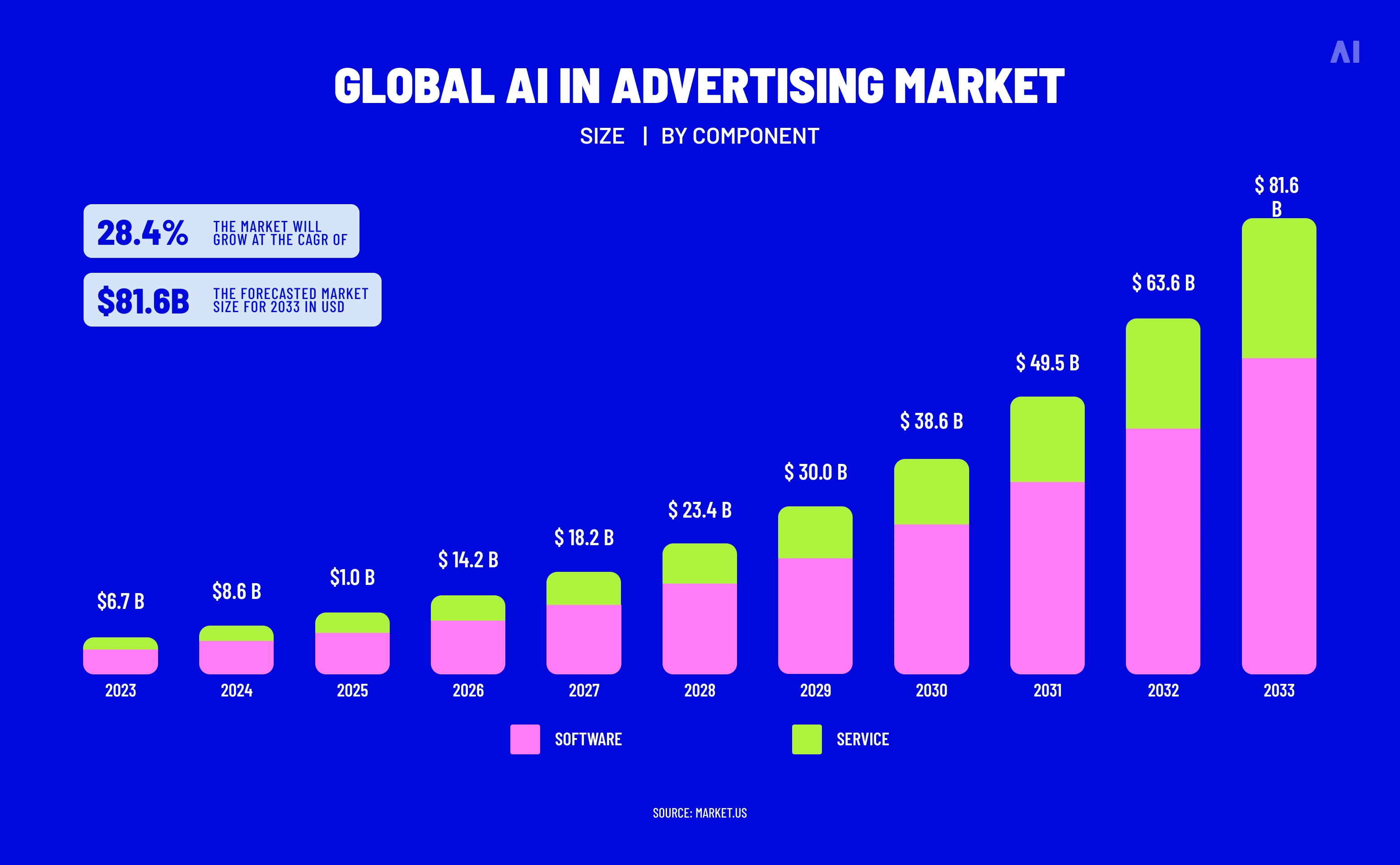
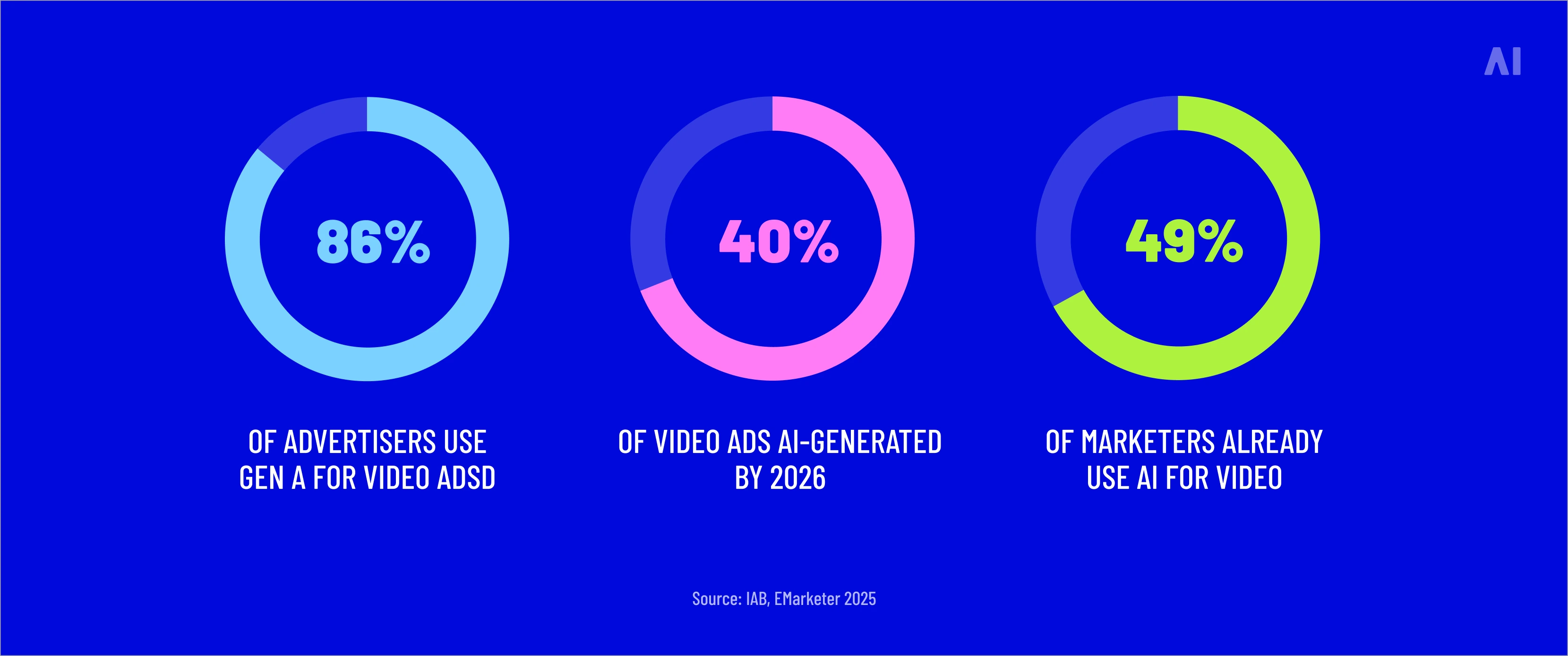
IAB’s July 2026 report found that nearly two in three surveyed digital-video ad buyers use generative AI for video creative. The finding covers GenAI broadly and does not measure avatar adoption separately.
For avatar advertising, the practical advantage is the ability to regenerate presenter delivery for planned variations. Whether those variations outperform filmed talent remains a campaign question: more production capacity does not establish better advertising performance.
What Makes an Effective AI Spokesperson Ad
An effective AI spokesperson ad starts with a clear selling idea. Before selecting the presenter, decide what the viewer should understand, what evidence supports the message and what action follows. The avatar’s role is to make that explanation easier to follow.
The opening hook should introduce a specific problem, benefit or question that the rest of the ad addresses. Avoid an attention-grabbing opening that leads into an unrelated pitch. Write the script for speech, using short sentences and concrete language. For a transcription app, “Upload your recording, then review the transcript” explains more than “Transform your workflow with intelligent technology.”
Choose the presenter and voice together. Consider the audience’s familiarity with the product, the message’s tone and the delivery required. Listen for clear pronunciation, natural emphasis and pauses that give important information room to register.
Build the visual plan around the explanation. Show the feature when the presenter describes it, keep product details accurate and make captions readable within the placement’s visible area. Pacing should allow viewers to understand the demonstration without competing speech, overlays and transitions.
End with a specific CTA that matches the destination: watch a demo, explore the product or claim the stated offer. The presenter supports the advertising idea; visual realism alone does not establish credibility or campaign effectiveness.
How to Create AI Avatar Ads Step by Step
To create AI avatar video ads, move from campaign decisions to production and approval. In Gartner’s 2026 CMO Spend Survey, 70% of CMOs said their internal marketing processes were not mature enough to implement and scale AI. The survey covered 401 marketing leaders in North America, the UK and Europe, mostly from organisations with over $1 billion in annual revenue.
Start With the Objective, Hook, and Script
Begin with the action you want the ad to produce. A purchase campaign might answer a buying objection; a lead-generation ad might explain what a prospect will get from requesting a demo. Set the audience, offer and key message before choosing a presenter.
Then write the script as spoken language. Give each sentence a job: introduce the problem, explain the benefit, support it or ask for action. For an illustrative travel-bag ad, describing where the charger fits is more useful than promising “effortless organisation.”
Read the script aloud and time it. If it overruns, remove secondary points before accelerating the voice.
Choose the Avatar, Voice, and Delivery
With the script in place, choose a presenter who fits the message and language. A stock avatar offers a ready-made option; a custom avatar can represent a consenting founder or spokesperson. Check advertising permissions before investing in either.
Licensing can change the decision. Synthesia’s published policy restricts stock-avatar use in paid social advertising without express written consent from Synthesia; custom-avatar use also requires appropriate consent from the individual.
For a custom likeness or cloned voice, document permission for the intended advertising uses, including markets and duration. Creating the asset inside a tool does not establish every commercial right.
Now audition a short passage containing the brand name, product terminology and offer. Listen for pronunciation, accent, emphasis and pacing. Where available, adjust emotion or delivery controls to suit the script, then review the result rather than assuming the setting worked. Have a fluent speaker check each target language.
Build the Product and Visual Context Around the Presenter
Build the edit around what the viewer needs to see. In the travel-bag example, show the actual compartment when the presenter explains where a laptop or charger goes. The footage provides the evidence; the avatar directs attention to it.
Use screenshots for software features, product footage for physical demonstrations and approved images for packaging or variations. Generated interactions need particular scrutiny: an attractive render can still misrepresent how a product opens, fits or functions.
Plan captions, feature labels, branding and backgrounds alongside the script. Keep text clear of platform interface elements. Introduce supporting motion or a cut when it helps explain the product, and let demonstrations occupy the screen when the presenter adds no further information.
Generate, Review, Refine, and Export Variations
Generate one complete master ad first. Review it as an advertisement, including the destination and offer, before producing the batch.
Check the details that can undermine the finished creative:
- Speech: pronunciation, lip sync, unnatural pauses and abrupt edits.
- Product and claims: accurate features, visuals, prices and substantiated promises.
- Presentation: readable captions, useful pacing, branding and visible disclosures.
- Conversion path: agreement between the spoken CTA, platform button and landing page.
Correct the master, then create the planned script, presenter or offer variations. Review changed elements in context; approval of one version does not automatically approve the next.
Export for the selected placements, reframing for vertical, square or landscape formats as required. Check captions, product details and disclosures again after cropping. Name each version so its script, market and test variable remain identifiable.
Keep the approved script, product assets and edit together; they become the reusable foundation for producing AI video ads at scale without a film crew.
How to Scale Spokesperson Videos Without Making Every Ad Look the Same
Before generating a batch of AI avatar ads, decide what each version should help you learn. Build variations around audience needs, buying reasons and product evidence. A repeatable production process should make those differences easier to create and review.
Build Variations Around the Message, Not Just the Avatar
Consider a travel-bag campaign. A commuter may want easier access to work essentials; a weekend traveler may want packing space. Each angle calls for its own opening, spoken script and demonstration.
Distinguish message tests from presenter tests. An avatar swap tests presenter fit. Testing a selling argument requires changing what the presenter says and the evidence supporting it.
For a focused comparison, change one main element while keeping the audience, placement and other creative elements comparable. Choose tests your budget can support; generating every combination can leave you with more files than useful findings.
Localize the Full Creative, Not Only the Voice
Translation is one production task within localization. In RWS’s April 2026 survey of 200 senior content leaders across the US, UK and Asia-Pacific, 65% reported that AI had slowed localization. The respondents represented large global enterprises, making this a finding about content workflows.
Assign a reviewer who understands both the language and the market. Give them authority to revise:
- The message: terminology, cultural references, presenter fit and the problem addressed in the opening.
- The offer and context: pricing, currency, availability, product visuals and landing-page promises.
- The delivery: pronunciation, pacing, captions, on-screen text and the timing of demonstrations.
A translated next-day delivery offer still needs replacing wherever that service is unavailable. Approve the complete local version before producing further variations.
Use Templates Without Turning Every Ad Into the Same Template
Standardize typography, logo placement, caption styles and review requirements. Keep opening scenes, scripts, presenters, supporting visuals, proof sequences and CTAs editable.
Store approved footage and copy as reusable modules. Track which versions use each module so an expired offer or outdated product image can be replaced across affected ads.
That system makes automating AI ad creative production and scaling what works more practical. The template handles assembly; the team decides which message deserves testing. Review each finished combination for clarity, accuracy and pacing before release.
How to Adapt AI Avatar Ads Across Platforms
Keep the selling idea consistent, then rebuild the edit for its placement. A vertical social ad needs a quick opening and uncluttered visuals; a longer video placement can accommodate a fuller demonstration.
Choose duration against the selected ad format before writing. Shorten the argument, remove competing overlays and adjust caption timing instead of speeding up the voice. Preview with sound on and off, then check that the spoken CTA, platform button and landing-page promise agree.
What AI Avatar Ads Still Need Human Review For
Review the finished export, including every localized or reformatted version. An approved script can still become an inaccurate ad when generation changes the product image, captions alter a number or an edit separates a claim from its qualification.
Assign reviewers to check:
- Script and claims: verify prices, specifications, evidence, offer terms and product demonstrations.
- Presenter and delivery: listen for pronunciation and brand tone; inspect lip sync, facial movement and visual artifacts.
- Audience and language: assess cultural context, presenter fit and localization with someone familiar with the market.
- Design and release: check visual hierarchy, captions, pacing, CTA, permissions, required disclosures and category-specific compliance.
Ask what each variation actually tests. A different face reading identical copy should be identified as a presenter test.
When evaluating creative automation tools and platforms, look for script approvals, version history and access to final exports for review.
Disclosure, Consent, and Synthetic Spokesperson Risks
Treat permission, truthful representation and disclosure as separate approvals.
For custom avatars or cloned voices, obtain written authorization covering the likeness, voice, AI use, paid placements, markets, duration and permitted edits. Check the provider’s commercial license too. Access to a recording, image or avatar file does not establish permission to use someone’s identity in advertising.
Present fictional spokespeople as brand presenters. Avoid invented customer histories such as “I’ve used this for six months.” If an avatar delivers a genuine testimonial, retain the customer’s authorization and original evidence, attribute it accurately and review how the reenactment is presented. FTC guidance explains that underlying fake or false testimonials remain prohibited and that avatar use can also be deceptive.
IAB and Sonata Insights’ January 2026 report surveyed 505 US Gen Z and Millennial consumers between October 2025 and January 2026: 73% said clear AI disclosure would increase or leave unchanged their purchase likelihood. This measures stated purchase intent.
Disclosure requirements depend on the platform, jurisdiction, content type and how the synthetic person is presented. For example:
- New York: covered advertisements featuring synthetic performers require conspicuous disclosure under a law effective June 9, 2026, subject to its scope and exemptions.
- European Union: Article 50 disclosure duties apply from August 2, 2026 to qualifying deepfake content. Disclosure must be clear at first exposure; machine-readable metadata alone is insufficient.
An AI label does not authorize impersonation, substantiate a claim or make a fabricated endorsement acceptable. Recheck paid-ad policies, disclosure workflows and applicable laws for each target market immediately before publication and launch.
How to Test and Measure AI Avatar Ad Variations
Give each batch a question to answer. In IAB’s July 2026 video-ad report, more than four in ten smaller buyers wanted stronger evidence of generative AI performance and easier platform integration.
Begin with a hypothesis: “Opening with a product demonstration will generate more qualified leads than opening with a presenter.” Set the primary metric, budget and review date before launch.
Test hooks, script angles, offers and CTAs as message variables. Test presenters, voices and pacing as delivery variables. Product demonstrations and visual treatments can test how the evidence is presented. Change one main element when you need to isolate its contribution; label broader concept comparisons accordingly.
Use platform experiments or split tests where available. Keep audience, placements, optimization settings and measurement consistent apart from the variable being tested. Google’s video-experiment setup supports comparing creatives while retaining campaign settings.
Use the same conversion definitions and attribution windows within a comparison. Allow for reporting delays, assess uncertainty and leave inconclusive tests labeled as inconclusive.
A strong click-through rate can identify an effective opening while concealing poor lead quality. Trace results through to the outcome the campaign was meant to produce.
Report findings with their conditions: which versions ran, to whom, when, at what spend and with what uncertainty. An avatar ad beating a particular filmed ad establishes a result for those executions in that test. It does not establish that AI avatars generally outperform human creative, and platform-attributed conversions alone do not demonstrate incremental sales.
How AI Digital Supports Scalable AI-Driven Video Creative
When an approved idea needs social videos, voiceovers and localized campaign versions, AI Digital’s AI Creative Studio provides a production partner combining AI-native workflows with human creative expertise. Strategists, designers and production specialists develop the concept, direct production and review the assets.
Its offering covers connected parts of the production process:
- Original creative: high-fidelity AI UGC, platform-native social video, AI video and motion graphics.
- Audio and language: AI and human voiceovers, audio finishing and localization across campaign versions.
- Campaign adaptation: aspect-ratio changes, shorter edits, multi-platform versioning and updates to approved assets.
Synthetic presenters and AI avatars also form part of its social-video production offering. They can support a spokesperson campaign alongside product visuals, voiceover and supporting creative.
The workflow begins with the campaign objective, audience, channel mix and brand guidelines. Concepts are approved before production; finished assets undergo human review for creative quality, brand consistency and technical requirements. Performance feedback then informs refreshes and subsequent variations.
For marketers, this brings the creative idea and its adaptations into one production brief. A useful starting brief specifies the buying argument, product evidence, required placements, languages, review owners and the question each variation should test.
Scale the Message, Not Just the Number of Videos
As your campaign grows, each new avatar ad should have a clear reason to exist: a different buyer concern, stronger product evidence or another message to test. Build a spokesperson-video workflow that keeps those differences deliberate as production expands.
For your next batch:
- Start with the idea: write a clear spoken script around one buying reason.
- Make variation meaningful: give each hook, presenter or demonstration a specific test question.
- Review before release: check product accuracy, claims, delivery, consent and disclosure.
- Act on campaign feedback: use results to decide what to refine, repeat or retire.
To put that process into production, plan a focused pilot with AI Digital, bringing your campaign objective, approved product assets and first test hypothesis.