CTV ad specs: Creative requirements, formats, and best practices


A polished video is only part of the asset package a streaming campaign needs. The production team may approve the picture and sound while ad operations still needs another rendition, a different duration or confirmation that the interactive elements will work on the booked inventory.
Getting that creative ready to run means coordinating technical specifications, format choices and delivery requirements from the start. This guide explains how those decisions fit together, where publisher requirements differ and what to check before handing over the final assets.
TL;DR: Key takeaways
- CTV ad specs cover the asset and its delivery. Requirements include resolution, encoding, bitrate, frame rate, audio, duration and file size.
- Different formats need different creative. In-stream video, interactive ads, pause ads and other placements have distinct asset and implementation requirements.
- Publisher specifications vary by workflow. The guide compares Amazon, Disney, Roku, Tubi and NBCUniversal/Peacock, distinguishing upload, source-file and playback requirements.
- Delivery involves more than a finished video. VAST, server-side ad insertion, transcoding and publisher approval influence how creative reaches the screen.
- Creative quality and technical readiness need separate attention. The guide covers television legibility, branding, audio, CTAs and QR codes, followed by common mistakes and pre-launch checks.
- AI Digital supports production and adaptation. AI Creative Studio combines AI-native workflows with human expertise to build and adapt assets across CTV formats.
What are CTV ad specs?
CTV ad specs are the technical, delivery and creative requirements an asset must meet to run on connected television inventory. They cover the video itself, the way it is supplied and any additional components needed for the advertising experience.
In connected TV advertising, the publisher name alone does not identify every requirement. You also need the advertising product, inventory source, market and serving method. Different CTV specs can apply to a standard commercial uploaded directly to a platform and an interactive placement bought through a demand-side platform.
Common guidance gives production a starting point; the final placement determines acceptance. Keep a requirements sheet for each deliverable and identify who owns export, trafficking and approval. That makes changes easier to trace when a campaign includes several publishers.
CTV ad specs: Core technical requirements
For standard in-stream video, begin with a clean, high-quality master and prepare the files the delivery partner requests. The following reference summarizes the decisions involved. Exact thresholds belong to the publisher and workflow, rather than one universal set of connected TV ad specs.
Use CTV ad video specs to brief the editor, then confirm the delivery configuration with ad operations. Assign each check to someone who can verify the finished asset, rather than leaving responsibility unclear until upload.
Resolution, aspect ratio, file format, and codec
For standard full-screen placements, 16:9 horizontal creative is the usual starting point. Common dimensions are 1920×1080 for Full HD and 1280×720 for HD, although acceptance varies by publisher. Preserve the original image quality instead of enlarging a small social export and assuming the larger dimensions resolve the problem.
The container and codec describe different properties. MP4 is a container; H.264 describes video compression. IAB Tech Lab’s format guidance identifies MP4 with H.264 video and AAC-LC audio as broadly compatible. A particular workflow can still require another source format or additional encoding settings.
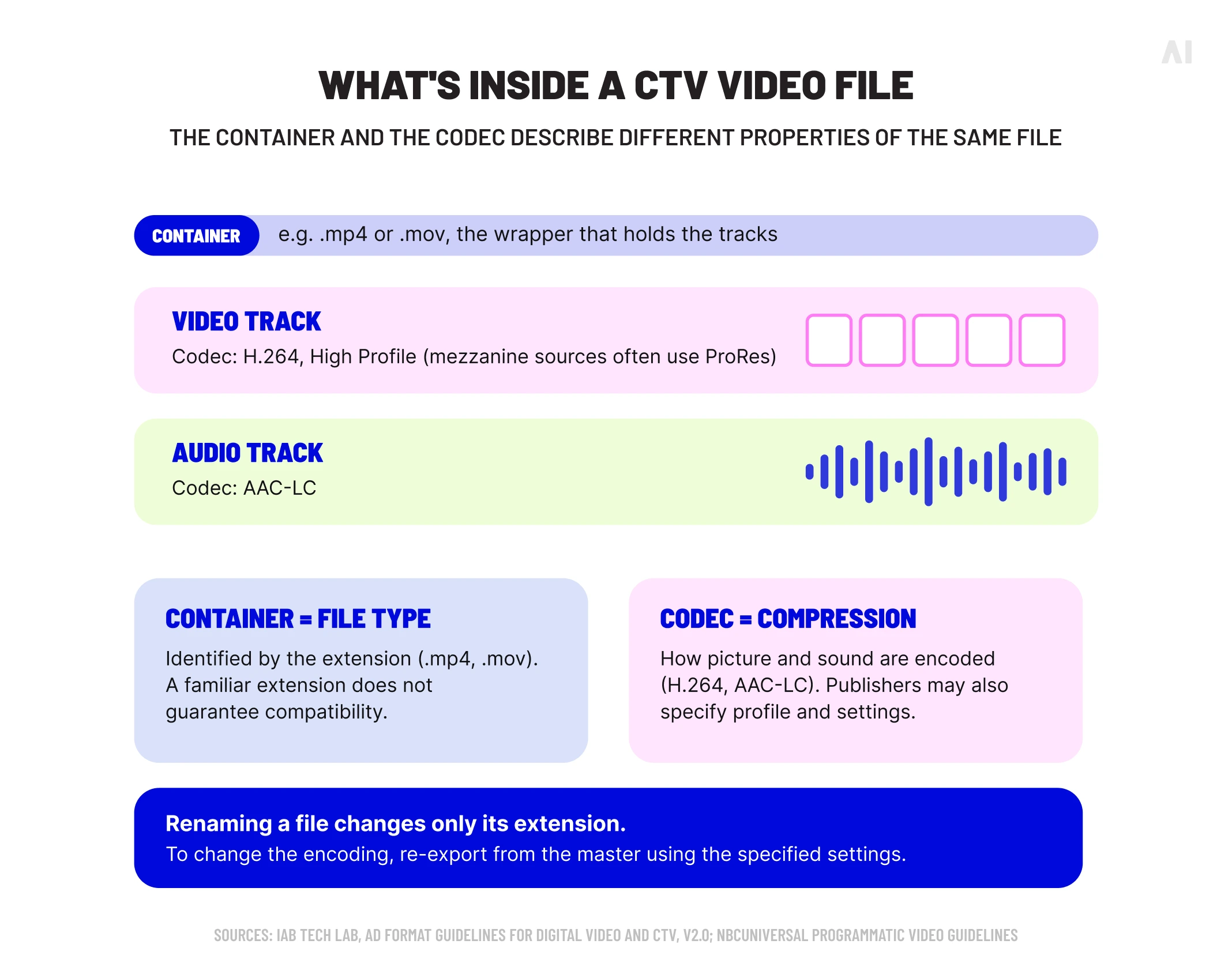
Keep the master available for new exports. A heavily compressed review copy is a poor starting point for further production, and changing its file extension does not change its encoding. Pause, menu and other nonstandard placements need their own asset instructions.
Bitrate, frame rate, audio, and mezzanine files
Bitrate describes the amount of data used per second. Before comparing values, establish whether they apply to the submitted source or a file prepared for playback. The difference can be substantial, as the publisher table below shows.
A mezzanine file is a high-quality source used to create delivery versions. Google’s CTV creative guidance distinguishes this source from ready-to-serve renditions. Providing the right input gives the receiving system material suitable for its encoding process; it does not mean viewers receive the source file unchanged.
Frame rate, meanwhile, needs to match the accepted settings without introducing unnecessary conversion. For sound, check the mix as well as the technical fields. Audio bitrate and sample rate cannot tell you whether dialogue is buried under music or the soundtrack clips.
⚡ A delivery specification is most useful when everyone knows which file it describes.
Duration, file size, and creative review
CTV commonly uses short commercial lengths, but the booked slot governs the deliverable. A file uploader accepting a duration does not establish that every placement can run it. Confirm the required cut before approving the script and edit.
File-size limits also need context. A source upload, a hosted rendition and an interactive asset package can have different limits. Reducing quality until a file passes upload should not replace checking whether the export settings are appropriate.
Finally, CTV ad requirements extend to content approval. Roku’s approval guidance describes technical and content review as distinct stages. Passing the file checks does not establish that the claims, category or destination have been approved.
CTV ad formats and their creative requirements
CTV ad formats change what production teams must supply. Establish the intended experience before finalizing the asset list, particularly when a campaign extends beyond a conventional commercial.
In-stream CTV video ads
In-stream ads run before, during or after streaming content. The distinction between pre-roll, mid-roll and post-roll placements affects the viewing context and available durations, but each asset still needs to meet the receiving environment’s technical requirements.
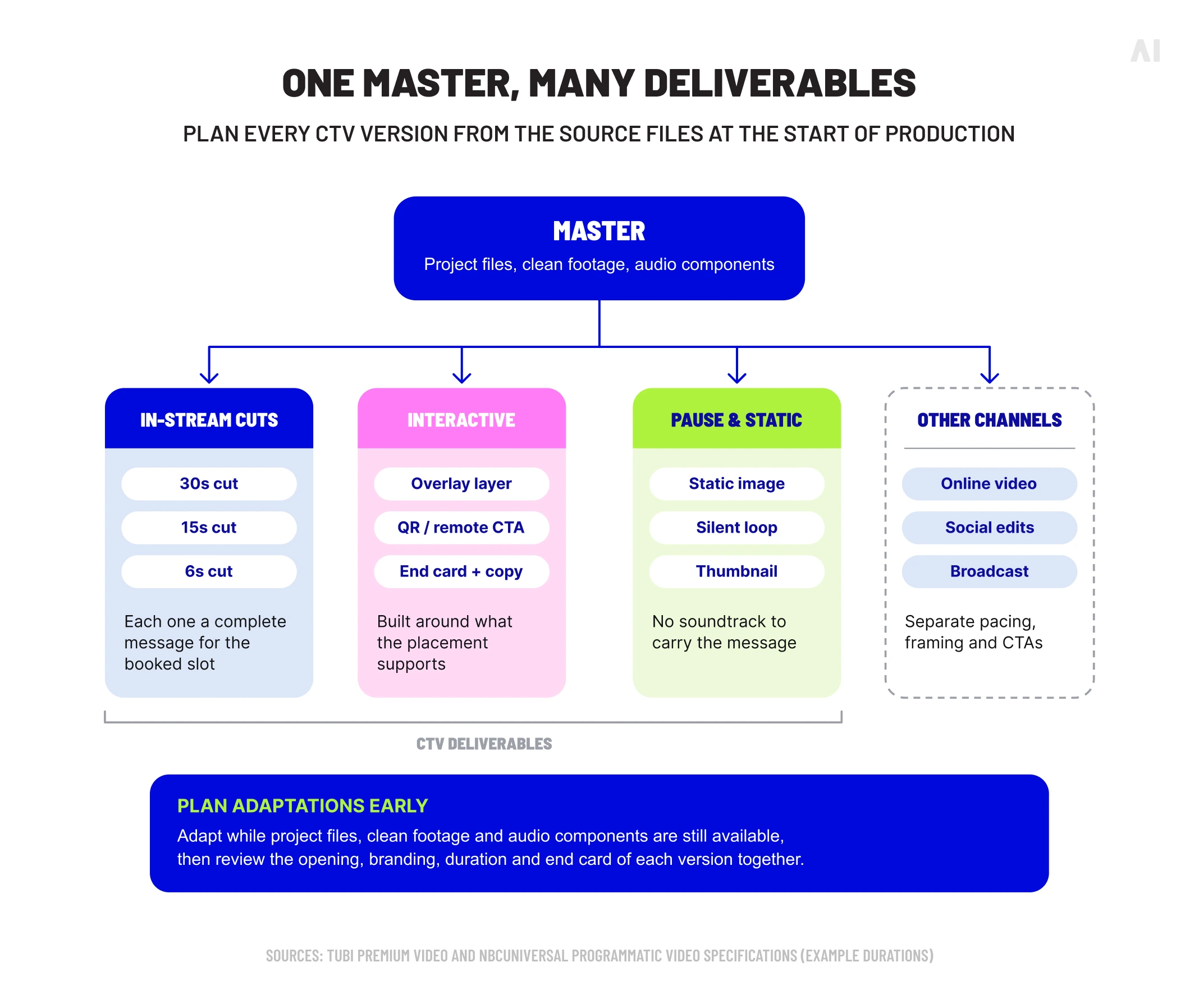
Build each cut as a complete message. Shortening an existing commercial by removing its ending can leave the offer unfinished or the brand unclear. Start with the available time and decide what the viewer needs to recognize, understand and remember.
Interactive and shoppable CTV ads
Interactive video ads can add QR codes, remote-control responses, overlays or shopping elements. Those additions bring production and implementation requirements beyond the video export.
For example, Disney’s Gateway Go requires site-served video and does not accept VAST tags for that product. Its Gateway Shop documentation requests supporting materials such as brand assets, end-card imagery and response copy.
Agree early on who builds each component, how the viewer responds and where that response leads. Review the video with the interaction layer visible so an overlay does not cover the product, offer or required disclosure.
Pause ads and other emerging CTV formats
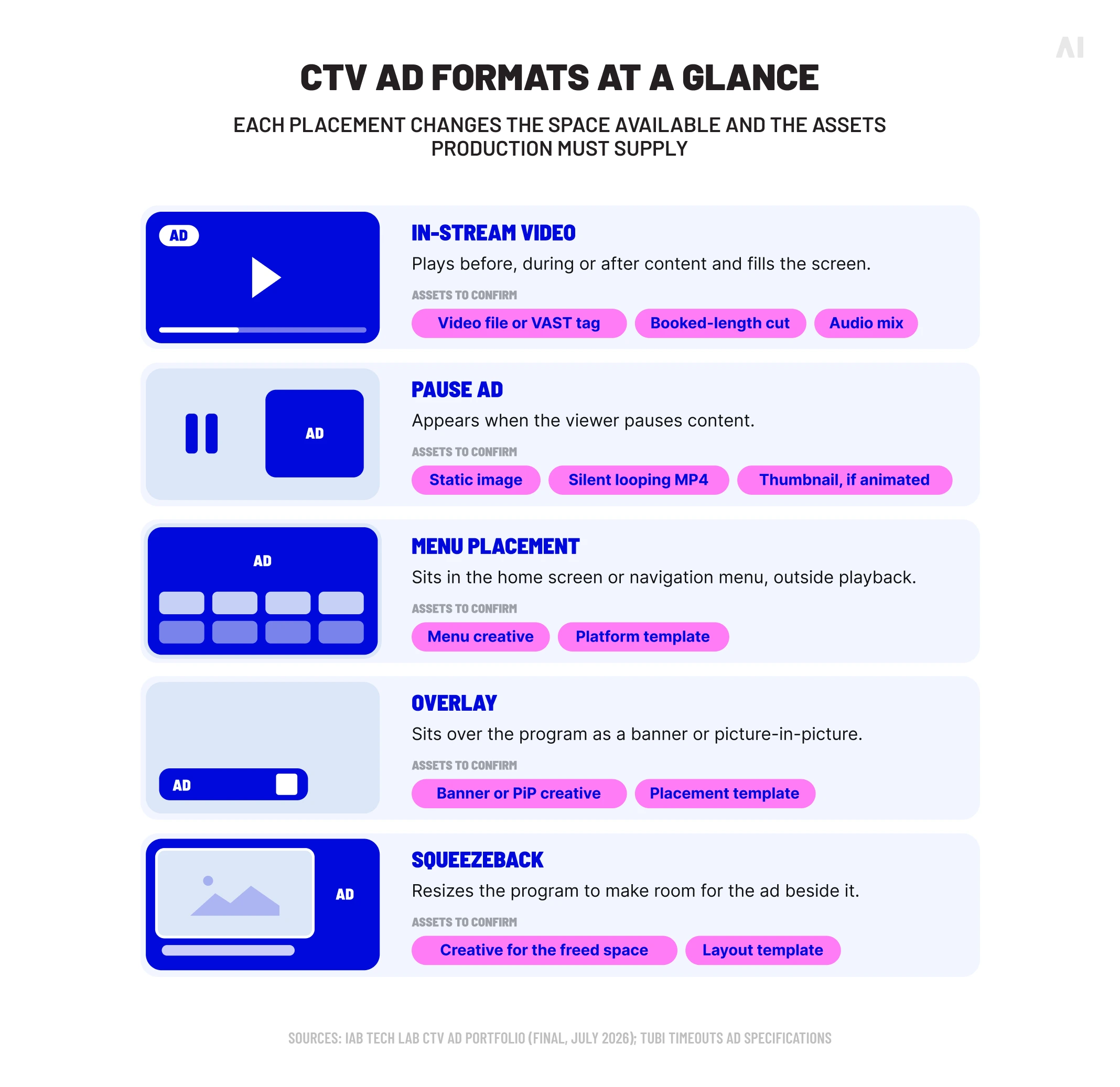
The final 2026 IAB Tech Lab CTV Ad Portfolio covers experiences beyond commercial breaks. Pause ads appear when viewers pause content; screensaver ads are initiated by the app or operating system. Menu placements sit within the interface, while in-scene advertising integrates branded elements into the content.
Overlays cover part of the picture. Squeezeback formats reduce the content area to make room beside it. That distinction changes the space available for creative and the template production needs.
Publisher instructions turn those categories into deliverables. Tubi Timeouts accepts static pause assets, while its US animated option requires a looping MP4, a thumbnail and no audio. A soundtrack-led commercial therefore needs more than a different export setting to work in that placement.
How CTV ad specs differ by publisher and platform
An asset accepted in one environment may need another export or submission route elsewhere. Confirming that route during CTV media buying lets the creative team prepare the correct versions before deadlines become tight.
The comparison below uses official documentation reviewed in September 2026. It focuses on US-relevant workflows. CBR means constant bitrate; VBR means variable bitrate. “Confirm slot” indicates that the cited page does not establish a single duration rule for that row.
❗Roku’s dedicated requirements page and 2026 rejection guidance support the listed settings, but another official help article gives different limits. Confirm the current upload requirements before delivery.
Use these CTV video specifications to identify the relevant documentation, then obtain the full requirements. Audio settings, approved vendors, content restrictions and additional renditions still need checking. For Disney, the table separates serving routes; for NBCUniversal, it separates source and playback files. Combining either pair into one number would conceal a production requirement.
VAST, SSAI, and CTV creative delivery
A VAST tag structures the ad response that tells a player or insertion system where to find media and how to handle associated metadata and tracking. IAB Tech Lab’s VAST documentation provides the standard; each publisher determines which versions and features its workflow accepts.
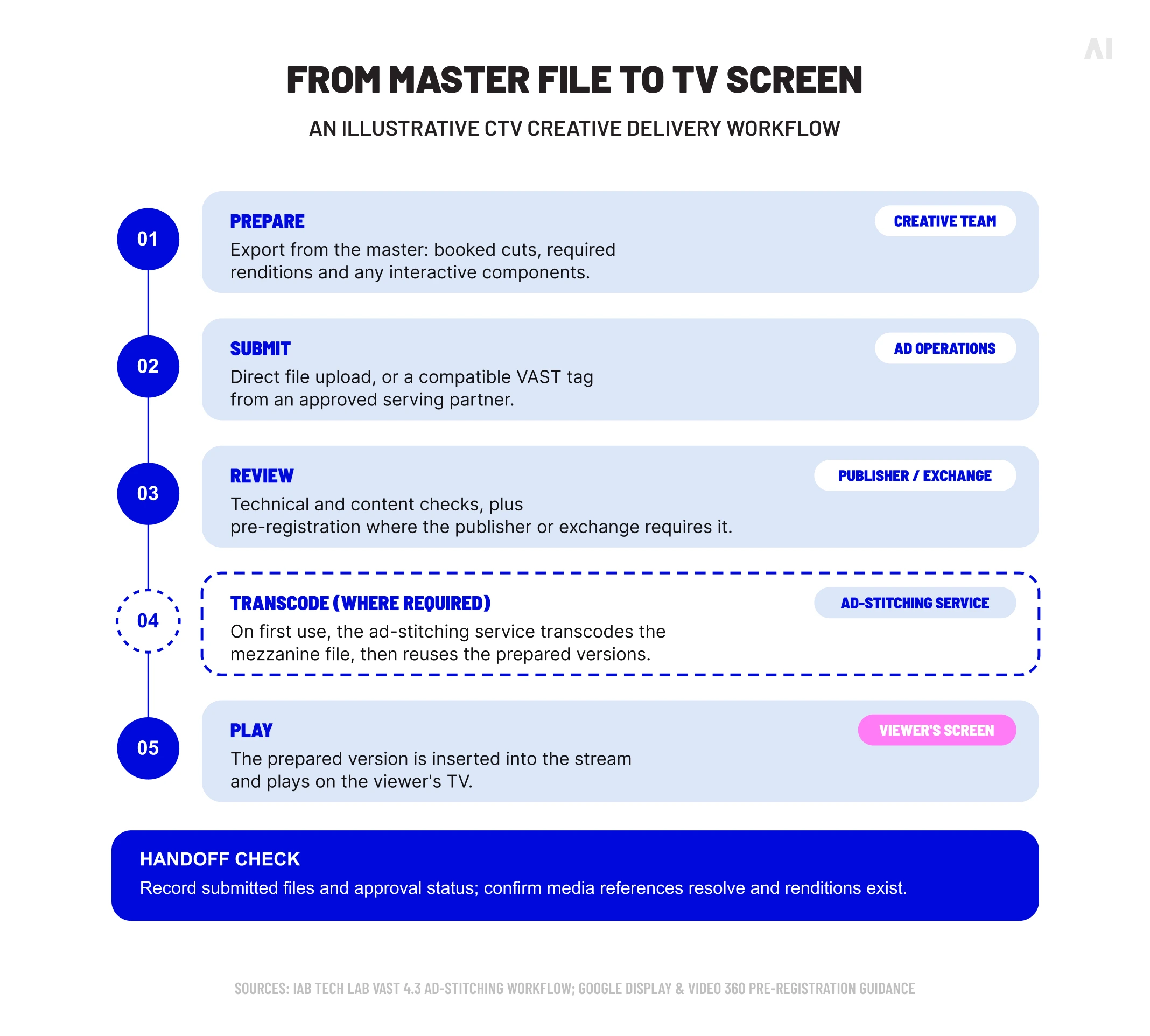
Server-side ad insertion, or SSAI, inserts advertising into the stream before it reaches the viewer. The VAST specification’s ad-stitching workflow describes retrieving a source asset, transcoding it when necessary and selecting the prepared version for insertion. This explains why source quality and processing time belong in the production plan.
Check the delivered response as well as the exported video. Confirm that media references resolve, required renditions are present and the receiving platform supports any interactive technology. A valid tag cannot make an unsupported feature work.
Publisher approval can also be a prerequisite to delivery. Google’s exchange pre-registration guidance documents separate review processes across major CTV supply partners. The production handoff should therefore identify both the submitted files and their approval status.
CTV creative best practices
Technical compliance gets an asset through the required checks. Creative judgment determines how clearly the audience receives the message. Review both before the campaign launches.
Design for the big screen
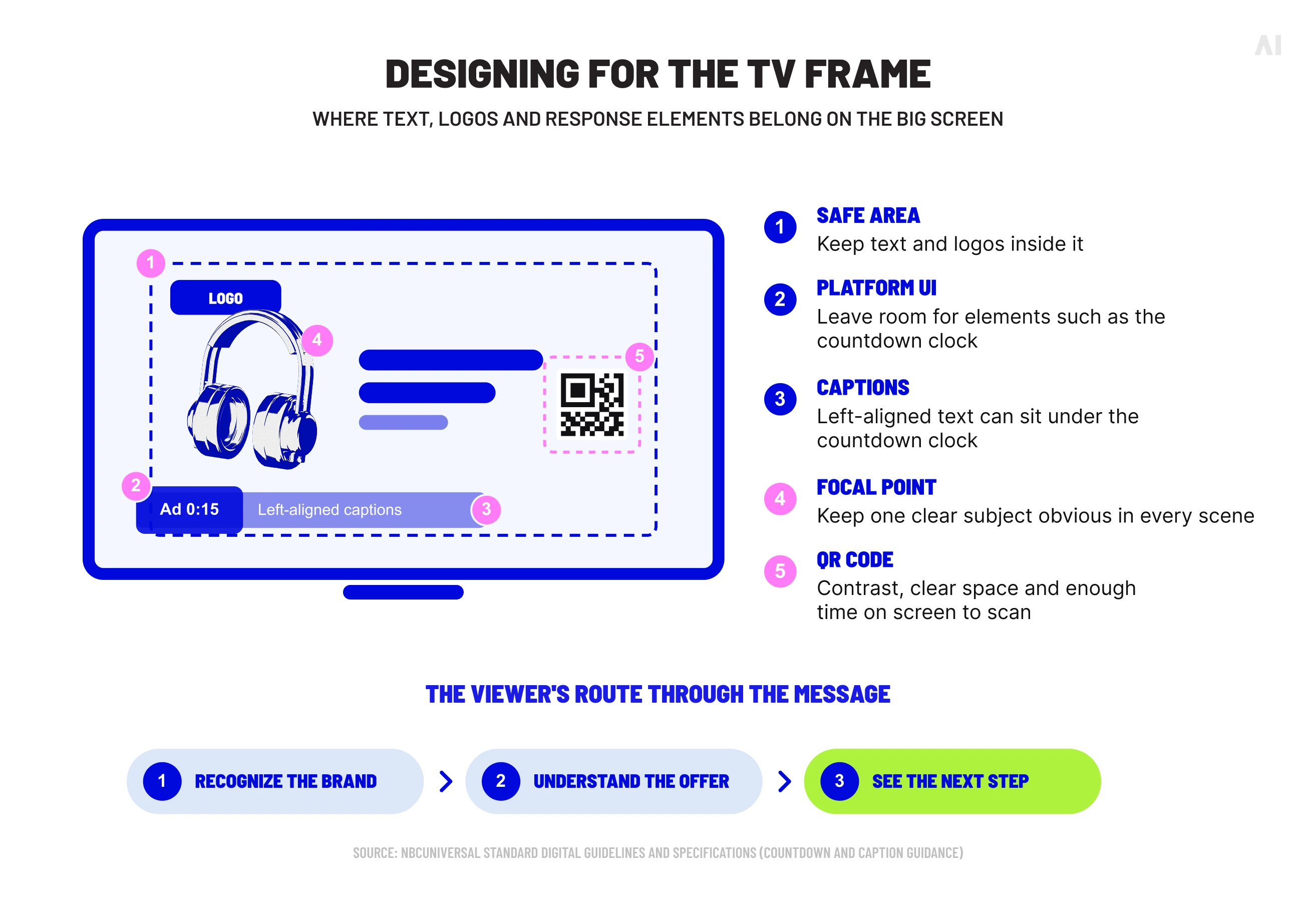
Use a clear visual hierarchy, uncluttered composition and imagery that holds up beyond a laptop preview. Watch the finished ad on a television from a normal seating position. Check that the intended focal point remains obvious throughout the edit.
Allow room for platform elements. NBCUniversal’s standard digital guidelines identify countdown positioning and warn that captions can be obscured. Ask for the placement template before finalizing text and logo positions.
Keep branding and messaging legible
Give the viewer a clear route through the message: recognize the brand, understand the offer and see the next step. Avoid asking a headline, product demonstration, disclaimer and competing promotion to demand equal attention.
Review text for size, contrast and reading time in the finished sequence. A line can be perfectly readable when paused and disappear too quickly during playback. Keep essential information visible long enough to understand without requiring the viewer to anticipate it.
⚡ Review the ad from the couch as carefully as you review it on the editing timeline.
Use audio, CTAs, and QR codes intentionally
For sound-on video, use dialogue, music and effects deliberately. Listen to the complete mix through television speakers, checking that the spoken message remains understandable. Confirm the publisher’s audio requirements independently of that listening test.
A CTA should describe an action the placement supports. For QR-enabled creative, check visibility, contrast, surrounding clear space and scan time. Test the final encoded asset with phones at the intended viewing distance, then follow the destination through to the promised offer.
Interactivity varies by serving method. Amazon’s third-party interactive video guidance currently supports remote-driven “Send to Phone” on Prime Video and excludes QR interactivity for that route. Confirm support before designing the response mechanism.
Adapt creative for CTV instead of reusing the same export
Broadcast, online video and social campaigns can share footage and a central idea. They still need versions suited to their placement, pacing and response options.
Review the opening, branding, duration and end card together. A social edit may depend on close viewing; a broadcast version may have no suitable response instruction for an interactive placement. Plan those adaptations while the project files, clean footage and audio components are available.
Common CTV creative mistakes
Some mistakes prevent delivery; others leave a technically accepted ad difficult to follow. Diagnose the problem before deciding that another export will solve it.
Keep feedback attached to the exact creative version. Otherwise, a corrected file can be confused with an earlier export, or an approved asset can be replaced without the necessary review.
Pre-launch CTV creative checklist
Before trafficking, work through the final assets and configuration together:
- Confirm the destination: publisher, product, market, inventory source and serving method.
- Check the picture: resolution, aspect ratio, scan type, framing and safe areas.
- Inspect the file: container, codec, bitrate, frame rate, size and required renditions.
- Verify timing and sound: booked duration, matching audio length, mix and technical audio settings.
- Validate delivery: hosting, tag format, media references and tracking calls. Check the applicable secure-creative requirements.
- Test response elements: overlays, supported controls, QR codes, redirects and mobile destinations.
- Complete review: brand claims, policy, publisher approval and any pre-registration.
- Preview the approved version: check playback and record the final asset identifier.
Use current official connected TV ad requirements for the actual workflow. Keep the approval record and requirements sheet with the assets so later swaps receive the same checks.
How AI Digital supports CTV creative production
AI Digital’s AI Creative Studio combines AI-native workflows with human creative expertise to produce, adapt and iterate campaign assets. Its capabilities include TV-grade AI video and motion graphics, audio engineering, CTV overlays and QR-enabled experiences, alongside resizing, downcuts and cross-platform adaptation.
For a campaign with several deliverables, the practical opportunity is to plan production around a shared concept and the versions it needs. Storyboarding and rapid prototyping can support that work before teams commit to finished executions.
AI Digital’s role is creative production and adaptation. Final exports and interactive components still need to meet the chosen publisher’s requirements and pass its review. Bring the inventory plan, formats, source materials and deadlines into the production brief so those requirements inform the work from the start.
Build CTV creative that is ready to run
Reliable CTV production begins with the destination and continues through the final playback check. Preserve good source assets, prepare the required versions and give creative decisions the same attention as encoding settings.
⚡ A finished master still needs a delivery plan.
If your campaign needs assets adapted across streaming formats and publishers, discuss your CTV creative requirements with AI Digital. A clear production brief can bring the creative concept, deliverable list and launch schedule into the same conversation.