Digital Signage in Retail: How to Integrate It into Your Retail Media Network


For many retailers, screens inside stores are still treated as operational tools. They are used to show product announcements, seasonal promotions, wayfinding messages, or basic brand content. While these use cases are valuable, they only capture part of the opportunity. Digital signage in retail becomes much more powerful when it is connected to a retail media network and managed as measurable media inventory.
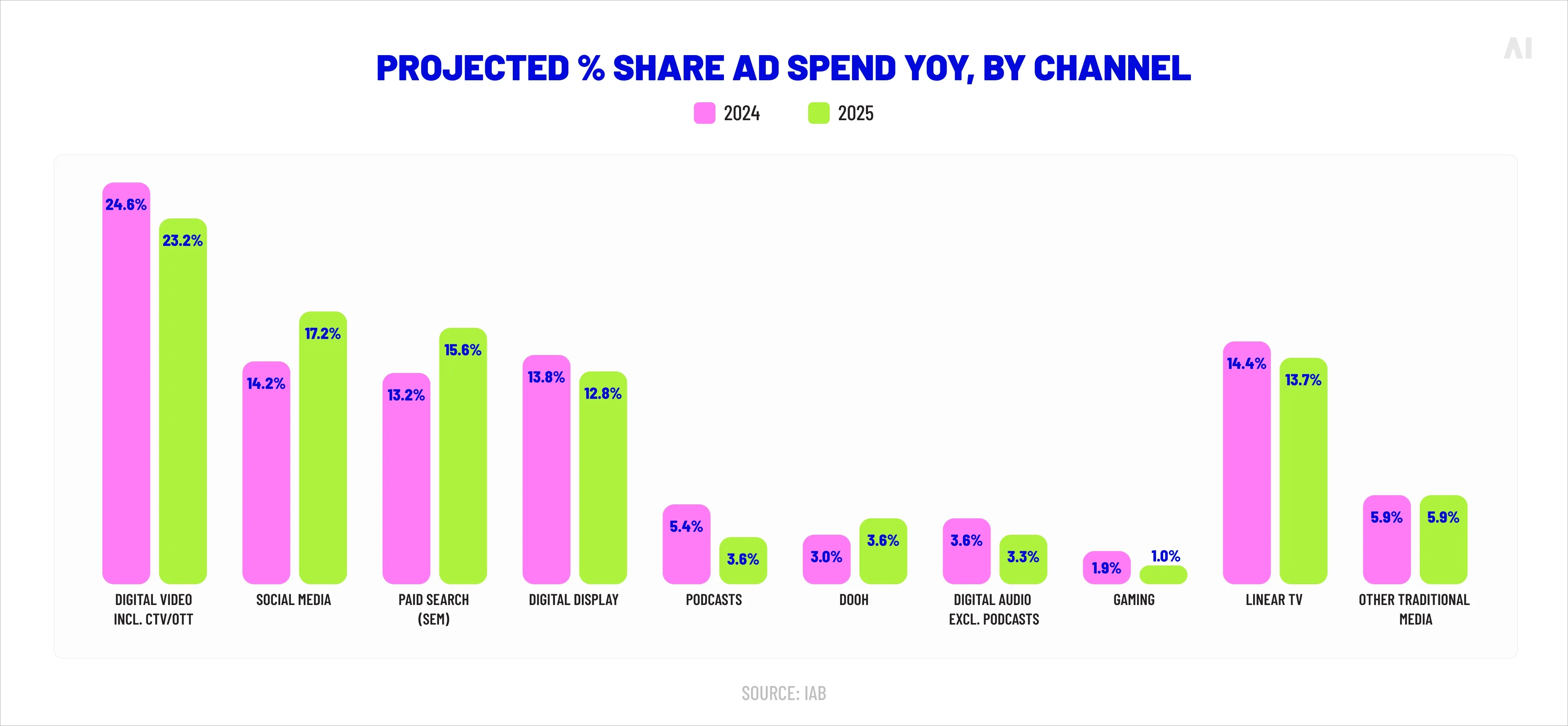
This shift matters because retail media is becoming a larger part of the advertising market. WARC Media forecasts global retail media ad spend to reach $196.7 billion in 2026, accounting for around 16% of total global ad spend. As retail media networks grow, retailers need more valuable inventory beyond sponsored search and onsite display. In-store digital signage gives them a way to extend media opportunities into physical stores, where shoppers are already close to purchase.
Physical stores are high-intent environments. Screens can reinforce offers, support brand campaigns, and connect store activity with digital media performance. But this requires more than adding more screens. It requires the right mix of technology, first-party data, campaign workflows, content strategy, governance, and reporting.
This guide explains how to plan, integrate, measure, and scale digital signage inside a retail media network, turning store screens into a performance-driven channel for media revenue and business growth.
What digital signage in retail is and why it matters
Digital signage in retail refers to the use of screens inside stores to display dynamic content.
This content can include:
- Product promotions
- Brand ads
- Wayfinding messages
- Loyalty offers
- Product information
- Seasonal campaigns
- Contextual messages based on time, location, or shopper behavior
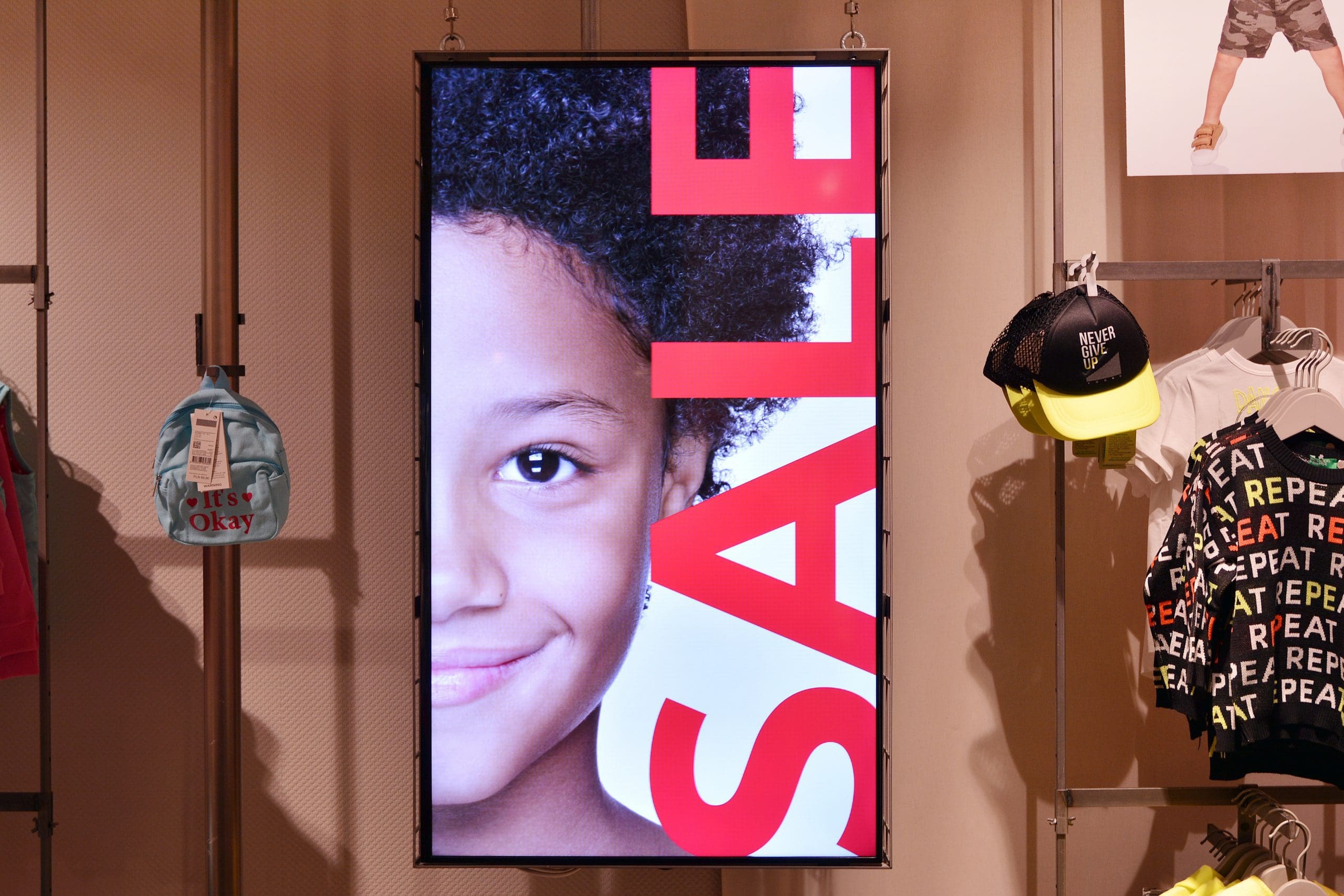
💡At a basic level, these screens help retailers communicate with customers inside the store. They can guide shoppers, highlight offers, support product discovery, and make the store environment feel more dynamic. But the real value of digital signage in retail stores appears when these screens are connected to a broader media and data ecosystem.
⚡️In the past, in-store screens were often managed as standalone communication tools. Today, they can become part of a connected retail media network. This means retailers can use them as media inventory that brands can buy, measure, and optimize.
When connected to campaign systems, first-party data, and reporting tools, digital signage can support:
- Revenue growth by creating new advertising inventory inside stores
- Shopper influence by showing relevant messages close to the point of purchase
- Omnichannel campaign execution by connecting in-store screens with online media
- Better measurement by linking campaign exposure with store-level or product-level sales data
- Improved customer experience by showing useful, timely, and relevant content
⚡️This is why digital signage is becoming more important for retail media leaders. It extends the value of digital display advertising into physical stores, where shoppers are already browsing products and making decisions.
Deloitte’s 2025 U.S. retail outlook reported that 47% of surveyed shoppers said digital screens positively impact their in-store grocery shopping experience. This supports the idea that screens are not just operational tools. They can improve the shopping experience, capture attention, and influence decisions when the content is relevant and well placed.
⚡️For advertisers, this creates a valuable opportunity. While many brands use top display ad networks to reach audiences online, in-store digital signage gives them access to shoppers inside the buying environment. That makes it especially useful for product launches, seasonal campaigns, category promotions, and last-mile purchase influence.
Turn store screens into revenue
Retailers can monetize in-store screens by selling advertising space to brands as part of their retail media offering.
Instead of using screens only for internal store messages, retailers can package them as:
- Sponsored product placements
- Category takeovers
- Seasonal campaign slots
- New product launch placements
- Checkout-area promotions
- Omnichannel retail media bundles
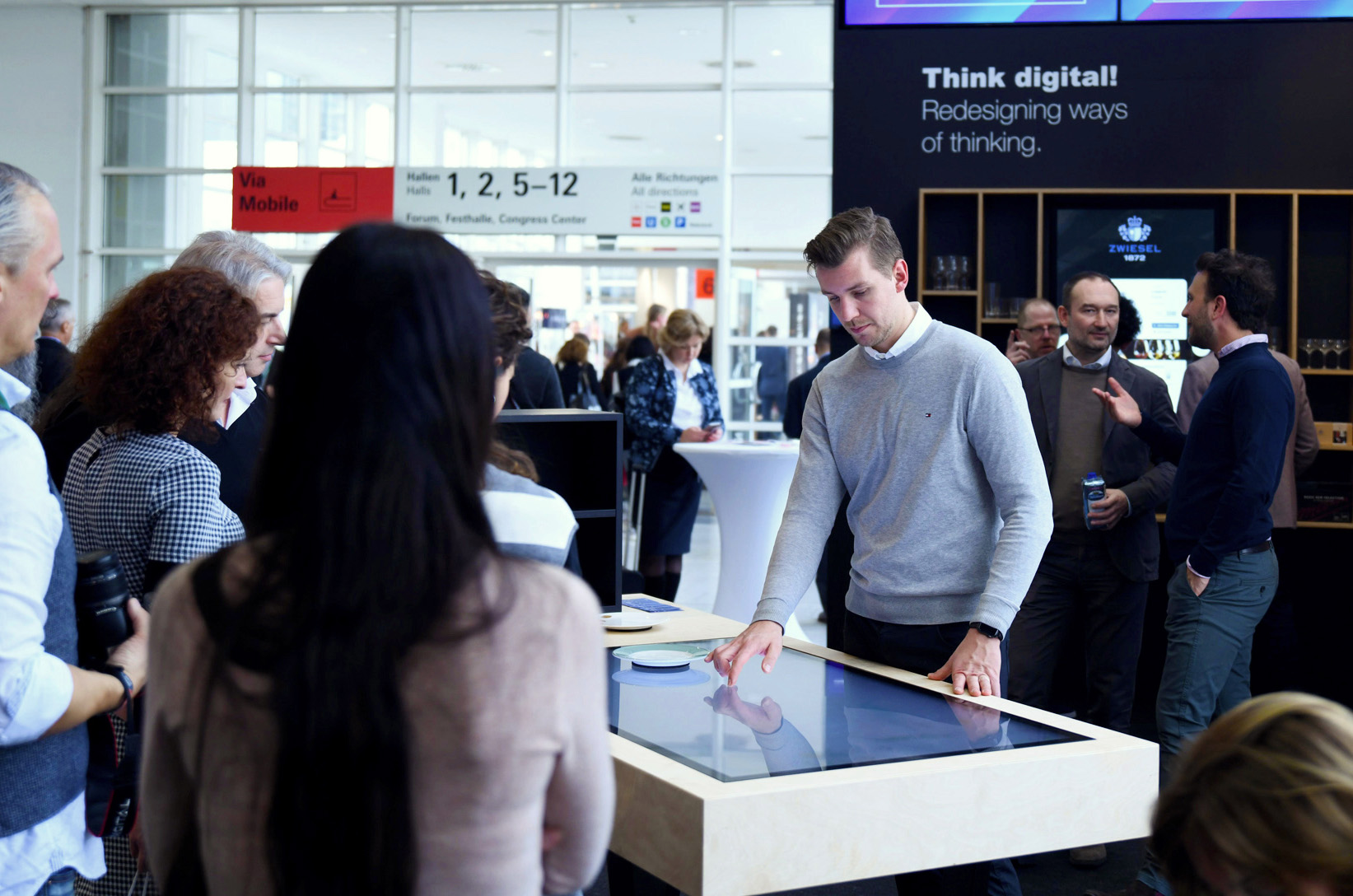
Waketo, a consulting and marketing firm, designed a digital touch table that allows customers to interactively customize products. Built using Intuiface, this setup combines the efficiency of e-commerce with the tactile benefits of in-store shopping, enabling users to adjust product configurations and make purchases directly from the display.
This creates a revenue opportunity from traffic the retailer already has. The store already attracts shoppers. Digital signage helps turn that existing attention into structured media inventory.
To make this work, retailers need to define:
- Where the screens are located
- Which screens have the highest media value
- What ad formats are available
- How campaigns are priced
- How content is approved
- How performance is reported to advertisers
The stronger the structure, the easier it becomes to sell in-store digital signage as a scalable media product.
Connect digital ads to in-store sales
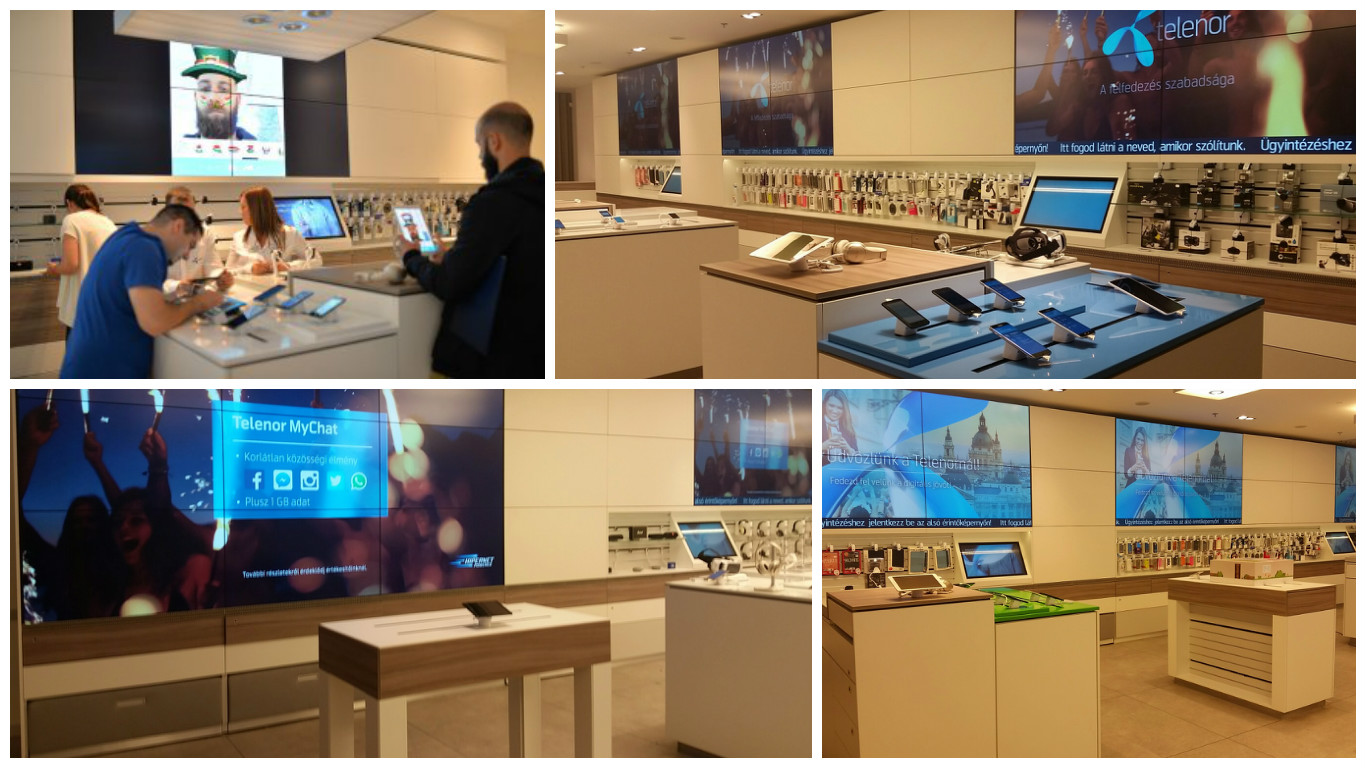
Telenor, a telecom provider, created in-store interactive kiosks using Intuiface to enhance product discovery and brand connection. Spread across over 33 stores, these kiosks offer a self-guided experience for customers to explore mobile products, check prices, and learn more about services independently.
Digital signage also helps connect online advertising with offline sales. A shopper may first see a product through an online ad, sponsored retail media placement, email campaign, or app offer. Later, the same product can appear on an in-store screen near the relevant aisle, shelf, or checkout area.
This creates a stronger connection between digital media and real-world purchase behavior.
For example:
- A brand runs an online campaign for a new snack product.
- The retailer shows the same product on aisle screens in selected stores.
- The campaign is matched with POS or loyalty data.
- The brand can see whether sales increased in stores where the signage campaign was active.
This helps close one of the biggest gaps in retail media: connecting digital targeting with actual store outcomes. When signage is integrated with campaign and sales data, it becomes easier to understand whether media activity influenced product sales, category lift, or basket value.
Use first-party data at the shelf
The strongest digital signage strategies use first-party data to make in-store messaging more relevant. Retailers can use loyalty, behavioral, transaction, and store-level data to decide what content should appear on specific screens.
This can include data such as:
- Purchase history
- Category performance
- Local store demand
- Loyalty program behavior
- Time of day
- Product availability
- Seasonal trends
- Regional preferences
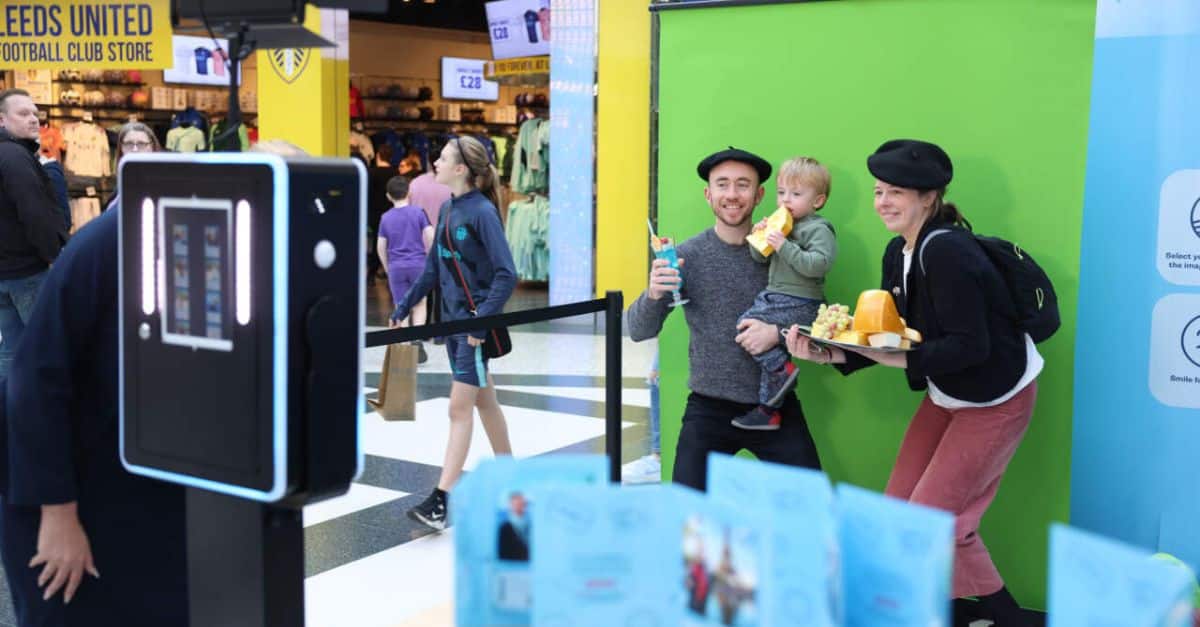
The TUI Group, a leader in travel and tourism, used Intuiface to completely revamp their in-store experience. By deploying large-format interactive displays and multi-touch tables, TUI enabled customers to explore vacation options and travel packages in an engaging, personalized way. This interactive setup fosters brand loyalty and encourages longer in-store engagement by creating a digital storytelling experience through immersive visuals and dynamic interfaces.
💡This does not mean every screen needs advanced one-to-one personalization. In many retail environments, contextual targeting is more practical and scalable.
For example:
- Breakfast products can be promoted in the morning.
- Family meal offers can appear before evening shopping peaks.
- Sunscreen or cold drinks can be promoted during hot weather.
- Holiday products can be shown near seasonal aisles.
- High-margin products can be promoted in relevant categories.
⚡️This is where digital signage connects with broader AI targeted advertising strategies. By using data to match the right message with the right context, retailers can make in-store screens more useful for shoppers and more valuable for advertisers.
How to integrate digital signage in your retail media network (RMN)
Integrating digital signage into a retail media network means turning store screens into planned, connected, and measurable media inventory. It is not only about installing more screens. It is about connecting strategy, store layout, campaign systems, data, content, and reporting so that in-store digital signage can support revenue growth and campaign performance.
⚡️For retailers, this is an important step in building a stronger retail digital marketing strategy. Physical stores already attract shoppers with strong purchase intent. When those environments are connected to retail media infrastructure, screens can become part of a wider omnichannel media offering.
A practical integration plan should answer four core questions:
- How will the signage generate revenue?
- Where should screens be placed for the highest media value?
- What technology is needed to manage campaigns at scale?
- How will data connect signage exposure with measurable outcomes?
The table below shows the main integration roadmap.
{{dsr-1}}
Step 1: Define the commercial model
The first step is to define how digital signage will generate revenue. Before choosing screen locations or technology, retailers need to understand the business model behind the channel.
This means deciding:
- Who will pay for the inventory: brands, suppliers, trade marketing teams, or internal retail teams
- How campaigns will be sold: standalone placements, category sponsorships, seasonal packages, or omnichannel bundles
- How pricing will work: fixed fees, CPM-based pricing, store-level packages, or premium zone pricing
- What advertisers will receive: screen exposure, campaign reporting, store-level insights, or sales impact analysis
This commercial model should guide every later decision. For example, if the goal is to sell premium placements to brands, then screen location, visibility, reporting, and campaign quality become critical. If the goal is to support internal promotions, the setup may be simpler.
A clear revenue model also helps retail media teams communicate the value of in-store digital signage to advertisers. Brands need to understand what they are buying, where their campaigns will appear, and how results will be measured.
Step 2: Map store zones to media value
Not every screen inside a store has the same value. A screen near the entrance plays a different role from a screen near the shelf, at checkout, or beside a product category. This is why retailers need to map store zones based on shopper intent, traffic, and commercial potential.
Common high-value zones include:
- Entrance areas: useful for awareness, seasonal campaigns, and brand storytelling
- Aisles: useful for category-level influence and product discovery
- Endcaps: useful for promotional campaigns and sponsored product visibility
- Checkout areas: useful for impulse offers, loyalty reminders, and last-minute promotions
- Service points: useful for utility content, cross-selling, or branded messaging
⚡️This approach is similar to the logic behind DOOH advertising, where placement, visibility, context, and audience movement shape media value. For retailers, the same principle applies inside the store. A screen becomes more valuable when it appears in the right location, at the right moment, with the right message.
For example, a beverage brand may receive more value from screens near chilled drinks than from a general entrance screen. A beauty brand may benefit from screens near cosmetics aisles, while a seasonal food campaign may perform better near endcaps or checkout. These examples show why screen placement should be planned around shopper behavior, not only store design.
⚡️Retailers can also use inspiration from DOOH advertising examples to think about context, motion, visibility, and creative simplicity. The strongest placements are not always the largest screens. They are the screens that appear where attention and purchase intent meet.
Step 3: Set up the core tech stack
After defining the commercial model and store zones, retailers need the right technology to manage digital signage as media inventory. Without a connected tech stack, in-store screens can become difficult to update, measure, and sell at scale.
A core digital signage tech stack usually includes:
- Screen hardware: displays placed in selected store zones
- Content management system: software for uploading, scheduling, and managing content
- Ad-serving capability: tools to deliver campaigns based on rules, locations, or audience segments
- Connectivity: reliable network access so screens can update in real time or near real time
- Inventory management: a way to organize screen availability, locations, formats, and campaign slots
- Monitoring tools: systems that track screen uptime, errors, and campaign delivery
- Reporting dashboards: tools that show campaign performance and delivery results
⚡️This is where tools like Smart Supply can support the structure of in-store media inventory. For retail media teams, inventory must be easy to understand, package, sell, and activate. Smart Supply helps organize supply so that screens can be managed as part of a broader media network rather than as disconnected store assets.
💡The goal is to make the system scalable. A retailer may start with a small group of stores, but the technology should be able to support more screens, more campaigns, more advertisers, and more reporting needs over time.
Step 4: Connect systems and enable data flow
Digital signage becomes more valuable when it is connected to data. Screens can display content without data, but they become much stronger media assets when retailers can connect signage activity with shopper behavior, campaign performance, and sales outcomes.
Important data sources include:
- POS data: to understand sales before, during, and after campaigns
- Loyalty data: to identify customer segments and purchase patterns
- Campaign data: to track which messages appeared, where, and when
- Inventory data: to avoid promoting unavailable or low-stock products
- Store-level data: to compare performance across locations
- Audience or behavioral data: to support better contextual targeting
This data flow supports both targeting and measurement. For example, a retailer can use transaction data to identify stores with strong demand for a product category. Then, it can activate relevant screen campaigns in those stores and compare sales results against stores where the campaign did not run.
💡The challenge is that many retailers work with fragmented systems. POS platforms, loyalty databases, media platforms, and content management tools may not be designed to work together. This can make campaign activation and reporting slow or incomplete.
⚡️For retailers dealing with fragmented platforms, this is where a more open and connected operating model becomes important. The Open Garden Framework helps retail media teams think beyond closed systems and build a more flexible structure for campaign activation, data flow, and measurement.
⚡️Readers who want to understand how fragmented advertising systems can be connected more effectively can explore The Open Garden Framework: A New Operating Model for Programmatic Advertising for a deeper look at how open, interoperable frameworks support cross-channel media execution.
When these systems are connected, in-store digital signage becomes easier to activate, optimize, and measure. Retailers can move from simple content display to a more advanced model where screens support targeting, campaign reporting, and revenue growth.
Step 5: Build a content and campaign strategy
Once the commercial model, store zones, technology, and data flow are defined, retailers need a clear content and campaign strategy. Digital signage works best when content is planned around the in-store environment, not simply reused from online ads.
A strong content mix can include:
- Brand ads for awareness and product launches
- Retail promotions for discounts, bundles, and seasonal offers
- Utility content such as wayfinding, product information, or loyalty reminders
- Contextual messages based on store location, time of day, or shopper behavior
In-store messaging should be short, visual, and easy to understand within seconds. Shoppers are usually moving, comparing products, or preparing to buy, so complex creative can reduce impact. The goal is to show the right message in the right store zone, with enough clarity to influence action.
Step 6: Launch and manage campaigns
After the strategy is in place, campaigns need to be activated, distributed, and monitored across screens. This is where centralized campaign management becomes important. Without a central system, teams may struggle with inconsistent content, slow updates, and limited visibility into what is running in each store.
⚡️Platforms like Elevate help retail media teams manage campaign execution across channels and locations. For digital signage, this can support:
- Campaign scheduling
- Creative distribution
- Store or zone-level targeting
- Content approval workflows
- Performance monitoring
- Campaign optimization
Centralized control helps retailers maintain consistency while still adapting campaigns to local store needs. It also gives advertisers more confidence that their campaigns are being delivered correctly.
Step 7: Pilot, measure, and optimize
Before scaling across the full store network, retailers should test digital signage in a limited number of locations. A pilot helps validate whether the commercial model, screen placement, content strategy, and measurement setup are working as expected.
Retailers can measure performance through:
- Screen uptime
- Campaign delivery
- Store traffic
- Sales lift
- Product or category performance
- ROAS
- Advertiser feedback
The purpose of a pilot is not only to prove success. It is also to find operational issues, creative gaps, and reporting limitations before the program becomes larger.
⚡️Readers interested in improving planning and performance forecasting can explore Retail Forecasting: A Guide to Smarter Planning, Media, and Growth, which explains how better forecasting supports smarter media, inventory, and growth decisions.
Step 8: Scale across stores with control
After the pilot proves value, retailers can scale digital signage across more locations. At this stage, control becomes essential. More screens, stores, campaigns, and advertisers can easily create inconsistency if the process is not standardized.
To scale effectively, retailers need:
- Standard content templates
- Clear campaign rules
- Store-zone guidelines
- Centralized reporting
- Local flexibility where needed
- Quality control and monitoring
The aim is to expand without losing campaign quality. With the right governance, retailers can keep messaging consistent, support local relevance, and turn in-store screens into a scalable retail media channel.
Content strategy for digital signage in retail
A strong content strategy is what turns digital signage from background noise into a useful retail media channel. Screens inside stores have only a few seconds to capture attention, so the message needs to be clear, visual, and relevant to the shopper’s location.
In-store digital signage should not simply reuse online ads. A shopper walking through an aisle or standing near checkout behaves differently from someone scrolling on a phone. The content needs to match the physical environment, the shopper’s intent, and the moment of decision.
⚡️This is why dynamic content personalization matters for retail media teams. It helps retailers adjust messaging based on context, such as store location, product category, time of day, or local demand.
According to Deloitte’s 2026 retail media outlook, retail media spending is projected to reach approximately $67 billion in the U.S. by 2026, reflecting the growing importance of retailer-owned advertising channels, including in-store media networks and digital signage. This shows that screens can improve the customer journey when they provide relevant and useful content, not just more advertising.
A balanced content strategy usually includes three layers:
{{dsr-2}}
⚡️Readers interested in building a broader content system across channels can explore Multichannel content marketing strategy: a complete guide, which explains how brands can keep messaging consistent across retail media, digital ads, owned channels, and in-store experiences.
The content mix that works in-store
The best digital signage strategies use a mix of commercial and useful content. If every screen only shows ads, shoppers may stop paying attention. If screens only show store information, retailers miss the media revenue opportunity.
A strong in-store content mix can include:
- Brand ads for awareness, launches, and sponsored visibility
- Retail promotions for discounts, bundles, and seasonal campaigns
- Product education for ingredients, use cases, comparisons, or benefits
- Utility messaging for directions, service information, or loyalty reminders
- Contextual offers based on time, location, weather, or category demand
This balance keeps screens valuable for both shoppers and advertisers. Shoppers get useful information. Brands get visibility in high-intent store environments. Retailers create a media product that supports both customer experience and campaign performance. Looking ahead, industry forecasts suggest continued growth in the channel, with the global digital signage market projected to reach approximately $29.6 billion in 2026, reflecting increasing retailer investment in in-store media and customer engagement technologies.
Context-aware messaging that matches shopper intent
Digital signage performs better when the message matches the shopper’s context. A screen at the entrance should not always show the same content as a screen beside a product category or near checkout.
Retailers can adjust content based on:
- Time of day: breakfast offers in the morning, meal solutions in the evening
- Store zone: awareness at the entrance, product detail near the shelf
- Shopper behavior: category interest, loyalty activity, or basket patterns
- Local demand: regional preferences, weather, events, or seasonal trends
- Product availability: promoting items that are in stock and ready to buy
For example, a beverage campaign may work best near chilled drinks during warm weather. A beauty campaign may perform better near cosmetics aisles, where shoppers are already comparing products. In a 2026 retail media case study, a national convenience retailer reported a 22% increase in promoted beverage sales when weather-triggered digital signage ads were displayed near refrigerated drink sections during periods of high temperatures. The more closely the content matches the shopping moment, the more useful the screen becomes.
Creative that drives action
Creative for in-store digital signage should be simple, fast, and easy to understand. Shoppers are usually moving, scanning shelves, or making quick decisions. Complex messages can be missed.
Effective signage creative usually follows these rules:
- Use one main message
- Keep copy short
- Make the product or offer easy to see
- Use strong visual contrast
- Add motion carefully
- Include a clear call to action
- Avoid small text
- Design for distance and movement
Simple creative often performs better than overloaded visuals because it is easier to process. A shopper should understand the message within a few seconds: what the product is, why it matters, and what action to take.
For example, Walmart Connect has used in-store digital screens to highlight seasonal products and limited-time promotions near relevant aisles, helping shoppers discover offers while they are already considering a purchase. A simple message such as a featured snack promotion displayed near the snack aisle is often more effective than a screen crowded with multiple products and competing calls to action.
The goal is not to make screens look busy. The goal is to make them useful, relevant, and easy to act on. When content is clear and context-aware, digital signage becomes a conversion tool inside the store, not just another display.
Measuring digital signage in retail: Attribution, performance, and ROI
Digital signage in retail becomes more valuable when retailers can prove its impact. Screens may create visibility in-store, but advertisers need more than visibility. They need to understand whether a campaign reached shoppers, influenced behavior, and contributed to sales.
This is why measurement is central to retail media growth. In-store digital signage should be tracked like a media channel, not just a store communication tool. Retailers need to connect screen exposure with data from stores, campaigns, POS systems, and loyalty programs.
This is especially important as in-store retail media grows. eMarketer forecasts that U.S. in-store retail media ad spend will reach $1.06 billion by 2028. As more advertisers invest in this channel, they will expect clearer proof of performance.
💡IAB and IAB Europe have also released industry standards for in-store retail media definitions and measurement, showing that the market is moving toward more structured reporting. For retail media teams, this means measurement needs to be built into the program from the start.
⚡️Readers who want a deeper understanding of how different touchpoints contribute to a sale can explore multi-touch attribution. This is useful for teams trying to connect in-store screens with digital ads, app activity, loyalty campaigns, and final purchase behavior.
⚡️For teams focused specifically on out-of-home and in-store formats, Retail Forecasting: A Guide to Smarter Planning, Media, and Growth offers useful context on how impressions, exposure, location, and outcomes can be measured across physical media environments.
KPIs that matter
The right KPIs help retailers show advertisers how digital signage supports real business results. Impressions matter, but they should not be the only metric. A strong measurement framework connects media delivery with shopper behavior and sales outcomes.
Key KPIs can include:
- Estimated impressions: how many shoppers may have been exposed to the screen
- Screen uptime: whether screens were active and delivering content correctly
- Campaign delivery: whether the right creative appeared in the right store or zone
- Sales lift: whether promoted products sold more during the campaign
- Category lift: whether the campaign improved performance across a product category
- ROAS: how much revenue was generated compared to media investment
- Basket value: whether exposed stores saw higher average transaction value
- Store-level performance: how results differed across locations
⚡️These KPIs help connect media activity with commercial outcomes. For a broader view of performance tracking, digital marketing KPI frameworks can help teams understand which metrics are useful for awareness, engagement, conversion, and revenue.
{{dsr-3}}
Linking exposure to sales
The main measurement challenge is connecting screen exposure with actual purchases. Unlike online ads, in-store screens do not always have direct click data. Retailers need to use store-level and transaction-level signals to understand performance.
Common methods include:
- POS data: comparing sales before, during, and after the campaign
- Loyalty data: connecting exposed customer groups with purchase behavior
- Test and control stores: comparing stores with signage campaigns against similar stores without them
- Time-window analysis: measuring sales changes during campaign periods
- SKU-level reporting: tracking the exact products promoted on screens
- Attribution models: estimating how signage contributed alongside other media touchpoints
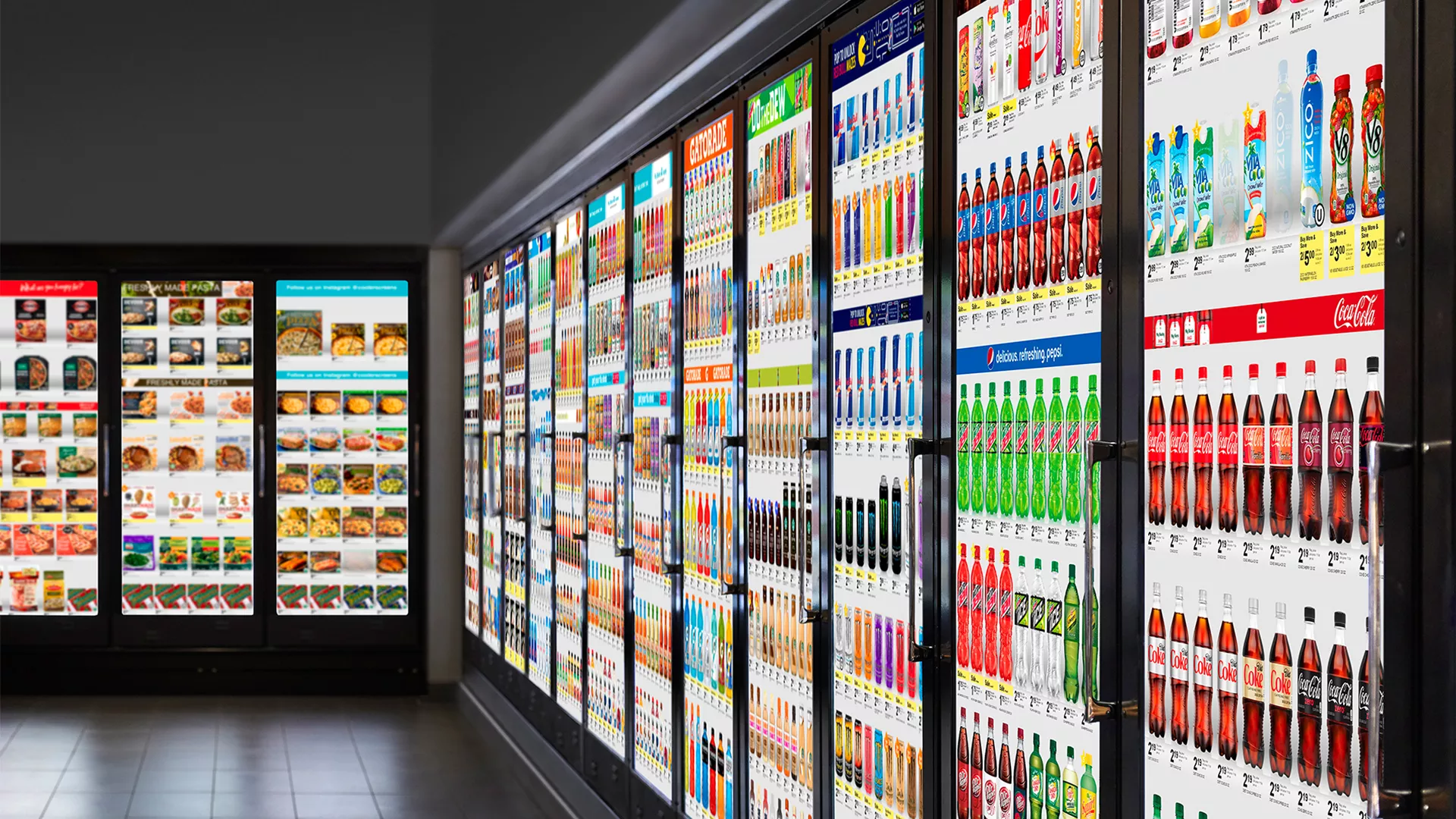
For example, a retailer may run a beverage campaign on screens near refrigerated aisles in 50 stores. It can then compare sales in those stores with similar locations where the campaign did not run. This helps advertisers understand whether the signage contributed to product sales or category growth.
The goal is not perfect measurement from day one. The goal is consistent, transparent reporting that helps advertisers make better decisions.
Unified reporting across channels
Digital signage should not be reported separately from the rest of the retail media program. Advertisers need a clear view of how in-store screens work with onsite ads, offsite media, app placements, email campaigns, loyalty offers, and other digital channels.
Unified reporting helps answer questions such as:
- Which channels supported the strongest sales lift?
- Did in-store signage improve the impact of digital campaigns?
- Which stores, zones, or product categories performed best?
- Which creative formats drove better outcomes?
- How did the campaign perform across the full shopper journey?
This kind of reporting helps retailers move from channel-by-channel measurement to a more complete performance view. It also makes digital signage easier to sell as part of a broader omnichannel retail media package.
When in-store and digital data are connected, retailers can show advertisers not only where a campaign appeared, but how it contributed to sales, shopper behavior, and revenue growth.
Challenges of in-store digital signage and how to solve them
Digital signage can create new media value, but it also introduces operational complexity. As retailers add more screens, locations, campaigns, and advertisers, small problems can quickly become larger issues.
The most common challenges are not only technical. They usually come from inconsistent execution, slow content workflows, disconnected systems, and weak governance. Solving these issues early helps retailers scale digital signage without reducing campaign quality.
Scaling breaks consistency across stores
As digital signage expands across multiple locations, consistency becomes harder to maintain. Different stores may use different screen formats, content schedules, campaign rules, or creative standards. This can weaken the advertiser experience and make campaigns harder to measure.
Common problems include:
- Different creative formats across stores
- Outdated promotions staying live too long
- Inconsistent campaign timing
- Limited visibility into what is running
- Store-level changes that do not match campaign rules
Retailers can solve this with centralized control, standardized templates, and clear campaign workflows. This does not mean every store needs to show the exact same content. It means every campaign should follow the same quality, approval, and reporting standards.
⚡️This is similar to the logic behind programmatic advertising, where automation, rules, and centralized control help media teams manage campaigns at scale. For in-store digital signage, the same principles can support consistency across screens and locations.
Content becomes a bottleneck
Digital signage needs regular content updates. Campaigns change, promotions expire, products go out of stock, and advertisers need new creative versions. Without a clear workflow, content production and approval can slow down the entire program.
This often happens when too many teams are involved without clear ownership. Marketing, retail media, store operations, brand partners, and creative teams may all need input, but no one controls the final process.
Retailers can reduce this bottleneck by using:
- Pre-approved creative templates
- Clear content ownership
- Standard approval timelines
- Campaign calendars
- Modular creative assets
- Automated resizing or formatting
- Rules for urgent updates
The goal is to make content flexible without making it chaotic. A structured workflow helps teams move faster while keeping campaigns accurate and brand-safe.
Disconnected systems limit performance
Digital signage becomes harder to measure when systems do not work together. POS data, loyalty data, campaign platforms, content systems, and screen networks often sit in separate environments. This makes it difficult to target campaigns, optimize content, or prove sales impact.
Disconnected systems can create problems such as:
- Limited campaign visibility
- Slow reporting
- Weak attribution
- Poor targeting
- Duplicate manual work
- Incomplete sales analysis
💡Retailers can solve this by defining which data flows matter most. They do not need to connect every system at once. A practical starting point is to connect campaign delivery data with POS and store-level sales data. This creates a basic measurement foundation.
⚡️Teams that want to understand this problem across more channels can explore What Is Cross-Platform Advertising? Strategy, Challenges, and Measurement. This reading is useful for marketers who need to connect fragmented media activity across retail, digital, in-store, and external platforms.
Lack of control reduces campaign quality
Without proper governance, digital signage can become inconsistent and difficult to manage. Poor control can lead to outdated content, incorrect offers, weak creative quality, or campaigns running in the wrong store zones.
This reduces advertiser trust. If brands are paying for in-store media, they need confidence that campaigns are delivered correctly and measured reliably.
Retailers can improve control through:
- Centralized campaign monitoring
- Screen uptime checks
- Approval workflows
- Brand safety rules
- Store-zone guidelines
- Creative quality standards
- Clear escalation processes
Good governance does not slow down campaign execution. It makes execution more reliable. When rules, roles, and reporting are clear, retailers can protect campaign quality while scaling digital signage across more stores.
How to combine digital signage with other marketing channels
Digital signage works best when it is connected to the wider marketing ecosystem. In-store screens should not operate separately from online ads, retail media placements, loyalty campaigns, apps, or email. They should reinforce the same customer journey across physical and digital touchpoints.
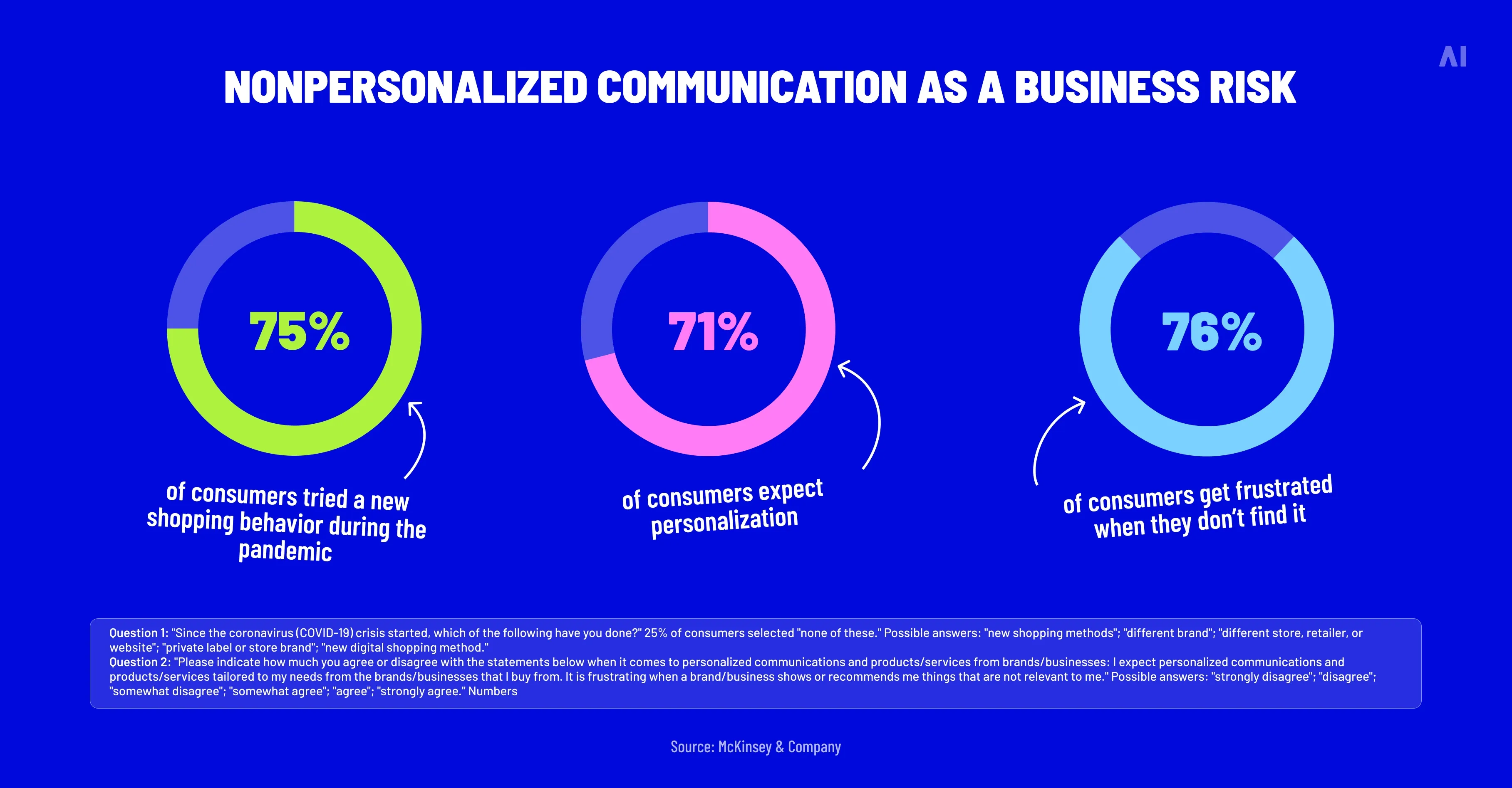
For retailers, this creates a more consistent customer experience. A shopper may first see a product in an online ad, receive a related loyalty offer, and then notice the same product on an in-store screen near the relevant aisle. When these moments are connected, the campaign feels more useful and easier to act on.
⚡️The goal is not to make the system overly complex. Retailers need a practical setup that combines personalization, shared data, and automation without creating too much manual work. AI-driven personalization can help teams understand how data and automation can make messages more relevant across channels while still keeping execution scalable.
⚡️For teams building a broader planning foundation, Creating a Data-Driven Marketing Strategy is useful because it explains how data can guide campaign decisions, audience targeting, channel selection, and performance measurement across the full marketing mix.
Align in-store and digital campaigns
In-store digital signage should support the same campaign strategy used across digital channels. This means the message, timing, offer, and creative direction should be consistent across online ads, retail media placements, app campaigns, email, and store screens.
For example:
- A brand promotes a new product through onsite retail media.
- The same product appears in an app or loyalty offer.
- In-store screens highlight the product near the relevant category.
- Sales data is used to understand whether the campaign influenced purchases.
This alignment improves both performance and customer experience. Shoppers receive a consistent message instead of disconnected promotions. Advertisers also get a stronger campaign structure because in-store screens reinforce digital exposure close to the point of purchase.
Use shared data across channels
Shared data helps retailers connect digital and in-store marketing more effectively. First-party data, audience segments, product performance, and campaign signals can all support better targeting and reporting.
Useful data can include:
- Loyalty program activity
- Purchase history
- Product category interest
- Store-level sales trends
- Campaign engagement
- Local demand
- Product availability
💡When this data is shared across channels, retailers can make better decisions about which message to show, where to show it, and when it should appear. For example, a product performing well online can be promoted on in-store screens in selected locations. A loyalty audience interested in a category can receive a digital offer while related signage supports the same campaign in-store.
⚡️Readers interested in reducing reporting gaps across platforms can explore Alternatives to Walled Garden Reporting: Building Independent Cross-Channel Visibility. This is especially useful for teams that need a clearer view of performance across retail media, digital ads, in-store channels, and external platforms.
Balance personalization and simplicity
Personalization can improve relevance, but it should not make digital signage too difficult to manage. In-store environments are fast-moving, and not every screen needs advanced audience-level targeting.
In many cases, simple contextual messaging works better. A broad but relevant offer shown in the right store zone can be more effective than a highly complex campaign that is difficult to activate or measure.
Retailers should use personalization when it adds clear value, such as:
- Showing category-specific content near relevant aisles
- Adjusting messages by time of day
- Promoting products based on local demand
- Supporting loyalty campaigns with relevant in-store reminders
- Updating content based on stock availability or seasonal trends
⚡️For a deeper look at how personalization works across advertising environments, ad personalization explains how data can improve message relevance while still requiring clear rules, privacy awareness, and practical execution.
Automate where it matters
Automation can help retailers manage digital signage across many screens, stores, and campaigns without relying on manual updates. This is especially important when in-store signage is part of a larger retail media network.
Automation can support:
- Campaign scheduling
- Creative rotation
- Store or zone-level targeting
- Content updates
- Screen monitoring
- Performance reporting
- Campaign optimization
💡The key is to automate repetitive tasks while keeping strategic control. Retailers still need clear approval rules, brand safety standards, and measurement logic. Automation should make campaign delivery faster and more consistent, not less transparent.
⚡️This also helps retailers avoid some of the limitations associated with closed media environments. Walled gardens can make it harder to compare performance across channels, so retail media teams need systems that support visibility, control, and cross-channel reporting.
When digital signage is connected with other marketing channels, it becomes more than an in-store screen network. It becomes part of a coordinated media strategy that supports awareness, engagement, purchase decisions, and measurable growth.
Key takeaways for retail media leaders
Digital signage in retail becomes more valuable when it is treated as part of the retail media business, not just part of store operations. Screens can still support promotions, wayfinding, and shopper communication, but their real value appears when they are connected to campaign planning, data, content workflows, and measurement.
For retail media leaders, the priority is not simply to add more screens. The priority is to build a scalable system that turns in-store attention into measurable media value.
Key takeaways include:
- Treat digital signage as a revenue-generating media channel, not only a store communication tool.
- Start with a clear commercial model before investing in technology or expanding screen networks.
- Focus on high-impact store locations such as entrances, aisles, endcaps, and checkout areas.
- Connect signage with data and retail media platforms to support targeting, campaign delivery, and measurement.
- Use solutions like Smart Supply and Elevate to organize media inventory and manage campaign activation.
- Keep execution simple at the start, then scale with templates, governance, reporting, and clear workflows.
- Measure success through sales impact and media performance, not impressions alone.
- Start with a pilot, validate the results, and then expand across stores with more control.
⚡️Retailers that build this foundation can turn in-store screens into a stronger retail media asset. For teams ready to connect store media, data, and campaign execution, get in touch with AI Digital to explore how to build and scale a more measurable retail media network.